
Starting to wonder if my kit lens is holding me back...
Discussion


GetCarter said:
I've worked in recording studios for the past 25 years, and we wouldn't DREAM of getting an orchestra in, bunging up some mics and then mastering. If a piece is 5 minutes long it will generally take 10 minutes to record and then an hour of two to post process. We'll crop out any extraneous noises, sharpen the image using E.Q. and alter the curves to extract the best possible sound from the instruments. If we don't, we end up with a flat, lifeless image that nobody wants to hear.
Interesting comparison. Sadly, and this may just be me getting older, but the 'flat lifeless images nobody wants to hear' seems a perfect description of most of the rubbish broadcast on Radio 1.2slo said:
Interesting comparison. Sadly, and this may just be me getting older, but the 'flat lifeless images nobody wants to hear' seems a perfect description of most of the rubbish broadcast on Radio 1.
Ah well you need to turn the bass and treble up then 
(no doubt the sound engineer's equivalent of ketchup and brown sauce)


Assuming you want some crits on the above (forgive me if you don't)
I'll ignore any comments I may have on composition... and limit to post processing:
Take the first shot... nice capture of an exiting moment - yet much of the image is taken up with a drain cover. 10 seconds in PP and it's the car in the foreground. You took a decision what to point your camera at, you take a further decision later on what we should see in the frame.
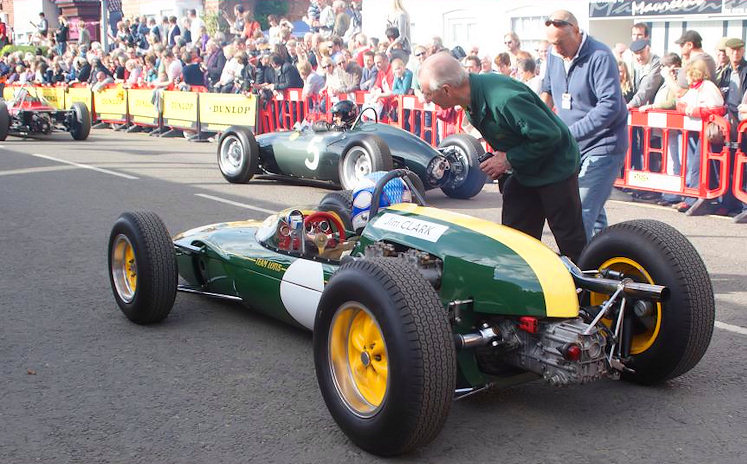
I'll ignore any comments I may have on composition... and limit to post processing:
Take the first shot... nice capture of an exiting moment - yet much of the image is taken up with a drain cover. 10 seconds in PP and it's the car in the foreground. You took a decision what to point your camera at, you take a further decision later on what we should see in the frame.
Uh-ha!
Like you saw a car, but the camera saw all the clutter.
(That's not meant to be quite as harsh as it reads, now I've read it back)
But yes, you can go a long way towards creating what your mind saw.
My approach - OMMV - would be to selectively darken, desaturate and de-clarity the backgrounds a little (bit like a squash, you add water to taste), maybe crop and clone a bit. I could easily see shots like that coming off of my memory card and no amount of expensive glass can magically turn a crowded event into a studio work.... So it's all about leading the eye of the viewer where you want.
Like you saw a car, but the camera saw all the clutter.
(That's not meant to be quite as harsh as it reads, now I've read it back)
But yes, you can go a long way towards creating what your mind saw.
My approach - OMMV - would be to selectively darken, desaturate and de-clarity the backgrounds a little (bit like a squash, you add water to taste), maybe crop and clone a bit. I could easily see shots like that coming off of my memory card and no amount of expensive glass can magically turn a crowded event into a studio work.... So it's all about leading the eye of the viewer where you want.
I tend to go for the shoot wide and crop approach mostly - if you get it a bit too wide and have to crop then it's fine, if you go the other way you can't get back stuff outside of the frame.
I think all those photos posted above would look much better with a little levels/curves attention if nothing else. I don't consider that photo manipulation as you're just correcting what the sensor picked up. A camera doesn't pick up what you see to start with - colour balance and exposure do not much the human visual system and different people ave slightly different visual acuity anyway.
I think all those photos posted above would look much better with a little levels/curves attention if nothing else. I don't consider that photo manipulation as you're just correcting what the sensor picked up. A camera doesn't pick up what you see to start with - colour balance and exposure do not much the human visual system and different people ave slightly different visual acuity anyway.
Think of it this way; JPGs are prints, RAW is your film/negs. All you are choosing is whether to process yourself or let someone else do it.
Photoshop and image manipulation afterwards are a different matter, but there is no more to be ashamed of in using lightroom than using a darkroom.
Photoshop and image manipulation afterwards are a different matter, but there is no more to be ashamed of in using lightroom than using a darkroom.
Ok. This is good, so the lens isn't holding be back, but my old fart mood about picture editing.
What should I be using for editing? I have a (very) old copy of photoshop installed on the desktop, but frankly it is so complicated I have never bother to work out how to use it.
What would people recommend?
What should I be using for editing? I have a (very) old copy of photoshop installed on the desktop, but frankly it is so complicated I have never bother to work out how to use it.
What would people recommend?
Megaflow said:
What should I be using for editing? I have a (very) old copy of photoshop installed on the desktop, but frankly it is so complicated I have never bother to work out how to use it.
Use it then... Don't think of it as 'complicated', just overwhelming in terms of all the tools and options available, many of which you'll probably never need to touch...There's loads of tutorials (including video ones) all over the internet - start by Googling for Cropping, Sharpening, Levels and Curves Photoshop tutorials - they're the absolute essentials in my book, anything else depends on how far you want to take photo-editing and what you consider 'cheating'!
http://phong.com/tutorials/ has some good stuff (and some great images!).
Loads of info on youtube etc but really, start at the top in the develop module and work your way down. I always check and adjust temp and hue first using the eyedropper tool dragged across onto a neutral dark in the RAW image. Make sure your clipping warnings are on and get the histogram looking right, then proceed down the page.
Lightroom's a good choice
I tend to start with the exposure and white balance then jump around if I know what I'm looking for. Starting at the top and working down is a good way to start.
There are many tutorials that cover the tools on youtube that should give you a good grounding. It is worth learning the other features as you don't realise what it can do untill you learn them.
I usually just shoot raw and export the images I want, I did try raw + jpeg but that just resulted in having twice as many files as necessary cluttering up the browser. Raw files do take up more space so they take longer to write to the memory card potentially reducing how many shots you can take in quick sucsession.
If you have no need to edit to perfection, (family snaps etc..) then jpeg only would be fine but there may just be that one you'll want to have the full file for.
I have done a couple of photoshoots for friends, when we'd finished they wanted to copy all the shots off my memory card to put straight on facebook. Shooting in raw only gave me a good excuse to say no. I was able to get home, edit any shots I wanted, delete the bad, and hand over a collection of photographs I was happy being shown off as my work
I view the Straight Out of Camera images as being either a work in progress, or a technical review of equipment/technique.
When I started getting into photography I did post a couple 'Straight out of camera' shots. This was mainly to get an image up quickly for a forum, but I suppose there was also a bit of egotism in there, as in; 'look how good I am without editing.'
Now I'd much rather do a quick edit and post a better image.
I tend to start with the exposure and white balance then jump around if I know what I'm looking for. Starting at the top and working down is a good way to start.
There are many tutorials that cover the tools on youtube that should give you a good grounding. It is worth learning the other features as you don't realise what it can do untill you learn them.
I usually just shoot raw and export the images I want, I did try raw + jpeg but that just resulted in having twice as many files as necessary cluttering up the browser. Raw files do take up more space so they take longer to write to the memory card potentially reducing how many shots you can take in quick sucsession.
If you have no need to edit to perfection, (family snaps etc..) then jpeg only would be fine but there may just be that one you'll want to have the full file for.
I have done a couple of photoshoots for friends, when we'd finished they wanted to copy all the shots off my memory card to put straight on facebook. Shooting in raw only gave me a good excuse to say no. I was able to get home, edit any shots I wanted, delete the bad, and hand over a collection of photographs I was happy being shown off as my work
I view the Straight Out of Camera images as being either a work in progress, or a technical review of equipment/technique.
When I started getting into photography I did post a couple 'Straight out of camera' shots. This was mainly to get an image up quickly for a forum, but I suppose there was also a bit of egotism in there, as in; 'look how good I am without editing.'
Now I'd much rather do a quick edit and post a better image.
Alternative approaches - slightly.
Most editors these days have some pre-sets for 'styles' or whatever they have chosen to call them.
The pre-sets, at their basic level, just apply various adjustments in various of the tools available.
To get a starter for 10 with your images use the pre-sets and when you find something that you sort of like you will be able to see what has been changed. Then play with the settings some more to discover what else changes and in what way it changes. Likely to gain better understanding faster that way.
Thereafter, if you still have a niggling doubt about playing around with RAW files (or jpgs for that matter) find out what adjustments are available to you for the in-camera jpgs. There are usually a few, sometimes quite a lot. You may find some combination that would be quite OK for the majority of the things you wish to photograph on a "fitness for purpose" basis. Save the longer processing work for the rest. (The downside to that is that you get less editing experience ... but that might not be a concern for you.)
I will admit that I don't do either of those things but, were I diving into digital today, I probably would if someone told me about it. At least to start with.
Most editors these days have some pre-sets for 'styles' or whatever they have chosen to call them.
The pre-sets, at their basic level, just apply various adjustments in various of the tools available.
To get a starter for 10 with your images use the pre-sets and when you find something that you sort of like you will be able to see what has been changed. Then play with the settings some more to discover what else changes and in what way it changes. Likely to gain better understanding faster that way.
Thereafter, if you still have a niggling doubt about playing around with RAW files (or jpgs for that matter) find out what adjustments are available to you for the in-camera jpgs. There are usually a few, sometimes quite a lot. You may find some combination that would be quite OK for the majority of the things you wish to photograph on a "fitness for purpose" basis. Save the longer processing work for the rest. (The downside to that is that you get less editing experience ... but that might not be a concern for you.)
I will admit that I don't do either of those things but, were I diving into digital today, I probably would if someone told me about it. At least to start with.


Megaflow said:
So, I have got myself a copy of Lightroom, and taken a test shot in RAW & JPG.

What would be the first elements to look at in Lightroom, say the top 3 or 4?
Adobe have lots of really good tutorial videos on their website.What would be the first elements to look at in Lightroom, say the top 3 or 4?
Have a look here:
http://tv.adobe.com/show/learn-lightroom-4/
Gassing Station | Photography & Video | Top of Page | What's New | My Stuff