
How do I post Flickr photos from an iPad?
Author
Discussion

neilski

Original Poster:

2,563 posts

259 months

Saturday 16th January 2016
quotequote all
As above, I'm using the Flickr app on an iPad and when I choose "share" it gives me the option to copy the URL but it doesn't end in .jpg so when I try to post an image on here using the [img] tags it won't work. What option should I be choosing because looking at them all, none are obvious?

Thanks.

neilski

Original Poster:

2,563 posts

259 months

Saturday 16th January 2016
quotequote all
I've found how to post from Safari using a convoluted method of copying & pasting a huge url. Is that the only way or will the app do it in less steps?

Beggarall

589 posts

265 months

Saturday 16th January 2016
quotequote all
The best way I have found is to open the picture (presume it is in Photos") then when you click on it you get a box with an upward pointing arrow and Flickr is among the various options to upload to. I would ignore the Flickr app.

neilski

Original Poster:

2,563 posts

259 months

Saturday 16th January 2016
quotequote all
Thanks but I don't want to post from iPad photos to Flickr I want to share my already uploaded Flickr photos to PH using the Flickr app. Am I right in thinking I have to use the Flickr website in Safari to copy the huge url then paste it into PH and there's no way of doing this straight from the app?

GravelBen

16,358 posts

254 months

Sunday 17th January 2016
quotequote all
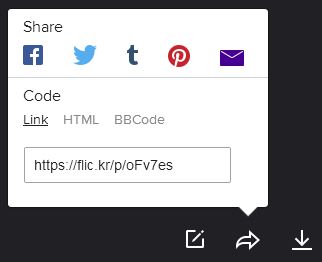
Does it have a 'BBcode' option as well as a URL option when you hit 'share'? The way it does when sharing from a photo on the flickr website. You don't need to put the [img] tags around it as they're included in the share formatting.

From the flickr website you just hit the share arrow to bring up this box, then hit 'BBCode', copy whats in the box and paste into your PH post.


Edited by GravelBen on Sunday 17th January 06:23

neilski

Original Poster:

2,563 posts

259 months

Sunday 17th January 2016
quotequote all
There's no option for BBCode within the app, just copy URL. Website it is then. Oh well....

Craikeybaby

11,830 posts

249 months

Monday 18th January 2016
quotequote all
Yes, you have to use the website. You aren't the only one to be annoyed by it.

Zerotonine

1,171 posts

198 months

Tuesday 19th January 2016
quotequote all
I tried the app once. Binned it pretty quick and now use the laptop for uploading to Flickr, and the website on the iPad for sharing. The app is appalling.

Morbid

179 posts

193 months

Friday 22nd January 2016
quotequote all
Get the FlickStackr Explore app - this allows you to grab the BB code (I use this on iPhone, assume the app is available for iPad too).

Edited by Morbid on Friday 22 January 17:12

Craikeybaby

11,830 posts

249 months

Friday 22nd January 2016
quotequote all
Thanks, I'll try that.