
Mac Mini/Studio for Lightroom/Photoshop
Discussion


I recently acquired a Mac Mini M1. It's not high-spec, 8GB RAM only but I put Lightroom and Photoshop on it to play with and am currently editing a set of images I shot last weekend at a sports event. It's fine, other than doing any AI-powered functions, currently it's crawling through applying a basic denoise setting to 80 photos.
I do have a Windows PC with a fast GPU which I am sure is much quicker but I'd like to switch fully to Mac so am wondering, is it the lack of a GPU that is causing the poor performance here or lack of RAM? Am wondering whether a later/better spec Mac Mini would improve things, or if I'd need to go for a Studio.
I do have a Windows PC with a fast GPU which I am sure is much quicker but I'd like to switch fully to Mac so am wondering, is it the lack of a GPU that is causing the poor performance here or lack of RAM? Am wondering whether a later/better spec Mac Mini would improve things, or if I'd need to go for a Studio.
I would say this but Mac is always the way to go (I use both Mac and PC, so am not a fanboy), but you'll need absolute minimum 16 ram, and 32 for it to run smoothly. M4 chip and min 1TB HD and you'll fly.
Matters not that much what box it comes in.
For my photography I use a very fast MacPro laptop, and connect it to an external monitor. Also connects permanently to an external Sandisk to store all the raw files, rather than fill up the HD.
Matters not that much what box it comes in.
For my photography I use a very fast MacPro laptop, and connect it to an external monitor. Also connects permanently to an external Sandisk to store all the raw files, rather than fill up the HD.
I was looking into this. A you tube video compared a top end Mac Studio with a top end PC at the same price (over $4000) and the PC basically was significantly faster and wiped the floor with the Mac for some operations. Sure the Mac was far more compact, much quieter and consumed only a fraction of the power - but if bang per buck in video editing is your criterion, the PC easily wins. PCs are much easier to upgrade when the next generation of graphics cards come along. I can certainly see the appeal of something as discrete as the Mac but...
I can only offer a Windows PC perspective on Lightroom classic but fwiw:
Ancient Intel i5-9500T (no GPU)
- 8GB: uncomfortable
- 16GB: good balance
- 32GB: comfortable overkill, about 15-18GB free most of the time, suspect windows cache expanded rather than Lightroom using it
Denoise times
- No GPU: 2-3 minutes per image
- Nvidia 8GB 4060 running externally using a 1x PCI-E motherboard connector: 15 seconds per image
After upgrading to an AMD Ryzen 7 255 mini PC with a built in 780M GPU, I've actually found it performs comparably to the Nvidia 4060 when denoising using pureRaw so I've not needed to turn on the Nvidia at all. If I turn off the GPU acceleration, we're back to minutes per image for denoise.
I would expect the Mac to benefit in a similar way.
tl;dr more RAM always helpful but GPU will very likely be the bottleneck for denoise. Also helps for offload when exporting.
Ancient Intel i5-9500T (no GPU)
- 8GB: uncomfortable
- 16GB: good balance
- 32GB: comfortable overkill, about 15-18GB free most of the time, suspect windows cache expanded rather than Lightroom using it
Denoise times
- No GPU: 2-3 minutes per image
- Nvidia 8GB 4060 running externally using a 1x PCI-E motherboard connector: 15 seconds per image
After upgrading to an AMD Ryzen 7 255 mini PC with a built in 780M GPU, I've actually found it performs comparably to the Nvidia 4060 when denoising using pureRaw so I've not needed to turn on the Nvidia at all. If I turn off the GPU acceleration, we're back to minutes per image for denoise.
I would expect the Mac to benefit in a similar way.
tl;dr more RAM always helpful but GPU will very likely be the bottleneck for denoise. Also helps for offload when exporting.
Dont forget, modern mac's with Apple chips - the Ram is shared between the processor and the GPU. So you do need a good chunk of it, as its also your graphics memory. I have a 16gb mac mini M2, and have occasionally run out, just doing some basic video editing.
Before investing in something, might be worth installing an app like "istat menus". - that'll give you stats for memory, CPU, RAM usage, GPU usage. etc - so you can see what your bottleneck actually is.
Ive known people who've upgraded and been disappointed..... then i find out they are working off an old slow 2.5" hard drive, for example!
But i wouldn't be surprised if 8gb is holding you back a bit - Apple really shouldn't offer any computer with just 8gb of ram these days!
Also, Apple quirk ive noticed - a previous gen max chip, will usually out perform a current gen pro chip., when it comes to video / graphics / photo work. So its not always worth getting the latest say m5 pro chip, if for the same price or less you can find a simialr spec m4 max. the max will end up being better, in my view
Before investing in something, might be worth installing an app like "istat menus". - that'll give you stats for memory, CPU, RAM usage, GPU usage. etc - so you can see what your bottleneck actually is.
Ive known people who've upgraded and been disappointed..... then i find out they are working off an old slow 2.5" hard drive, for example!
But i wouldn't be surprised if 8gb is holding you back a bit - Apple really shouldn't offer any computer with just 8gb of ram these days!
Also, Apple quirk ive noticed - a previous gen max chip, will usually out perform a current gen pro chip., when it comes to video / graphics / photo work. So its not always worth getting the latest say m5 pro chip, if for the same price or less you can find a simialr spec m4 max. the max will end up being better, in my view
Edited by Fordo on Wednesday 4th March 11:01
tog said:
Well I knew a low spec MBA M2 with 8GB ram wasn't going to fly through them, but I do most of my editing at home on the Studio. If your high spec M4 does it in 10 sec then 20 secs for an older M1 Max seems fair. What res files are you working on?
Varies... Sony7R so 36mb mb... down to Canon GX5 and DJI Drone (smaller!). Seems to make no difference. Always says 10 secs and finishes WAY before that.Thanks all, really useful.
I'm only doing stills, no video so just Lightroom and Photoshop. The PC I'm comparing it to is an 12th generation Intel i5, 32GB DDR5 and a nVidia 4070 Super GPU so it's absoutely not a fair fight Other than the AI noise reduction the Mac Mini seems to do OK, despite "only" 8GB of RAM.
I've just installed System Monitor Panel to see what the machine is doing as it's running some denoise just now and it seems to be hammering the GPU. CPU usage is about 20%, RAM about 80% so it looks like a better GPU will probably help.
I'm only doing stills, no video so just Lightroom and Photoshop. The PC I'm comparing it to is an 12th generation Intel i5, 32GB DDR5 and a nVidia 4070 Super GPU so it's absoutely not a fair fight
Other than the AI noise reduction the Mac Mini seems to do OK, despite "only" 8GB of RAM.I've just installed System Monitor Panel to see what the machine is doing as it's running some denoise just now and it seems to be hammering the GPU. CPU usage is about 20%, RAM about 80% so it looks like a better GPU will probably help.

I think this is where some of the capabilities of third party software like PureRaw really come into their own. I can have it running batch denoise / processing on a large queue of images on a separate machine to generate the DNG files whilst I'm working on editing the images I've already imported on the main machine.
What I'd really, really, really like to see is some sort of "render farm" capability in lightroom where I can do the same thing and offload final file export work to a dedicated machine rather than have it tie up my main editing machine. There are ways and means around it with shared catalogs etc but it's a bit of a faff. I see some people have been asking for this for over a decade though.
So far I've gone as far as set my main launch shortcut for lightroom classic to only use three quarters of the cpu cores in the editing machine so that I may at least listen to youtube without stuttering in the background!
What I'd really, really, really like to see is some sort of "render farm" capability in lightroom where I can do the same thing and offload final file export work to a dedicated machine rather than have it tie up my main editing machine. There are ways and means around it with shared catalogs etc but it's a bit of a faff. I see some people have been asking for this for over a decade though.
So far I've gone as far as set my main launch shortcut for lightroom classic to only use three quarters of the cpu cores in the editing machine so that I may at least listen to youtube without stuttering in the background!
StevieBee said:
My feeling is that the capability of software is advancing a rate greater than the capacity of hardware needed to run it.
I'm running a very high spec Mac Studio for pro level image and video work. Even that struggles at times, particularly with processing like denoising.
What model/spec is your Mac, please?I'm running a very high spec Mac Studio for pro level image and video work. Even that struggles at times, particularly with processing like denoising.
8bit said:
StevieBee said:
My feeling is that the capability of software is advancing a rate greater than the capacity of hardware needed to run it.
I'm running a very high spec Mac Studio for pro level image and video work. Even that struggles at times, particularly with processing like denoising.
What model/spec is your Mac, please?I'm running a very high spec Mac Studio for pro level image and video work. Even that struggles at times, particularly with processing like denoising.
M2 Ultra Chip
128GB Memory
Only thing I keep on the actual Mac is the software. All work libraries and content run from external SSD drives.
95% of the time it runs as sweet as anything and have zero issues. It's really only when I get into complex or awkward image processing that it starts to become a little sluggish. I'm generally working with large size RAW images and 4K (and sometimes 6K) LOG video.
Processing via a cloud based platform is the better option but you're then into subscriptions and credit purchases which bugs me a little.
StevieBee said:
My feeling is that the capability of software is advancing a rate greater than the capacity of hardware needed to run it.
I'm running a very high spec Mac Studio for pro level image and video work. Even that struggles at times, particularly with processing like denoising.
Largely true, but there are software ways around it. You can certainly do things in Davinci resolve which result in sticky editing - even in very high powered processors. Can't say about Adobe but Resolve has a number of (software) facilities to cure the problem - using proxies (which can be created automatically in the background), running the editing timeline at a lower frame rate, using optimised clips, using a "smart" cache and embedding rendered footage in the timeline.I'm running a very high spec Mac Studio for pro level image and video work. Even that struggles at times, particularly with processing like denoising.
Well I took the plunge and this arrived yesterday:
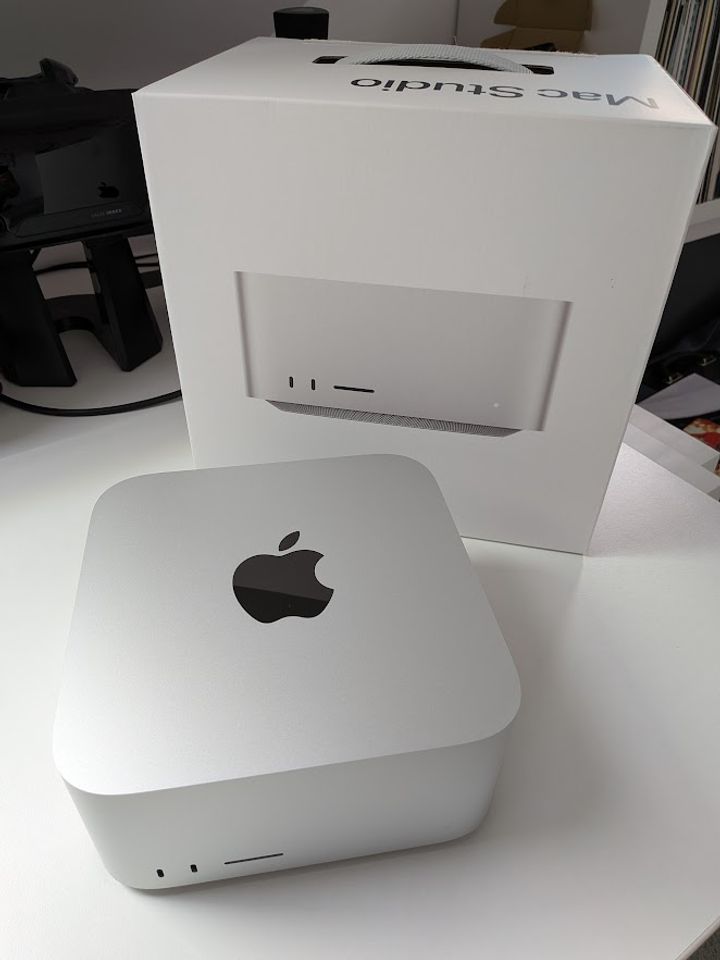
M2 Max, 32GB RAM and 512GB SSD. So far I've only done the transfer from the old Mini but I did a quick test with Lightroom applying AI denoise to an image and it chomped through that many times quicker than the Mini did.
One thing I would like is a better picture viewer than the MacOS Preview app. On Windows I like double-clicking an image in a folder and then being able to scroll between other photos in the same folder with the cursor keys, Preview can't do that. Any recommendations for that?
Also keen to hear of any handy tools/apps or tweaks people think are worth knowing?
M2 Max, 32GB RAM and 512GB SSD. So far I've only done the transfer from the old Mini but I did a quick test with Lightroom applying AI denoise to an image and it chomped through that many times quicker than the Mini did.
One thing I would like is a better picture viewer than the MacOS Preview app. On Windows I like double-clicking an image in a folder and then being able to scroll between other photos in the same folder with the cursor keys, Preview can't do that. Any recommendations for that?
Also keen to hear of any handy tools/apps or tweaks people think are worth knowing?
Message Board | Photography & Video | Top of Page | What's New | My Stuff