
Wireless tv transmitter
Discussion


Pvapour said:
Quick one, looking at reviews for wireless transmitters and this popped up ‘Iogear GW3DHDKIT’
is there anything better than this now? Review was quite old.. It’d be nice to have the option for multiple receivers if possible.
This stuff is all terrible low quality shyte is there anything better than this now? Review was quite old.. It’d be nice to have the option for multiple receivers if possible.

It is marketed at people who become desperate for a solution, having forgotten to fit cables!
Most of the time it will work just enough to stop your immediate refund request.
Essentially what you want is a wireless BALUN kit. These kits normally use CAT5/6 cable to carry the signal. Good wired ones from reputable companies cost a good bit more than the wireless one you mention.
I would suggest if anyone was making this, it would be well north of £500.
The simple answer to this, is don’t do it!
Run CAT6 cable and use conventional equipment that works and has a company standing behind it, with a UK supported warranty.
Amazon still sell Scart / RCA to HDMI cables. Even those have lots of good reviews, even though not a single one of them has ever worked.
Red 5 said:
Pvapour said:
Quick one, looking at reviews for wireless transmitters and this popped up ‘Iogear GW3DHDKIT’
is there anything better than this now? Review was quite old.. It’d be nice to have the option for multiple receivers if possible.
This stuff is all terrible low quality shyte is there anything better than this now? Review was quite old.. It’d be nice to have the option for multiple receivers if possible.
It is marketed at people who become desperate for a solution, having forgotten to fit cables!
Most of the time it will work just enough to stop your immediate refund request.
Essentially what you want is a wireless BALUN kit. These kits normally use CAT5/6 cable to carry the signal. Good wired ones from reputable companies cost a good bit more than the wireless one you mention.
I would suggest if anyone was making this, it would be well north of £500.
The simple answer to this, is don’t do it!
Run CAT6 cable and use conventional equipment that works and has a company standing behind it, with a UK supported warranty.
Amazon still sell Scart / RCA to HDMI cables. Even those have lots of good reviews, even though not a single one of them has ever worked.
Essentially its only getting a picture from the sky box in lounge to projector, not looked at back of sky box to see if it has ethernet, i’m guessing the new projector (not bought yet) will have a cat6 socket and communicate through It? New area for me so sorry if a bit wet!
Ether net on AV devices is for network connection, not video outputs.
A ‘BALUN’ arrangement, is a a pair of small boxes.
One at the Sky box end (usually) has a power supply to plug into the mains.
You take HDMI on a short cable from the Sky box, into the nearest box, then take CAT6 to the second box by the projector.
You then take another short HDMI into the projector.
This uses the only HDMI connector on the Sky box, so this may effect your plans?
There will also be some sort of sound system for the projector I take it?
If so, this has to be located correctly.
Some questions that might help.....
What type of system / systems are you adding?
Why is the Sly box in the wrong room for the projection system?
How far away are we talking, from Sky to projector?
What sort of projector do you plan to buy?
How many rooms are involved?
A ‘BALUN’ arrangement, is a a pair of small boxes.
One at the Sky box end (usually) has a power supply to plug into the mains.
You take HDMI on a short cable from the Sky box, into the nearest box, then take CAT6 to the second box by the projector.
You then take another short HDMI into the projector.
This uses the only HDMI connector on the Sky box, so this may effect your plans?
There will also be some sort of sound system for the projector I take it?
If so, this has to be located correctly.
Some questions that might help.....
What type of system / systems are you adding?
Why is the Sly box in the wrong room for the projection system?
How far away are we talking, from Sky to projector?
What sort of projector do you plan to buy?
How many rooms are involved?
Red 5 said:
Ether net on AV devices is for network connection, not video outputs.
A ‘BALUN’ arrangement, is a a pair of small boxes.
One at the Sky box end (usually) has a power supply to plug into the mains.
You take HDMI on a short cable from the Sky box, into the nearest box, then take CAT6 to the second box by the projector.
You then take another short HDMI into the projector.
This uses the only HDMI connector on the Sky box, so this may effect your plans?
There will also be some sort of sound system for the projector I take it?
If so, this has to be located correctly.
Some questions that might help.....
What type of system / systems are you adding?
Why is the Sly box in the wrong room for the projection system?
How far away are we talking, from Sky to projector?
What sort of projector do you plan to buy?
How many rooms are involved?
Got it, loosing the hdmi is a no go as it is by and feeds the lounge tv (answers your location query)A ‘BALUN’ arrangement, is a a pair of small boxes.
One at the Sky box end (usually) has a power supply to plug into the mains.
You take HDMI on a short cable from the Sky box, into the nearest box, then take CAT6 to the second box by the projector.
You then take another short HDMI into the projector.
This uses the only HDMI connector on the Sky box, so this may effect your plans?
There will also be some sort of sound system for the projector I take it?
If so, this has to be located correctly.
Some questions that might help.....
What type of system / systems are you adding?
Why is the Sly box in the wrong room for the projection system?
How far away are we talking, from Sky to projector?
What sort of projector do you plan to buy?
How many rooms are involved?
Its a very simple situation, just the 2 rooms that are concerned with the sky signal.
The aforementioned lounge which is where most sky watching will go on, then the cinema room where most watching will be through apple tv dl or thrown from devices.
Projector not chosen yet but it’ll only need 1 hdmi from apple tv and from what youve said probably 3 x rca for video.
As you can tell, i’m guessing 40ft of rca would solve the problem as the sky hd box has these spare (or even a scart can be converted to rca easily)
Only issue is 5.1 sound, can that be replicated from stereo rca now? If not then i could use the one from sky box and just send stereo to tv wall mounted speakers and forget about speakers behind the sofa etc.. answered my own question me thinks..
I think you need to ask for help locally, from a clever AV person.
We all have our specialist areas etc, so it’s fine that you’re not strong on this stuff.
Almost every sentence is opening up another can of worms! There should be no RCA involved at all and I think you should stop trying to work it all out.
I’m always keen to help, but no amount of typing here is gonna do the trick, as misunderstanding leads to incorrect assumptions and will end up as your wasted money!
I’m sure you can achieve all that you want to do, but each area might need a good bit of time to explain and specify correctly meeting all criteria inc budget.
Whatever you do, don’t ask the electrician!
Is there anyone local?
What rough area are you in please?
We all have our specialist areas etc, so it’s fine that you’re not strong on this stuff.
Almost every sentence is opening up another can of worms! There should be no RCA involved at all and I think you should stop trying to work it all out.
I’m always keen to help, but no amount of typing here is gonna do the trick, as misunderstanding leads to incorrect assumptions and will end up as your wasted money!
I’m sure you can achieve all that you want to do, but each area might need a good bit of time to explain and specify correctly meeting all criteria inc budget.
Whatever you do, don’t ask the electrician!
Is there anyone local?
What rough area are you in please?
Not a chance here for an expert 
Ive just run the rca cables that support video from the back of the sky box to another hd tv i have whilst it was running hdmi to our other tv and it works perfectly
I guess theyre not on the back for nothing, does that mean i’m an expert now
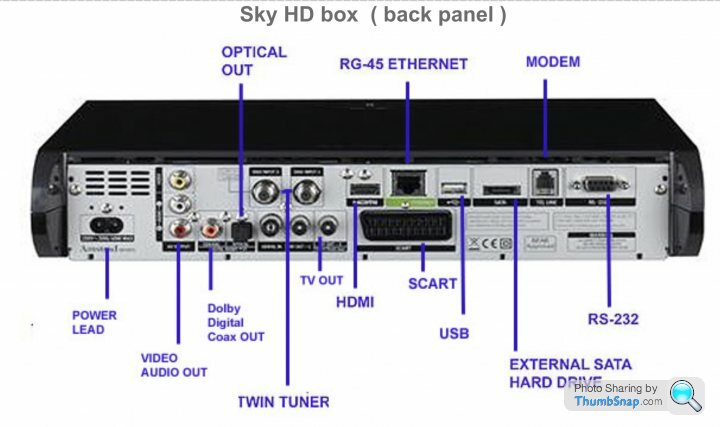
Thanks anyway, problem solved and 15m RCA video/audio cable now winging its way to me
Ive just run the rca cables that support video from the back of the sky box to another hd tv i have whilst it was running hdmi to our other tv and it works perfectly
I guess theyre not on the back for nothing, does that mean i’m an expert now
Thanks anyway, problem solved and 15m RCA video/audio cable now winging its way to me
If you’re going to accept SD, then you’d be better off converting the RGsB, as that will be massively better! I remember using them a lot about 20years ago. It’s very old tech, but still miles better.
The composite connector was mostly used for VHS and old CRT!
There’s no need to be using 2ch stereo for anything either, as you have multiple digital options available.
I’d still be wanting to use HDMI thought and stick to HD. I see no reason not to do this, especially as you can get the cables in still!
You can deal with control, any triggers and 5.1 audio at the same time.
The simplistic solution, to avoid expensive mistakes, would be to get SkyQ.
Can you see that being a possibility?
Lots of the cat 5/6 baluns have a local HDMI out as well, eg
https://www.ebay.co.uk/p/16007710016?iid=261372687... la-877514743599&abcId=1140496&merchantid=101727684&gclid=Cj0KCQjw3qzzBRDnARIsAECmryqHeJtpMRrz0YbC1FYl8iXFVC2yD9wWLzMaMiXNbU3HjTLEEP7ZzCkaAoJfEALw_wcB
No affiliation with the seller, I have installed a few of these and they good value.
You will still need to break the sound out of the skybox, so a soundbar or av amp with a sound synch function may be beneficial.
https://www.ebay.co.uk/p/16007710016?iid=261372687...
la-877514743599&abcId=1140496&merchantid=101727684&gclid=Cj0KCQjw3qzzBRDnARIsAECmryqHeJtpMRrz0YbC1FYl8iXFVC2yD9wWLzMaMiXNbU3HjTLEEP7ZzCkaAoJfEALw_wcBNo affiliation with the seller, I have installed a few of these and they good value.
You will still need to break the sound out of the skybox, so a soundbar or av amp with a sound synch function may be beneficial.
I had an electrician install a power socket in the ceiling for our projector, and an HDMI cable through the ceiling (for about £100) which runs to an HDMI switch, similar to this:
https://www.amazon.co.uk/Tendak-Switcher-Optical-T...
The HDMI switch has various devices (Sky Q, Amazon Firestick, Blue Ray, Media Centre) connected as well as an optical cable to a surround sound system. Whatever source you select is sent to the projector via a single HDMI cable.
You don't need to spend a fortune to do it properly.
https://www.amazon.co.uk/Tendak-Switcher-Optical-T...
The HDMI switch has various devices (Sky Q, Amazon Firestick, Blue Ray, Media Centre) connected as well as an optical cable to a surround sound system. Whatever source you select is sent to the projector via a single HDMI cable.
You don't need to spend a fortune to do it properly.
Pvapour said:
Not a chance here for an expert
Ive just run the rca cables that support video from the back of the sky box to another hd tv i have whilst it was running hdmi to our other tv and it works perfectly
I guess theyre not on the back for nothing, does that mean i’m an expert now
Thanks anyway, problem solved and 15m RCA video/audio cable now winging its way to me
The composite RCA connection (yellow) on the back of the Sky box is the lowest quality legacy video connection still left in use - putting that in to a projector with a huge image will look utterly sIve just run the rca cables that support video from the back of the sky box to another hd tv i have whilst it was running hdmi to our other tv and it works perfectly
I guess theyre not on the back for nothing, does that mean i’m an expert now
Thanks anyway, problem solved and 15m RCA video/audio cable now winging its way to me
 te and be a complete waste of money on the projector as you'll never get more than standard definition 576i from it. The easiest option would probably be to get another Sky box and run cables to that, and an AV receiver in the cinema room to take all the video inputs from Sky/Apple TV etc and distribute them to the projector.
 As others have recommended. Run in a CAT6 and use an HDMI extender kit. Labgear do a very good one which has a local HDMI passthrough for your TV, PoE for the receiver. I've used 100s of them. Also IR control so you can control the Sky box from the PJ.
https://www.amazon.co.uk/Labgear-HDX60P-HDMI-Exten...
I'd also recommend running in a second CAT6 as a spare, just in case.
https://www.amazon.co.uk/Labgear-HDX60P-HDMI-Exten...
I'd also recommend running in a second CAT6 as a spare, just in case.
Forums | Home Cinema & Hi-Fi | Top of Page | What's New | My Stuff