
Dartford charge account email
Discussion


I had an email yesterday purporting to be from Dart charge, looked genuine, had my account number etc stating as per a previous email that as they'd changed account providers, and i'd need to change my password upon logging in.
Now, of course I check before hand, and this https address had an odd r. configgered before the dartfordcrossing address began. (thanks Gmail) I did my usual and logged in via a saved address, and nothing, no asking for password change etc.
I have forwarded a copy to Dart charge asking them to review, but was curious if anyone else had received this, and if it was a verifiable Dart charge email.
TIA.
Now, of course I check before hand, and this https address had an odd r. configgered before the dartfordcrossing address began. (thanks Gmail) I did my usual and logged in via a saved address, and nothing, no asking for password change etc.
I have forwarded a copy to Dart charge asking them to review, but was curious if anyone else had received this, and if it was a verifiable Dart charge email.
TIA.
I also got the email and when I logged in (not via the link) it also did not ask to change password.
Also yes, it does appear the link/email is legit. If you do a lookup on the domain DNS records, the r denotes some kind of mail provider/tracker (sendinblue). The link is also still a subdomain of gov.uk.
I always do your approach though, go direct to the website if I am not expecting a mail.
Also yes, it does appear the link/email is legit. If you do a lookup on the domain DNS records, the r denotes some kind of mail provider/tracker (sendinblue). The link is also still a subdomain of gov.uk.
I always do your approach though, go direct to the website if I am not expecting a mail.
dutters said:
I also got the email and when I logged in (not via the link) it also did not ask to change password.
Also yes, it does appear the link/email is legit. If you do a lookup on the domain DNS records, the r denotes some kind of mail provider/tracker (sendinblue). The link is also still a subdomain of gov.uk.
I always do your approach though, go direct to the website if I am not expecting a mail.
Thank you, that does make some sense, i'll update here if they respond to my email request on the validity. Also yes, it does appear the link/email is legit. If you do a lookup on the domain DNS records, the r denotes some kind of mail provider/tracker (sendinblue). The link is also still a subdomain of gov.uk.
I always do your approach though, go direct to the website if I am not expecting a mail.
Well same as you I just went to the usual DartCharge page and logged into my account, no prompt to change my password.
It might indeed be a requirement if the new management firm are requiring more complex passwords as part of their system but I'd imagine it'll ask you to change it when you log in via the usual route at some point if it's needed.
It might indeed be a requirement if the new management firm are requiring more complex passwords as part of their system but I'd imagine it'll ask you to change it when you log in via the usual route at some point if it's needed.
Continue using your normal way of logging in until it requests a change.
Always assume any form of government/council/public services system is open to hacking and never click on any link in an unsolicited email from them, emails and links can be spoofed. Always use your normal forms on access.
Always assume any form of government/council/public services system is open to hacking and never click on any link in an unsolicited email from them, emails and links can be spoofed. Always use your normal forms on access.
C5_Steve said:
They are indeed changing who manages the charging as has been reported but I thought you only needed to re-validate your payment method? Not seen anything about needing to change passwords to log in.
This. I had advanced notification of the change and noted it in my e-calendar. A few days before my own calendar reminder, I had an e-mail from them reminding me of the need to verify my payment method, which I subsequently did. I don’t think I needed to change password.Grey_Area said:
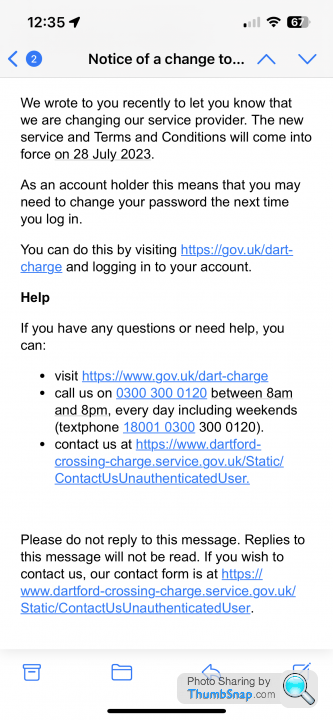
This is a screenshot of the email in question , the link address differs subtly from that which is shown, hence my apprehension
Riley Blue said:
Grey_Area said:
As far as I can see, someone has typed a full stop at the end of the sentences that end with a link. It's a common error, is easy to spot and simple to overcome - or am I missing something?If you had https://r. Then the address would be close to what Gmail shows as the real link, not the words typed out, that’s was my red flag, it’s been suggested above that this could well be a authentic link, and part of a sub address; but I don’t usually click links, and do try to see where they originated prior to anything else. Hence my initial comments
Forums | General Gassing | Top of Page | What's New | My Stuff