
pod display..instrument panel
Discussion


tuscandom said:
come on you lot,someone must know something ...!!!
need some good advice,cheers
The lights are separate to the LCD itself. When you open up the console there are a number of green LEDS around the display part of the pod. If the lights are flicking on and off, but the pod itself is still working it could be a dry joint somewhere on one of the circuit boards, or a dodgy cable either to the pod unit itself (there are a number of cables going into the four layers of PCB that make up the pod), or it could be a dodgy joint between the pods. Unfortunately, it could be a tricky one to diagnose. If you want to see how to take the pod apart and put it back together, see this thread:...!!!need some good advice,cheers
http://www.pistonheads.com/gassing/topic.asp?h=0&a...
and embedded somewhere in the thread is my photo walkthrough:
http://the-gopher.homeip.net:8080/Qmultimedia/cgi-...
Hope this helps!
edited: To say, you can pick up a replacement LCD PCB from Leven if you determine that that is the faulty part. I think it was about £120.
Edited by the-gofer on Monday 20th August 19:38
Edited by the-gofer on Wednesday 17th June 13:37


Guys,
I have just been through this exercise as I was getting intermittent missing lines, especially when cold and damp. I found that they came back after an hour or so driving - I assumed that there were some dry joints etc which came good once warm.
Anyway, got the display unit out and took all of the PCB's off but just couldn't wiggle the LCD PCB out from under the speedo motor - am I missing something? Didn't want to force it as I was only really having a little look-see. I checked all the connections for each board, cleaned up pins where necessary, re-heated a couple of suspect looking solder joints, sprayed a little with WD40 and put the whole thing back together again and back into the car.
Result is that the screen looks better with no more horizontal lines but now have some new lines, vertically! I think it is due to the WD40 and am hoping that it will dry itself out after a good run. If not, I will be getting the hair dryer out to try to push some warm air in there. If that fails then it is back to taking it all out again. Still reckon I will have the problem with the speedo motor though - has anyone had to take the motor off to get the last PCB out or is it just a case of forcing it out?
Cheers
Andy
I have just been through this exercise as I was getting intermittent missing lines, especially when cold and damp. I found that they came back after an hour or so driving - I assumed that there were some dry joints etc which came good once warm.
Anyway, got the display unit out and took all of the PCB's off but just couldn't wiggle the LCD PCB out from under the speedo motor - am I missing something? Didn't want to force it as I was only really having a little look-see. I checked all the connections for each board, cleaned up pins where necessary, re-heated a couple of suspect looking solder joints, sprayed a little with WD40 and put the whole thing back together again and back into the car.
Result is that the screen looks better with no more horizontal lines but now have some new lines, vertically! I think it is due to the WD40 and am hoping that it will dry itself out after a good run. If not, I will be getting the hair dryer out to try to push some warm air in there. If that fails then it is back to taking it all out again. Still reckon I will have the problem with the speedo motor though - has anyone had to take the motor off to get the last PCB out or is it just a case of forcing it out?
Cheers
Andy
andyoleary said:
Anyway, got the display unit out and took all of the PCB's off but just couldn't wiggle the LCD PCB out from under the speedo motor - am I missing something? Didn't want to force it as I was only really having a little look-see. I checked all the connections for each board, cleaned up pins where necessary, re-heated a couple of suspect looking solder joints, sprayed a little with WD40 and put the whole thing back together again and back into the car.
Still reckon I will have the problem with the speedo motor though - has anyone had to take the motor off to get the last PCB out or is it just a case of forcing it out?
This bothered me, but it DOES come out with some waggling and a little brute force, after all, i wasn't too bothered about damaging the old one.Still reckon I will have the problem with the speedo motor though - has anyone had to take the motor off to get the last PCB out or is it just a case of forcing it out?
I then found that the new one wouldn't fit in the hole. (it really is a tight fit!) Anyhow, i got a file and worked on the back edge of the new board. After filing off about 1mm she slipped in good and proper.
In both cases you have to work away from the speedo motor, its that edge you file down and put in first.
Hope this helps......

andyoleary said:
Ok......did you re-align the 6 metal "lugs" that come through the PCB from the display unit? Or does the whole assembly (PCB & display) come out as one piece?
Thanks
Andy
No, i just stripped it down section by section. Unscrew the little lugs and lift off the board. This reveals the next board and the next set of lugs.Thanks
Andy
When you pull the screen out, it comes in one peice with its own pcb mounted on its back. Its this that is a tight fit into the hole. I filed down the rear edge of the new pcb (the one under the speedo motor) until it fitted in snuggly. Had to take off about 1mm.
Sorted! Got a replacement screen/PCB assy this morning and (since learning how to do it yesterday) took it out, filed off the front edge of the PCB, opened the screw holes slightly (bit of a tight fit) and re-fitted the new one. Half hour later, all working fine, thank god!
Thanks all,
Andy
Got a replacement screen/PCB assy this morning and (since learning how to do it yesterday) took it out, filed off the front edge of the PCB, opened the screw holes slightly (bit of a tight fit) and re-fitted the new one. Half hour later, all working fine, thank god!Thanks all,
Andy
I had the same problem as tuscandom with the LCD backlight and today finally got around to investigating properly.
Previously, my backlight would work for a few weeks, then flicker & go. Applying some pressure to the circuit boards through where the indicator / windscreen levers are would usually bring it back.
The culprit seems to have been a poor solder joint on the LCD PCB (the one board in the dash TVR don't make themselves I believe!)
Pics before & after of the joint on the LCD PCB:
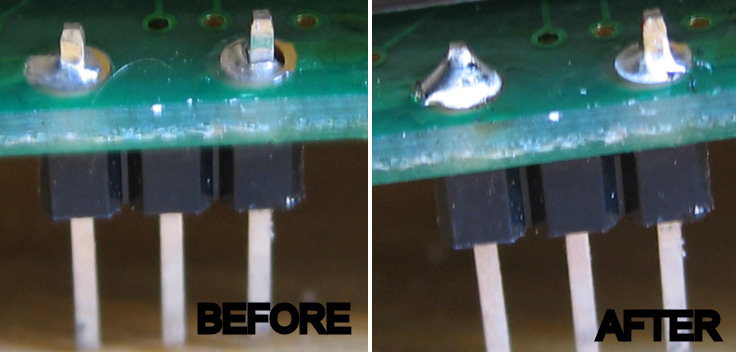
Looking at the pics which are blown up, I guess I didn't really need any more solder on the left hand joint and could have done with a touch more on the right hand joint which was obviously causing my problem. Maybe I should have looked at the photos before re-assembling!
Previously, my backlight would work for a few weeks, then flicker & go. Applying some pressure to the circuit boards through where the indicator / windscreen levers are would usually bring it back.
The culprit seems to have been a poor solder joint on the LCD PCB (the one board in the dash TVR don't make themselves I believe!)
Pics before & after of the joint on the LCD PCB:
Looking at the pics which are blown up, I guess I didn't really need any more solder on the left hand joint and could have done with a touch more on the right hand joint which was obviously causing my problem. Maybe I should have looked at the photos before re-assembling!
Message Board | Tuscan | Top of Page | What's New | My Stuff