
iMac 2024 and Nikon NX studio app...
Discussion


Hi
I am not a techie....so bare with me ....!
I have an iMac 2024 with an M4 chip running Tahoe 26.3
All seems fine ....except.....
I recently bought a very nice Nikon D70s SLR to get back into photography, after having abandoned 'a real camera' in favour of an iPhone (!)
Anyway, I thought the best software for editing the photos after I uploaded them was the Nikon NX Studio software, which I got directly from the Nikon website.
It seems it is not really suitable for my 20 year old camera which uses Compact Flash etc.
So....
I thought I could just un-install the Nikon NX studio software. I used CCleaner which usually does this sort of a job ( or has for me in the past anyway...!)
But...it seem that there is still software on the lower icon bar see photo at least and I cannot get rid of it.
It will not move from there when I attempt to drag it into the bin. As far as I know the software from Nikon did not have an uninstaller.
It is not a problem in itself, other than when I try to install the latest Apple Update, I cannot do it because Nikon NX is preventing it.
Presumably there is free software around that would enable me to completely remove any remnants of the NX software...?
Please note....I am not a techie....!!!
Any advice would be welcome .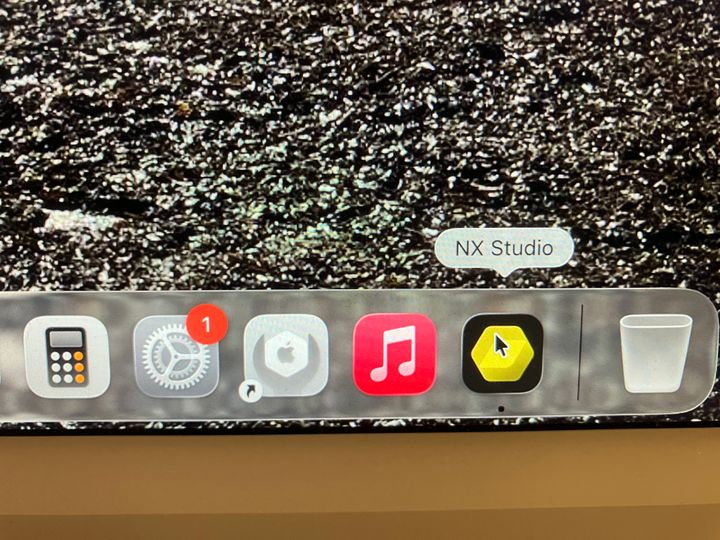
I am not a techie....so bare with me ....!
I have an iMac 2024 with an M4 chip running Tahoe 26.3
All seems fine ....except.....
I recently bought a very nice Nikon D70s SLR to get back into photography, after having abandoned 'a real camera' in favour of an iPhone (!)
Anyway, I thought the best software for editing the photos after I uploaded them was the Nikon NX Studio software, which I got directly from the Nikon website.
It seems it is not really suitable for my 20 year old camera which uses Compact Flash etc.
So....
I thought I could just un-install the Nikon NX studio software. I used CCleaner which usually does this sort of a job ( or has for me in the past anyway...!)
But...it seem that there is still software on the lower icon bar see photo at least and I cannot get rid of it.
It will not move from there when I attempt to drag it into the bin. As far as I know the software from Nikon did not have an uninstaller.
It is not a problem in itself, other than when I try to install the latest Apple Update, I cannot do it because Nikon NX is preventing it.
Presumably there is free software around that would enable me to completely remove any remnants of the NX software...?
Please note....I am not a techie....!!!
Any advice would be welcome .
Gassing Station | Computers, Gadgets & Stuff | Top of Page | What's New | My Stuff