
Poor broadband. How to fix?
Discussion


Virgin BB. 1gig package. This is what my speed test was tonight. You can see the huge drop in performance. Frankly, I’m sick of it.
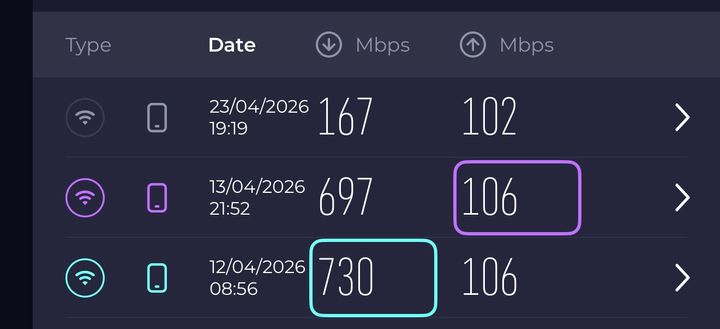
Router in living room, booster in hall and bedroom. Performance on the PS5 is embarrassing. I literally had better performance on an Xbox 360 20 years ago. No other option for fibre, stuck with Virgin.
How can I solve this? Internet/wifi isn’t my strong suit and I don’t understand how it works. What can I do?
Router in living room, booster in hall and bedroom. Performance on the PS5 is embarrassing. I literally had better performance on an Xbox 360 20 years ago. No other option for fibre, stuck with Virgin.
How can I solve this? Internet/wifi isn’t my strong suit and I don’t understand how it works. What can I do?
You could try https://www.samknows.com/realspeed/
It might be able to see the router .. it doesn't for me, only sees the device, but you might be lucky. It'll tell you anyway. Point is you need to establish where the issue starts.
It might be able to see the router .. it doesn't for me, only sees the device, but you might be lucky. It'll tell you anyway. Point is you need to establish where the issue starts.
bigandclever said:
You could try https://www.samknows.com/realspeed/
It might be able to see the router .. it doesn't for me, only sees the device, but you might be lucky. It'll tell you anyway. Point is you need to establish where the issue starts.
It might be able to see the router .. it doesn't for me, only sees the device, but you might be lucky. It'll tell you anyway. Point is you need to establish where the issue starts.
There you go then. It's not your broadband 
Is the PS5 wired (ethernet cable to the router) or wireless? If it's wired is the cable if the correct spec? If it's wireless, is it set to 5GHz (for speed) or 2.4GHz (for distance away from router)? You'd rather have wired regardless.
And so on.
Is the PS5 wired (ethernet cable to the router) or wireless? If it's wired is the cable if the correct spec? If it's wireless, is it set to 5GHz (for speed) or 2.4GHz (for distance away from router)? You'd rather have wired regardless.
And so on.
The issue appears to be the quality of your WiFi which I assume is what the boosters are that you mention. As a test, use the PS5 network performance tool on WiFi and do the same test plugged directly into your router. If the performance is higher and closer to the router results above then the issue is your WiFi.
Look at some good Deco WiFi units from Amazon. Test those and if it improves it you’re good to go. If not you should be able to send them back.
A good rule is to plug your most latency sensitive devices like your PS5 into one of the Decos or a hub connected to the Deco. You’ll find your speeds are better than it connecting to one over WiFi.
Look at some good Deco WiFi units from Amazon. Test those and if it improves it you’re good to go. If not you should be able to send them back.
A good rule is to plug your most latency sensitive devices like your PS5 into one of the Decos or a hub connected to the Deco. You’ll find your speeds are better than it connecting to one over WiFi.
bigandclever said:
You could try https://www.samknows.com/realspeed/
It might be able to see the router .. it doesn't for me, only sees the device, but you might be lucky. It'll tell you anyway. Point is you need to establish where the issue starts.
Thanks for that link! very useful to get that breakdown directly. It might be able to see the router .. it doesn't for me, only sees the device, but you might be lucky. It'll tell you anyway. Point is you need to establish where the issue starts.

I have a couple of long (30 metre) Ethernet cables and some end to end couplers so that if I need to test using a direct connection to the router I can temporarily stretch the cable around the house.
I can also use these cables to bypass the router and connect my computer directly to the fibre broadband ONT box which allows one connection which is usually the router but in an emergency can be my desktop PC.
When speed testing a service also consider that the other end such as the PlayStation Network won't necessarily be reserving all that bandwidth just for you and so you are unlikely to get full speed.
I can also use these cables to bypass the router and connect my computer directly to the fibre broadband ONT box which allows one connection which is usually the router but in an emergency can be my desktop PC.
When speed testing a service also consider that the other end such as the PlayStation Network won't necessarily be reserving all that bandwidth just for you and so you are unlikely to get full speed.
i get over a gig on WiFi, yet my PS5 downloads like it is on dial up, my apple TV 12 " away maxes out
i gave up in the end and put in a pair of gig powerline adapters, fixed the problem instantly
https://www.amazon.co.uk/TP-Link-TL-PA7027P-KIT-Pa...
i gave up in the end and put in a pair of gig powerline adapters, fixed the problem instantly
https://www.amazon.co.uk/TP-Link-TL-PA7027P-KIT-Pa...
WiFi is a two way thing so even if something that is the same distance away works perfectly it does not mean another thing will. It may receive the signal fine but be unable send a signal back. antenna design, which speed network it has connected to, whether the signal is blocked by something or interference from something could be the cause. There are so many things that can a a effect WiFi.
bigandclever said:
Ruskie said:
I literally had better performance on an Xbox 360 20 years ago.
Just for a laugh, that's vanishingly unlikely to be true The absolute fastest domestic UK broadband in 2006 was 24Mbps and most 'superfast' speeds were 8-10Mbps.
Bloat increases to (more than) match the speed available.
8Mb/s would have been plenty for video.
ARH said:
WiFi is a two way thing so even if something that is the same distance away works perfectly it does not mean another thing will. It may receive the signal fine but be unable send a signal back. antenna design, which speed network it has connected to, whether the signal is blocked by something or interference from something could be the cause. There are so many things that can a a effect WiFi.
cheap s t controller in the PS5 doesnt help, there are 100s of posts about problems with it
Gassing Station | Computers, Gadgets & Stuff | Top of Page | What's New | My Stuff