
Show me your 3 screen setup?
Discussion


Looks like I'm WFH for the foreseeable future and I'm struggling to come up with screen arrangement that works, so looking for suggestions/ideas please?
At the moment I'm using 3x 24" monitors, all of which run in different resolutions which really pisses me off. I was thinking about buying a matching pair of 24's running QHD (1440) but 1200 will work. FHD 1080 hurts my eyes!
Added to that I need a 3rd screen for various messaging apps such as Teams etc..
Currently running the mismatching pair of 24s in landscape with the other screen portrait for the messaging apps, but I'm not sure if that's the right way to do it and I should have it landscape above the pair.
Do I just buy an ultrawide and run a single monitor above it in landscape or at the side in portrait. The main screen "real estate" is either database or design on one side and then spreadsheet or outlook on the other and I just can't figure out what works.
Help gratefully received, ta.
At the moment I'm using 3x 24" monitors, all of which run in different resolutions which really pisses me off. I was thinking about buying a matching pair of 24's running QHD (1440) but 1200 will work. FHD 1080 hurts my eyes!
Added to that I need a 3rd screen for various messaging apps such as Teams etc..
Currently running the mismatching pair of 24s in landscape with the other screen portrait for the messaging apps, but I'm not sure if that's the right way to do it and I should have it landscape above the pair.
Do I just buy an ultrawide and run a single monitor above it in landscape or at the side in portrait. The main screen "real estate" is either database or design on one side and then spreadsheet or outlook on the other and I just can't figure out what works.
Help gratefully received, ta.
If you can, get a desk mount with 2 highly adjustable arms, and add a pair of 27" 4k screens. Most modern laptops will drive these comfortably.
You mention that some resolutions hurt your eyes - moving up to 27" helped me a lot, as I'm at that stage where I'm wearing varifocals. The extra screen size goes a long way.
After that, either a laptop screen works as your third screen, or you could add a 24" lower res screen off to one side as the third.
You didn't mention whether your computer is MS or Apple. If Apple, I'd make at least one display an Apple Studio 27" display - it's worth every £ considering the extra functionality.
You mention that some resolutions hurt your eyes - moving up to 27" helped me a lot, as I'm at that stage where I'm wearing varifocals. The extra screen size goes a long way.
After that, either a laptop screen works as your third screen, or you could add a 24" lower res screen off to one side as the third.
You didn't mention whether your computer is MS or Apple. If Apple, I'd make at least one display an Apple Studio 27" display - it's worth every £ considering the extra functionality.
I use a 49" doublewide
49 MSI MPG 491CQPX the X means 240Hz
It's an OLED, capable of split screen over 2 X HDMI on PBP (picture by picture) mode or over 1 DP for the full thing.
The only pain is you need to manually switch on PBP every time you need it, I have it set to down on the monitors selector as a shortcut now.
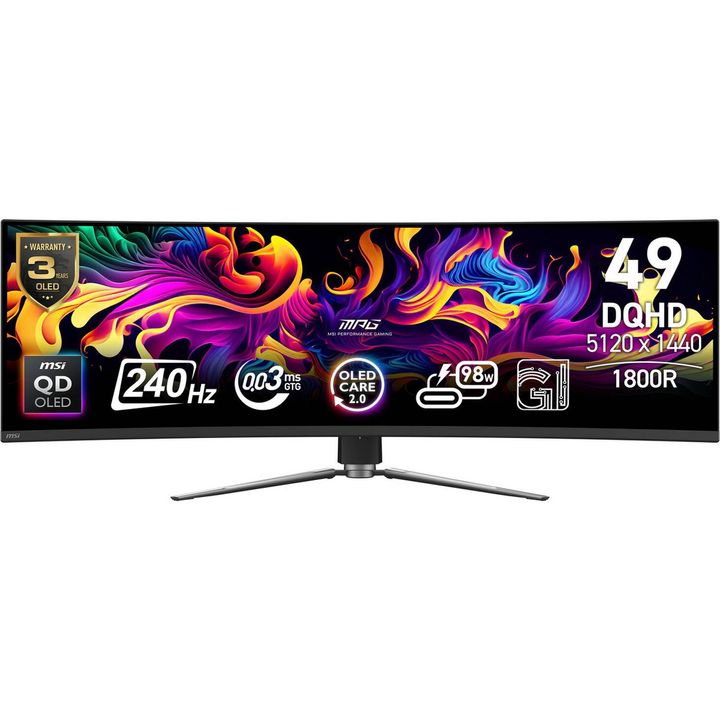
I used to run 2 X 27" monitors and it takes the same footprint.
49 MSI MPG 491CQPX the X means 240Hz
It's an OLED, capable of split screen over 2 X HDMI on PBP (picture by picture) mode or over 1 DP for the full thing.
The only pain is you need to manually switch on PBP every time you need it, I have it set to down on the monitors selector as a shortcut now.
I used to run 2 X 27" monitors and it takes the same footprint.
I'm using the Dell Ultrasharp 52" 6144x2560 and a 32" 3840x2160 either side.
32MP - driven with a Blackwell 2000 Pro desktop card (16GB) in a Dell compact workstation.
This is purely a Windows desktop running productivity apps and usually a number of Citrix/RDP sessions.
If working with less space I would ditch the extra screens and have a single ultra-wide over 2 or 3 separate smaller screens. The 52" is great and the 49's I've used have also been very good.
I also hate differing DPI scaling ratios so uniform pixel density / PPI is more important to me than matched resolutions.
32MP - driven with a Blackwell 2000 Pro desktop card (16GB) in a Dell compact workstation.
This is purely a Windows desktop running productivity apps and usually a number of Citrix/RDP sessions.
If working with less space I would ditch the extra screens and have a single ultra-wide over 2 or 3 separate smaller screens. The 52" is great and the 49's I've used have also been very good.
I also hate differing DPI scaling ratios so uniform pixel density / PPI is more important to me than matched resolutions.
Edited by theboss on Thursday 19th November 11:54
i have a 39" 5k2k tandem oled with a 24" IPS monitor above it and a burner ipad to the side i use for twitch/youtube and teams/meet as google and ms accounts aint getting near my main machine
https://www.lg.com/uk/monitors/gaming-monitor/39gx...
https://www.lg.com/uk/monitors/gaming-monitor/39gx...
Edited by Dave Hedgehog on Thursday 19th November 12:24
Quite a few in here:
Share your home working workstation environment....
https://www.pistonheads.com/gassing/topic.asp?h=0&...
Share your home working workstation environment....
https://www.pistonheads.com/gassing/topic.asp?h=0&...
Thanks for all the replies so far. Using a Windows PC, well laptop.

Good point about DPI, thank you.
theboss said:
I'm using the Dell Ultrasharp 52" 6144x2560 and a 32" 3840x2160 either side.
I also hate differing DPI scaling ratios so uniform pixel density / PPI is more important to me than matched resolutions.
Isn't that basically IMAX? I also hate differing DPI scaling ratios so uniform pixel density / PPI is more important to me than matched resolutions.
Edited by theboss on Thursday 19th November 11:54
Good point about DPI, thank you.
I too subscribe to the IMAX school of thought, and driven in part by the show us your workstation thread on here.
I m running one 50 inch landscape and two 32 inch in portrait either side of the panel.
Total overkill but it works for me.
That being said, the only work I do on them is basic admin work such as drafting documents, spreadsheets, emails etc so a lot of static screens opposed to moving images. In view of this, I opted to use much cheaper televisions (RCA) as the monitors, so the whole setup was less than £750 - less than the cost of a biggish wraparound single monitor.
I m running one 50 inch landscape and two 32 inch in portrait either side of the panel.
Total overkill but it works for me.
That being said, the only work I do on them is basic admin work such as drafting documents, spreadsheets, emails etc so a lot of static screens opposed to moving images. In view of this, I opted to use much cheaper televisions (RCA) as the monitors, so the whole setup was less than £750 - less than the cost of a biggish wraparound single monitor.
Edited by ADJimbo on Thursday 19th November 20:26
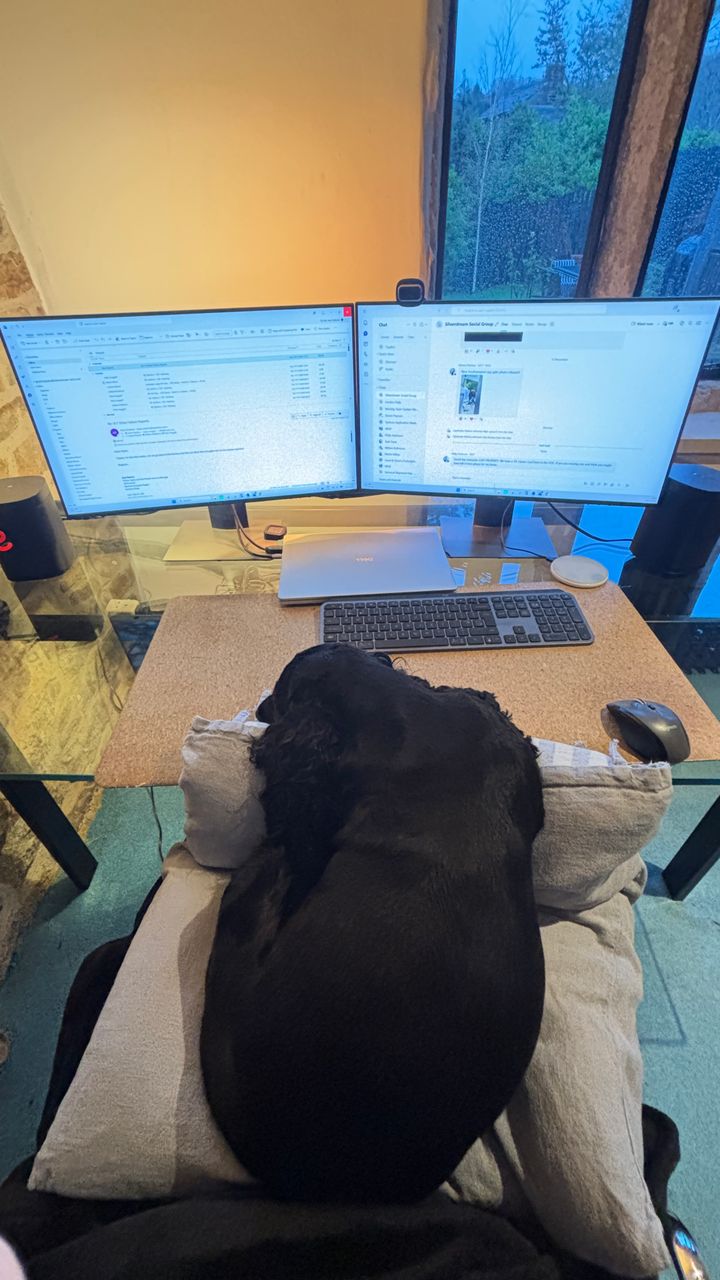
I run two 24’s at 1920 x 1080. I have a third but I prefer to work on two. I find the keyboard and mouse is too far out of alignment with the outer two of the three monitors when there are three in a row. Like driving a car looking out the side window.
I just keep an eye out for notifications from Outlook or Teams in the taskbar and work on two.
A nice warm cocker spaniel on your lap is highly recommended.
I just keep an eye out for notifications from Outlook or Teams in the taskbar and work on two.
A nice warm cocker spaniel on your lap is highly recommended.
I've used multiple screens for many years and couldn't imagine going back to a single monitor setup.
As long as the screens are roughly the same size and resolution, it's easy to configure them so the cursor moves seamlessly between displays, making the whole setup feel very natural.
As a varifocal wearer, the biggest improvement for me wasn't the monitors themselves, but having a dedicated pair of glasses made specifically for computer work.
Standard varifocals have to cover everything from long-distance vision down to reading distance. As a result, only a relatively narrow section of the lens is ideal for viewing a monitor. You constantly find yourself adjusting your head position to look through the correct part of the lens, which can become surprisingly tiring over the course of a day.
Computer-specific varifocals are optimised for intermediate viewing distances, so a much larger area of the lens is suitable for screen work. The result is far greater comfort, with less head movement and less strain when working for a long time at the PC.
They're not suitable for driving because long-distance vision isn't their purpose, but for anyone who spends hours in front of a screen, I'd recommend getting a set of dedicated spectacles.
Edited by rlg43p on Thursday 19th November 20:58
Gassing Station | Computers, Gadgets & Stuff | Top of Page | What's New | My Stuff