
1 PS4 to 2 TV's
Discussion


Not sure this is the right forum for this, but I suspect most of the PS4 users hang out here more then the computers/gadgets sub section.
Has anybody set up a PS4 to work simultaneously on 2 TV's? IE to duplicate the image on to 2 screens.
The reason behind this is, I want my son to be able to play the PS4 on his TV in his bedroom, which is the other side of the hallway from my TV room, where the PS4 is. I know the controllers will be fine as I have tested this. I want to avoid simply using a long HDMI cable and swap the cable at the PS4 over to which ever TV I want the output on, as well as not wanting to put holes on the wall to run cables through. I currently thinking powerline type adaptors, hdmi splitters, hdmi over cat5 sort of things.
Don't really want to continue down the route of moving the PS4 around every day or so, and don't just yet want to buy a 2nd PS4 either.
So has anybody tried/done this yet (even if it was to 2 TV's in the same room)? or has anbody tried this but with other HDMI devices? (Xbox, Sky, PVR) and if it can work to 2 TV's, is there any reason to stop you doing it to 3 or more? (assuming Bluetooth range on the controllers being the limit distance wise)
Has anybody set up a PS4 to work simultaneously on 2 TV's? IE to duplicate the image on to 2 screens.
The reason behind this is, I want my son to be able to play the PS4 on his TV in his bedroom, which is the other side of the hallway from my TV room, where the PS4 is. I know the controllers will be fine as I have tested this. I want to avoid simply using a long HDMI cable and swap the cable at the PS4 over to which ever TV I want the output on, as well as not wanting to put holes on the wall to run cables through. I currently thinking powerline type adaptors, hdmi splitters, hdmi over cat5 sort of things.
Don't really want to continue down the route of moving the PS4 around every day or so, and don't just yet want to buy a 2nd PS4 either.
So has anybody tried/done this yet (even if it was to 2 TV's in the same room)? or has anbody tried this but with other HDMI devices? (Xbox, Sky, PVR) and if it can work to 2 TV's, is there any reason to stop you doing it to 3 or more? (assuming Bluetooth range on the controllers being the limit distance wise)
Do you have a spare PC?
PS4 remote play output to the TV.
http://www.techradar.com/how-to/gaming/how-to-stre...
PS4 remote play output to the TV.
http://www.techradar.com/how-to/gaming/how-to-stre...
HDMI split probably the way to go.
Alternatively you could try a PlaystationTV, that lets you play the Playstation on another tv. Downside is that due to compression and transmission delays there's a bit of lag between the input and what you see on the screen, so it's not recommended for fast-playing games.
Alternatively you could try a PlaystationTV, that lets you play the Playstation on another tv. Downside is that due to compression and transmission delays there's a bit of lag between the input and what you see on the screen, so it's not recommended for fast-playing games.
This is my current thinking.
But cant seem to find any info on if this would work, specifically the HDMI over Ethernet via Powerline plugs
Excuse my awesome technical drawing skills
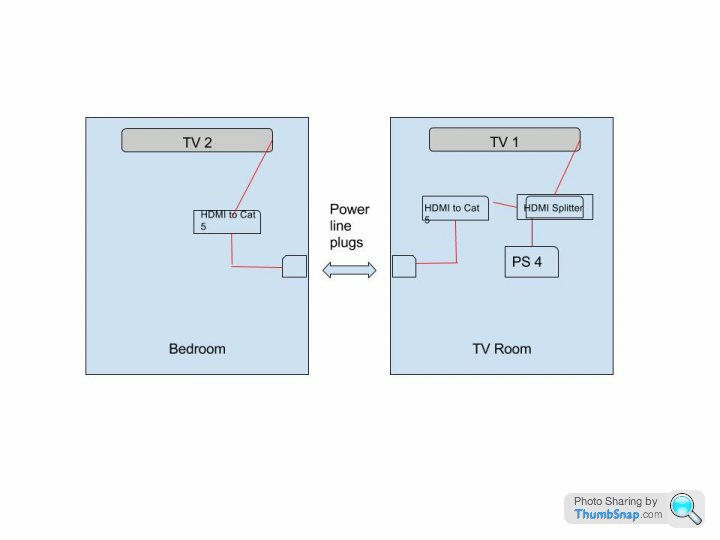
PlayStation TV might be a current work around for games like Minecraft, but his other current games are Fallout and Skyrim, and I am not sure how bad the lag would be on them.
But cant seem to find any info on if this would work, specifically the HDMI over Ethernet via Powerline plugs
Excuse my awesome technical drawing skills
PlayStation TV might be a current work around for games like Minecraft, but his other current games are Fallout and Skyrim, and I am not sure how bad the lag would be on them.
In case anybody else looks into this, HDMI to Ethernet over power line adaptors wont work, spoke to a seller on amazon, who said that the HDMI adaptors need to be directly connected via cat5/6 cables, suggestion seems to be HDMI over wireless....however a decent pair of these is more then a ps4.....so the simple answer is buy a new PS4, I will no look to sell this to the boss as a reason to buy a PS4 Pro 
one of these
http://www.cabledepot.co.uk/hdmi-cable-splitter-15...
then into one of these
http://www.currys.co.uk/gbuk/tv-and-home-entertain...
Not exactly cheap but not fortunes either. Just a thought. Some times simple wins.
http://www.cabledepot.co.uk/hdmi-cable-splitter-15...
then into one of these
http://www.currys.co.uk/gbuk/tv-and-home-entertain...
Not exactly cheap but not fortunes either. Just a thought. Some times simple wins.
If it helps, I play my PS4 remotely on my Vita, which is pretty much the same as the Playstation TV. No noticeable lag on it and I'm playing Yakuza 0 at the moment, which requires much faster response times than Skyrim or Fallout 4 (it's a fast-paced beat-em-up). I'd say that's going to be your cheapest bet for doing this.
Gassing Station | Video Games | Top of Page | What's New | My Stuff