
Canons DPP with DLO
Discussion


Canons Digital Light optimisation is something new in 3.11.26 or so , just available for download.
You can download lens profiles for a bunch of well used lenses including my 17-55,100-400, 70-200f2.8IS and mkII , 10-22, 35L etc.
What it does is attempt to correct for known elements in the light path, the lens (ca, distortion etc but a lot more) and the sensor (aa filter etc).
So does it work?
Here is an image I took with the 7D and 17-55 whilst walking the kepler track in April 2010.
ISO 100
f7.1
1/30th
Default conversion with ACR 6.6 and its 17-55 profile

Heres a crop of the lower right 100% from the image above and one processed with DLO

Heres a lower right crop of another image:

This isnt sharpening. I have switched sharpening off on DPP, and only the default sharpening on acr. Zoom in to 400% on the DPP effort and you will find no sharpening artefacts.
This is taken with a 100-400L at 400/5.6 ISO 160. Same, DPP/DLO on the right.
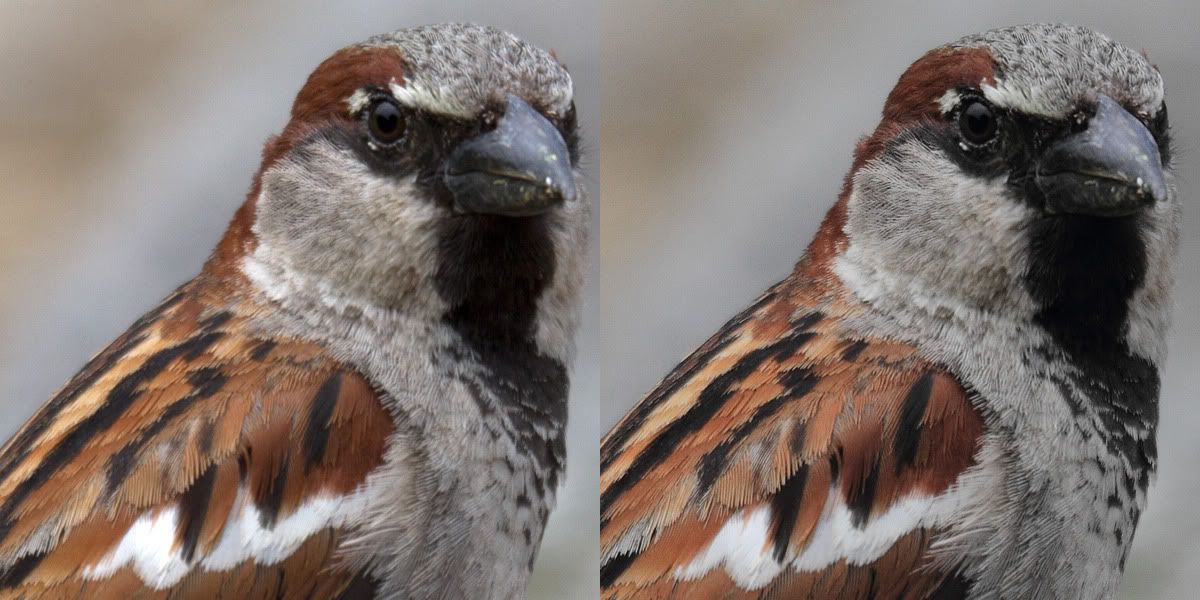
I've seen even more impressive things from corrections for the 35L etc.
This seems to affect the colours... And DPP is still a bit of a mess from a UI point of view, but for that shot you really want to get all you can out of its well worth a look.
You can download lens profiles for a bunch of well used lenses including my 17-55,100-400, 70-200f2.8IS and mkII , 10-22, 35L etc.
What it does is attempt to correct for known elements in the light path, the lens (ca, distortion etc but a lot more) and the sensor (aa filter etc).
So does it work?
Here is an image I took with the 7D and 17-55 whilst walking the kepler track in April 2010.
ISO 100
f7.1
1/30th
Default conversion with ACR 6.6 and its 17-55 profile
Heres a crop of the lower right 100% from the image above and one processed with DLO
Heres a lower right crop of another image:
This isnt sharpening. I have switched sharpening off on DPP, and only the default sharpening on acr. Zoom in to 400% on the DPP effort and you will find no sharpening artefacts.
This is taken with a 100-400L at 400/5.6 ISO 160. Same, DPP/DLO on the right.
I've seen even more impressive things from corrections for the 35L etc.
This seems to affect the colours... And DPP is still a bit of a mess from a UI point of view, but for that shot you really want to get all you can out of its well worth a look.

Well that's an even better set of examples than you had with just the House Sparrow on POTN Rob. At least this piece of advice is free! Last time I listened to you I had to buy a 7D + 70-200 f/2.8 L and since then I've had to buy 2 more L series lenses plus I'm now forced to think about a 5D3.
You have a lot to answer for
You have a lot to answer for
14-7 said:
Slightly confused on this one but the Canon europe site only gives me the 3.4.1 DPP download whereas I already have 3.11.1.0
Would you be able to post a link to the new download?
I just went to http://www.canon.co.uk/ > Support > 'Software Download Centre' > *input camera model* > Click the 'software' radio button.Would you be able to post a link to the new download?
2slo said:
Well that's an even better set of examples than you had with just the House Sparrow on POTN Rob. At least this piece of advice is free! Last time I listened to you I had to buy a 7D + 70-200 f/2.8 L and since then I've had to buy 2 more L series lenses plus I'm now forced to think about a 5D3.
You have a lot to answer for
all the really good people shoot Hassleblad H4d's now.You have a lot to answer for
Gassing Station | Photography & Video | Top of Page | What's New | My Stuff