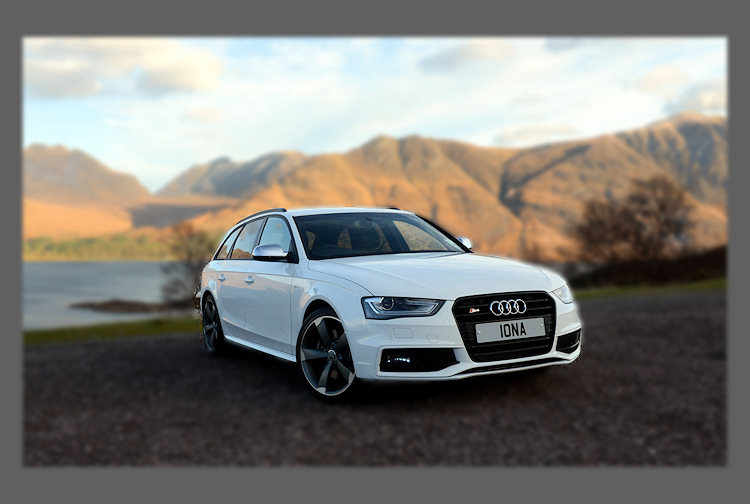
How did he do that?
Author
Discussion

Upatdawn

Original Poster:

2,202 posts

177 months

Friday 9th August 2013
quotequote all
check out the 4th image (top row) (3rd too but to a lesser extent)


http://www.ebay.co.uk/itm/jaguar-mk2-type-S-/18118...

Ed_P

701 posts

298 months

Friday 9th August 2013
quotequote all
Tilt/shift lens perhaps?

Upatdawn

Original Poster:

2,202 posts

177 months

Friday 9th August 2013
quotequote all
for a minute i thought it was a Corgi model

Upatdawn

Original Poster:

2,202 posts

177 months

Friday 9th August 2013
quotequote all
could he take 2 images, one sharp, one totally out of focus and overlay?

seems extreme for Ebay

Ultuous

2,291 posts

220 months

Friday 9th August 2013
quotequote all
Looks to me like he's just 'overblurred' everything but the subject (probably in Photoshop or similar) which does give a basic Tilt-Shift/ Miniaturisation like effect.

Gemm

1,833 posts

244 months

Friday 9th August 2013
quotequote all
Just a very poorly-done select/blur job to me. wink

14-7

6,233 posts

220 months

Friday 9th August 2013
quotequote all
Gaussian blur.

And over done it as well.

budfox

1,510 posts

158 months

Friday 9th August 2013
quotequote all
He just spent 5 minutes learning a couple of Photoshop techniques and did them both badly.

Simpo Two

92,695 posts

294 months

Friday 9th August 2013
quotequote all
He's just cut the car out badly and blurred the b/g. It doesn't make sense any way you look at it.

flat-planedCrank

3,697 posts

232 months

Friday 9th August 2013
quotequote all
Another vote for gaussian blur


Just lasso the car, invert the selection, feather the selection, add guassian blur to taste wink

MGJ2

416 posts

167 months

Saturday 10th August 2013
quotequote all
duplicate layer
gaussian blur 20 pixels
add vector mask
use black brush to "clean" the unwanted areas
change opacity.

Simpo Two

92,695 posts

294 months

Saturday 10th August 2013
quotequote all
MGJ2 said:
duplicate layer
gaussian blur 20 pixels
add vector mask
use black brush to "clean" the unwanted areas
change opacity.
Or:

Select car with polygonal lasso
Invert selection
Blur until it looks stupid.

Ah, FPC already said it.

Gemm

1,833 posts

244 months

Saturday 10th August 2013
quotequote all
Vector mask???? I'm sure they have absolutely no clue what vector mask is! Simpo is almost correct but here's what they did in more details; Select the car using polygonal lasso, making sure part of the roof of the building, exhaust pipe and the side window of the red car are also selected. Oh, and don't forget the fence behind and odd bits of the ground. Feather? What is feather? Invert selection. Blur until it looks stupid.

K12beano

20,854 posts

304 months

Saturday 10th August 2013
quotequote all
Just scrape a bit of paint off and let it rust over several years......


...Oh - i see that's not what you mean...... getmecoat

Upatdawn

Original Poster:

2,202 posts

177 months

Saturday 10th August 2013
quotequote all
so what software did they probably use, Photoshop?

Gemm

1,833 posts

244 months

Saturday 10th August 2013
quotequote all
Upatdawn said:
so what software did they probably use, Photoshop?
It's a very simple task, so I guess it can be any image editing software.

JustinMinns

262 posts

250 months

Saturday 10th August 2013
quotequote all
You don't even need photoshop, you can do it with instagram on your phone

K12beano

20,854 posts

304 months

Saturday 10th August 2013
quotequote all
Upatdawn said:
so what software did they probably use, Photoshop?
I like doing (a less extreme version of) this in Lightroom. It's so easy, and non 'togs think I'm a genius! bow

GetCarter

31,229 posts

308 months

Saturday 10th August 2013
quotequote all
Gemm said:
Just a very poorly-done select/blur job to me. wink
Yep. 10 seconds, tops.

okay... this took 15.


Edited by GetCarter on Saturday 10th August 15:14

crmcatee

5,803 posts

256 months

Saturday 10th August 2013
quotequote all
Did exactly what he thought it would - generated more people to look at his ad. smile