
Discussion


Guys,
Up untill now I have allways shot jpeg fine, but today I shot some RAW photos and I can't get them to download! I've tried the EOS Viewer Utilty, Digital Photo Professional, Picasa, Photoshop 7 and Raw shooter essentials 2005. Please help because some of these photos look awsome on the LCD.
Martin.
Up untill now I have allways shot jpeg fine, but today I shot some RAW photos and I can't get them to download! I've tried the EOS Viewer Utilty, Digital Photo Professional, Picasa, Photoshop 7 and Raw shooter essentials 2005. Please help because some of these photos look awsome on the LCD.
Martin.
Martin my zoom browser ex that came as part of the 300d bundle opens them and then once it converts them to whatever it is i can use ps7 to mess around.
sorry i can't be of much more help.
just incase you miss it you may find this usefull
www.pistonheads.com/gassing/topic.asp?t=157510&f=109&h=0
>> Edited by bilko2 on Tuesday 22 February 15:20
sorry i can't be of much more help.
just incase you miss it you may find this usefull
www.pistonheads.com/gassing/topic.asp?t=157510&f=109&h=0
>> Edited by bilko2 on Tuesday 22 February 15:20


 THANK YOU!
 Go to www.adobe.com and there is a plugin for Photoshop to read the latest RAW files, works very well too I might add (I've found it best for individual RAW editing so far) But it can't do batch processing to my knowledge.
Ok, I just went and found the link you will need: www.adobe.com/support/downloads/detail.jsp?ftpID=2701
(Assuming you are using Windows)
Ok, I just went and found the link you will need: www.adobe.com/support/downloads/detail.jsp?ftpID=2701
(Assuming you are using Windows)
AdobeRAW is cool, but I really miss the whitebalance dropper - has anyone found a way of doing this yet?
To be honest I either use Canon DPP or RawShooter Essentials as they are faster from a workflow perspective as they allow batch work and copying settings to multiple pictures. I use AbodeRAW only for one-offs.
To be honest I either use Canon DPP or RawShooter Essentials as they are faster from a workflow perspective as they allow batch work and copying settings to multiple pictures. I use AbodeRAW only for one-offs.
Phil S said:
Go to www.adobe.com and there is a plugin for Photoshop to read the latest RAW files, works very well too I might add (I've found it best for individual RAW editing so far) But it can't do batch processing to my knowledge.
Ok, I just went and found the link you will need: www.adobe.com/support/downloads/detail.jsp?ftpID=2701
(Assuming you are using Windows)
Phil,
That's for CS and I have 7, will it work?
Martin.
Bee_Jay said:
AdobeRAW is cool, but I really miss the whitebalance dropper - has anyone found a way of doing this yet?
To be honest I either use Canon DPP or RawShooter Essentials as they are faster from a workflow perspective as they allow batch work and copying settings to multiple pictures. I use AbodeRAW only for one-offs.
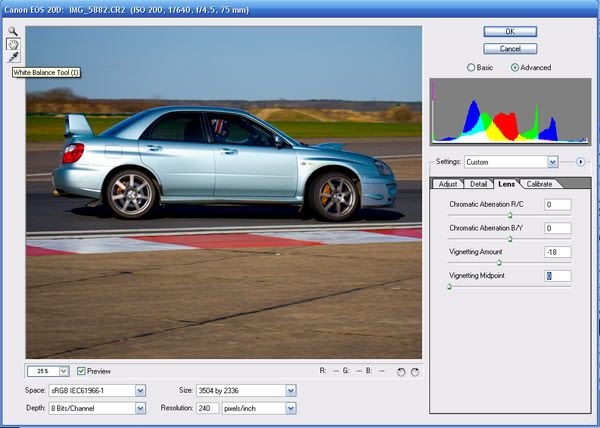
Yes, at the top left of the RAW import screen click the dropper button and squeeze away!
The noise reduction on the Adobe RAW is astonishing! Like I say for fast/batch working it probably isn't the tool I would use (I currently use Capture One Pro) But for individual picture perfection you can't beat Adobe RAW in my book!
Edit: Dropper tool show in this picture!
>> Edited by Phil S on Tuesday 22 February 17:26
Gassing Station | Photography & Video | Top of Page | What's New | My Stuff