
Scanning 6x7 transparency slides....
Discussion


Can anyone recommend a good flatbed scanner for 6x7 slides.
What sort of quality can I expect (any examples of scanned pics)? I know it will not be as good as a dedicated film scanner but only really need it for sending example pics to libraries/mags (original slide to be used for any publication).
What sort of quality can I expect (any examples of scanned pics)? I know it will not be as good as a dedicated film scanner but only really need it for sending example pics to libraries/mags (original slide to be used for any publication).
The Epson 4990 and Canon 9950F are both very good. There should be a few reviews on the net with example scans - e.g., Epson 4990 and Canon 9950F. I went for the Canon, but haven't had a chance to try it out yet.
Here's an example of scanning a 6x7 slide using an Epson 4780 at 4800 dpi. Its now been superseded
1. Full frame with scanner on default exposure setting, no sharpening or dust removal, but complete with photographer's jacket in the foreground. DOH ! The original image is about 360MB as a .psd file.

2. 100% crop of the above

3. 100% crop after sharpening and minor colour adjustment in Photoshop.

1. Full frame with scanner on default exposure setting, no sharpening or dust removal, but complete with photographer's jacket in the foreground. DOH ! The original image is about 360MB as a .psd file.
2. 100% crop of the above
3. 100% crop after sharpening and minor colour adjustment in Photoshop.
I recently bought the Epson Photo 4990 based on reviews here
www.photo-i.co.uk/Reviews/scanners_page.htm
Close run thing between the Epson and the Canon - think the Epson won on price for my requirements and the bundled software, there being little difference in quality performance over all.
I'm very pleased with it - there are some samples (crushed for the web of course) of some of the output in a few posted threads over the last month or so. Quite a selection of B&W 120 roll film negatives and 35mm negatives. I don't have any 6x7 slides. However 35mm slides scan pretty well providing the mounts don't fool the Epson scan software. Which some mounts can. Easy to get around by processing manually rather than relying on the software to identify what is and what is not a slide, but a little experimenting is worthwhile.
The site referenced also has a discussion forum with some very useful information.
And there is a guy in the US who supplies Wet Scanning kits for flatbed scanners which, apparently, can enhance the the quality even more, especially if the slides have issues with scratches and similar. Not something I have yet felt the need to invest in.
Beware that at top quality you are going to get some very large files - as already mentioned - and I am not at all convinced that there is any value to creating such large files (though I do!) unless you are going to print something enormous or crop a very small part of it to A3 or, possibly, you have a real hangup about 110% accurate colour matching and must do everything in 48bit colour.
The main point is that for 6x7 there are few non professional scanners out there. I was going to get a used dedicate 35mm unit but having found more medium format negatives than I expected, I'm glad I didn't. Not only does the flatbed allow the alternative source sizes but it provides for up to 24 35mm negs or 16 35mm slides to be scanned in a batch and offers holders for multiples of other multiples of other sizes as well. It is also excellent and fast for scanning prints, though that may not interest you.
HTH
www.photo-i.co.uk/Reviews/scanners_page.htm
Close run thing between the Epson and the Canon - think the Epson won on price for my requirements and the bundled software, there being little difference in quality performance over all.
I'm very pleased with it - there are some samples (crushed for the web of course) of some of the output in a few posted threads over the last month or so. Quite a selection of B&W 120 roll film negatives and 35mm negatives. I don't have any 6x7 slides. However 35mm slides scan pretty well providing the mounts don't fool the Epson scan software. Which some mounts can. Easy to get around by processing manually rather than relying on the software to identify what is and what is not a slide, but a little experimenting is worthwhile.
The site referenced also has a discussion forum with some very useful information.
And there is a guy in the US who supplies Wet Scanning kits for flatbed scanners which, apparently, can enhance the the quality even more, especially if the slides have issues with scratches and similar. Not something I have yet felt the need to invest in.
Beware that at top quality you are going to get some very large files - as already mentioned - and I am not at all convinced that there is any value to creating such large files (though I do!) unless you are going to print something enormous or crop a very small part of it to A3 or, possibly, you have a real hangup about 110% accurate colour matching and must do everything in 48bit colour.
The main point is that for 6x7 there are few non professional scanners out there. I was going to get a used dedicate 35mm unit but having found more medium format negatives than I expected, I'm glad I didn't. Not only does the flatbed allow the alternative source sizes but it provides for up to 24 35mm negs or 16 35mm slides to be scanned in a batch and offers holders for multiples of other multiples of other sizes as well. It is also excellent and fast for scanning prints, though that may not interest you.
HTH
I don't have any 6x7 slides but here is an example of a 35mm scanned in its mount to ensure no cropping because the composition, as you will see, was a bit tight! Crop anywhere, especially top or right side, and it looks poor. This is a 203kb file - the original is 23Mb (probably only 2400dpi scan!) so it can offer more than you can see here. Shot taken in Malta about 25 years ago. 
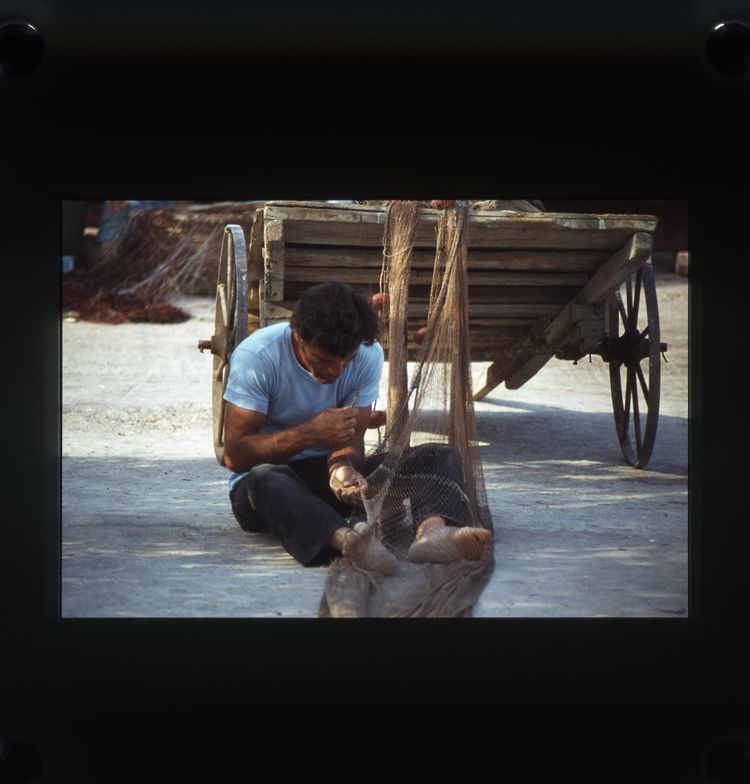
Here is a tidied version with the slide mount removed and a bit of burning in to extract more detail from the slightly overexposed area to the left of the shot next to the wheel and the the centre of the frame where the shaft of the cart resting in the ground lacked detail at the colour balance as scanned. However the detail was still there to be recovered. The initial crop gave a 21Mb file. This comes in around 230kb as presented.
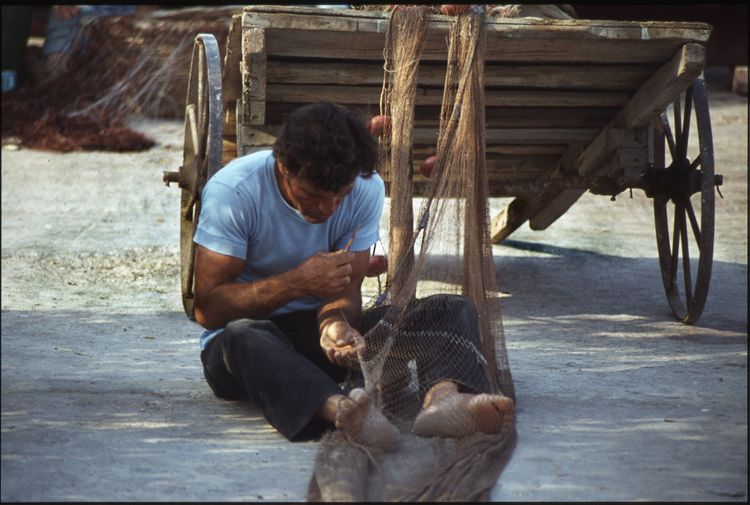
I would expect better results from a quality 6x7 slide - after all there is much more in the film to work with.
Here is a tidied version with the slide mount removed and a bit of burning in to extract more detail from the slightly overexposed area to the left of the shot next to the wheel and the the centre of the frame where the shaft of the cart resting in the ground lacked detail at the colour balance as scanned. However the detail was still there to be recovered. The initial crop gave a 21Mb file. This comes in around 230kb as presented.
I would expect better results from a quality 6x7 slide - after all there is much more in the film to work with.


te51cle said:
I preferred the Epson software instead of the Silverfast SE supplied with my machine. Think you'll have to try both on a couple of transparencies and see which you find easiest to use.
Agreed.
Possibly more than a couple of transparencies though because it seems to me that the results from each of the scan applications I have played with so far can vary from shot to shot. It may be that one application is particulalry good with one sort of shot or colour range but another is better with something different.
If, like me, you start to get interested in the comparisons be aware that it could be a long journey and you will find many comments from people who are very much into the minutiae of the variances which may indeed be important for their requirements.
Fascinating but time consuming and maybe not adding much to the results you get.
VueScan seems quite popular with many of the serious dabblers, though I am unsure of its track record when used with the Canon.

A couple of initial scans using the canon software
http://i24.photobucket.com/albums/c23/irvings/416b.j
http://i24.photobucket.com/albums/c23/irvings/401bb.
http://i24.photobucket.com/albums/c23/irvings/Copyof
http://i24.photobucket.com/albums/c23/irvings/416b.j

http://i24.photobucket.com/albums/c23/irvings/401bb.

http://i24.photobucket.com/albums/c23/irvings/Copyof

steve11 said:
A couple of initial scans using the canon software
http://i24.photobucket.com/albums/c23/irvings/416b.j
http://i24.photobucket.com/albums/c23/irvings/401bb.
http://i24.photobucket.com/albums/c23/irvings/Copyof
Nice, love the third one

steve11 said:
A couple of initial scans using the canon software
http://i24.photobucket.com/albums/c23/irvings/416b.j
http://i24.photobucket.com/albums/c23/irvings/401bb.
http://i24.photobucket.com/albums/c23/irvings/Copyof
these look great, but they are a little small to make any real judgement on the scanner/image quality. Any chance of some bigger ones?
_dobbo_ said:
A couple of initial scans using the canon software
http://i24.photobucket.com/albums/c23/irvings/416b.j
http://i24.photobucket.com/albums/c23/irvings/401bb.
http://i24.photobucket.com/albums/c23/irvings/Copyof
these look great, but they are a little small to make any real judgement on the scanner/image quality. Any chance of some bigger ones?
Whats the best size file to use, I tried the originals but they were taking forever to upload.
steve11 said:
Whats the best size file to use, I tried the originals but they were taking forever to upload.
It will always be a struggle to present a sample of the full resolution quality over the web. The ones I posted earlier are resized to 750 pixels wide for the benefit of PH and then saved with the jpg quality set to whatever in necessary to give a reasonably sized file - something between 120 and 150kb would be my target.
The only way to she the quality of a huge file (if you are scanning and the top end of the resolution range) would be to crop a tiny portion of it and present just that.
However I am rapidly coming to the conclusion that for 99.99% of requirements there is little or no point in using the higher resolutions. The exception would be if you really want to print huge - very huge - or your film and image quality was good enough that you code take a very tiny detail and expect to make a reasonable print (or view) image from it and wished to keep some exceptional subtlety of colour or shading in shadow areas.
Having the big files feels impressive but it is extrememly difficult to spot the differences between 4800 and 2400 dpi and 48bit vs 24bit colour in the majority of cases - quite likely the software and hardware used for output is not capable anyway! I reckon that much of the time 1200dpi and 24bit colour will prove more than adequate. But I could be wrong.
So, what are your conclusions about that with the Canon?
HankScorpio said:
Take a look at Hamrick's Vuescan as software, I've always used it on any scanner and has a huge degree of control and is very good for batching stuff.
I downloaded the free test version a couple a month or so ago and have to say that the interface seems spectacularly limited and difficult to do anything with. I assume the paid for version is improved by being less restrictive. Add to that that it seems to crash after a second scan when trying to save the output file and that the images have interestingly subtle colour but are by no means sharp (and don't seem to respond much to attempts to sharpen in Elements 2) and it has left me less than impressed so far.
Yet I know that a number of very serious photographers rave about it ...
Maybe I will check out the next update before taking a decision - the recently changed demo I have may have a few problems.
So I'm quite happy with Epson Scan - but that won't help Stave with a Canon!
LongQ said:
Whats the best size file to use, I tried the originals but they were taking forever to upload.
It will always be a struggle to present a sample of the full resolution quality over the web. The ones I posted earlier are resized to 750 pixels wide for the benefit of PH and then saved with the jpg quality set to whatever in necessary to give a reasonably sized file - something between 120 and 150kb would be my target.
The only way to she the quality of a huge file (if you are scanning and the top end of the resolution range) would be to crop a tiny portion of it and present just that.
However I am rapidly coming to the conclusion that for 99.99% of requirements there is little or no point in using the higher resolutions. The exception would be if you really want to print huge - very huge - or your film and image quality was good enough that you code take a very tiny detail and expect to make a reasonable print (or view) image from it and wished to keep some exceptional subtlety of colour or shading in shadow areas.
Having the big files feels impressive but it is extrememly difficult to spot the differences between 4800 and 2400 dpi and 48bit vs 24bit colour in the majority of cases - quite likely the software and hardware used for output is not capable anyway! I reckon that much of the time 1200dpi and 24bit colour will prove more than adequate. But I could be wrong.
So, what are your conclusions about that with the Canon?
Must admit I was scanning at 4800dpi and 48bit colour but as you say I was getting files absolutely massive and probably unusable in the real world. Only had the scanner for a day so will spend the next week getting to know the software and experimenting with different scanning options.
LongQ said:
Take a look at Hamrick's Vuescan as software, I've always used it on any scanner and has a huge degree of control and is very good for batching stuff.
I downloaded the free test version a couple a month or so ago and have to say that the interface seems spectacularly limited and difficult to do anything with. I assume the paid for version is improved by being less restrictive. Add to that that it seems to crash after a second scan when trying to save the output file and that the images have interestingly subtle colour but are by no means sharp (and don't seem to respond much to attempts to sharpen in Elements 2) and it has left me less than impressed so far.
Yet I know that a number of very serious photographers rave about it ...
Maybe I will check out the next update before taking a decision - the recently changed demo I have may have a few problems.
So I'm quite happy with Epson Scan - but that won't help Steve with a Canon!
Update ...
I downloaded the latest version of VueScan last night (8.3.9 release) and can now see the entire user interface which seemed to be strangely hidden away most of the time with the last load I had. The colours are interesting still, the surfaces of the subjects scan very nicely and are smoother than the EpsonScan results BUT this may be because the entire image is still very soft. And I have had it crash on me a couple of times when trying to save the files and also seemingly freeze on a number of occasions at different point in the process although this might be down to something I have done.
Still experimenting but if I can't get the sharpness I think I will have to mail support to see if there are any special issues I need to be aware of with the 4990.
Gassing Station | Photography & Video | Top of Page | What's New | My Stuff