
Discussion


Took the Noble out for a blast today and took the D200 along.
Glad I did as the light was great. This is pretty much untouched. Just pumped the sat and hue a little in RSE, saved as jpeg. Opened in CS and dropped to 750px wide then unsharp mask. 150, 0.5 and 1. Not sure why the sky went a bit noisey though. Hummmmmm, still not finding this game very simple!!!
What you think.
Greg

Glad I did as the light was great. This is pretty much untouched. Just pumped the sat and hue a little in RSE, saved as jpeg. Opened in CS and dropped to 750px wide then unsharp mask. 150, 0.5 and 1. Not sure why the sky went a bit noisey though. Hummmmmm, still not finding this game very simple!!!
What you think.
Greg
Nice image
Or do you mean fiddle with the resolution in "image size..."?
mr noble said:
So how do I drop the size of the file in CS too?
You mean compress the Jpeg a little? Has CS got a "Save for web" option (P'shop 6 does) where you can fiddle around with the Jpeg quality and size until you get what you need? Or do you mean fiddle with the resolution in "image size..."?

You should have seen me slam the brakes on when I looked left and saw that scene! 
I did only take 3 shots though. Thats were the huge screen and zoom function on the D200 are a delight!
Beano, I'll try to use "save for web" I think I forgot to change the dip from 300 to 72 in RSE actually which would account for the huge file.
Still not sure why the sharpennng and compressing has made the sky look grainy.
Greg
I did only take 3 shots though. Thats were the huge screen and zoom function on the D200 are a delight!
Beano, I'll try to use "save for web" I think I forgot to change the dip from 300 to 72 in RSE actually which would account for the huge file.
Still not sure why the sharpennng and compressing has made the sky look grainy.
Greg
Maybe it is my monitor, but it does look a bit oversharp and oversaturated. Changing the DPI probably won't change the actual image size in terms of pixels, the image size in inches just increases to match.
Under 'Save for Web' on CS2, there is a little arrow button to the right of the Preset dropdown menu. One option in there is Optimize To File Size. You tell it how small/big you want the file and it works out the rest.
Under 'Save for Web' on CS2, there is a little arrow button to the right of the Preset dropdown menu. One option in there is Optimize To File Size. You tell it how small/big you want the file and it works out the rest.
mr noble said:
Still not sure why the sharpennng and compressing has made the sky look grainy.
Greg, i think you'll find the grainyness may be due to you tweaking the saturation too much.
Size-wise, you can choose the filesize when using 'save as', and you don't lose your exif info like you do when you 'save for web'. Just adjust the image quality slider. for an image thats 750 wide, i'd keep the image over 200kb or you'll see noise appearing. Nice shot btw.
Actually after a quick play with ps, the grainy effect is from your unsharp mask. I was just playing around on a similar blue sky shot and 150,1.5,1 is too harsh. Taking it down to 95,0.7,4 on the same image was about right.
I look at a portion of the image at 100% when sharpening, as its hard to judge when you are zoomed out.
I look at a portion of the image at 100% when sharpening, as its hard to judge when you are zoomed out.

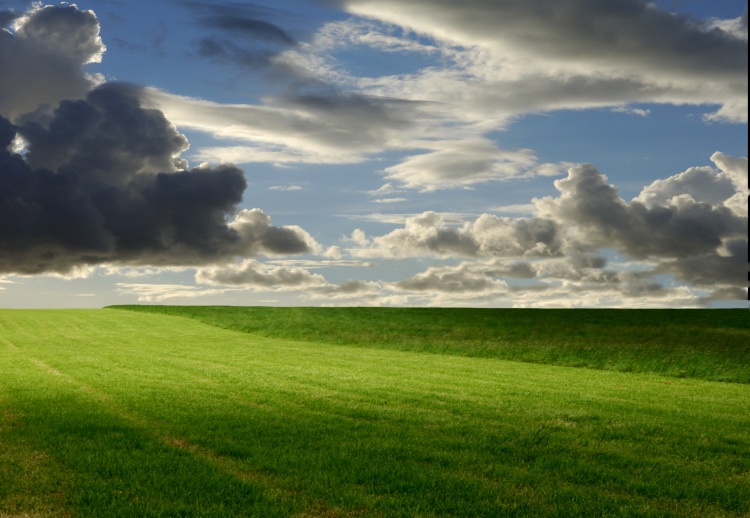
Mr Noble, I tend to use similar unsharp-mask settings with my slide scans (less is needed with the DSLR) and it will add a noise effect to the sky somewhat like grain. I usually use 150, 1.5, 1, or 100, 1.5, 1 for landscapes - just the once. If you don't want this effect, you can do what my brother does and separate the sky from the land before applying the filter just to the land section. I can rarely be bothered - I don't mind the effect in moderation. Getcarter's shot above does not have this noise in the sky, but the ground is a bit soft - if you split the shot you could have sky like his and ground like yours.
When you choose "file, save as..." in PShop you should have the option to choose the quality - choosing 5 or so out of the 12 available should give a small file size with a 750 pixel-wide image, well under 100K. Personally, to avoid du0plication of effort, I edit the shot in RAW or the full-size JPEG in PShp, then save it as an A4 300dpi JPEG image at quality 10, and a 950 or 800-wide "screen quality" JPEG at quality 5. Batch processing can be handy to do this with multiple images. Often editing the shot in the full-quality file and applying the unsharp mask filter last, but before resizing, can give better results.
When you choose "file, save as..." in PShop you should have the option to choose the quality - choosing 5 or so out of the 12 available should give a small file size with a 750 pixel-wide image, well under 100K. Personally, to avoid du0plication of effort, I edit the shot in RAW or the full-size JPEG in PShp, then save it as an A4 300dpi JPEG image at quality 10, and a 950 or 800-wide "screen quality" JPEG at quality 5. Batch processing can be handy to do this with multiple images. Often editing the shot in the full-quality file and applying the unsharp mask filter last, but before resizing, can give better results.
Gassing Station | Photography & Video | Top of Page | What's New | My Stuff