
tips for 'natural' light and colours, both indoors and out?
Discussion


I've owned my D40 for about 6 months now and I've loved playing around with my first 'proper' camera, learning the basics and getting one or two nice shots in the process but...
Something I consistently seem to struggle with is capturing natural looking light levels when theres alot of contrast, both indoors and outdoors. As an example, where I work is fairly rural and about this time of year the trees are all sorts of lovely shades, with the late afternoon light shining through the trees there some amazing contrasts in light/shadow to be seen which looks beautiful with the orange/brown leaves on the ground.
How would others shoot this?
What about indoor situations, I'm assuming no flash and longer exposure?
Something I consistently seem to struggle with is capturing natural looking light levels when theres alot of contrast, both indoors and outdoors. As an example, where I work is fairly rural and about this time of year the trees are all sorts of lovely shades, with the late afternoon light shining through the trees there some amazing contrasts in light/shadow to be seen which looks beautiful with the orange/brown leaves on the ground.
How would others shoot this?
What about indoor situations, I'm assuming no flash and longer exposure?
yep, auto white ballance, matrix metering and -0.3 on the exposure compensation since I read that was a good idea. While I'm fairly comfortable playing with full manual exposure and aperture settings I've not really messed with the manual white balance and so on, is it a case of keeping a bit of white paper on me to calibrate it?
I can't remember... can you take in RAW with the D40? If so, you can adjust the white balance afterwards - hence auto white balance is all you'll ever need... apart from the software to read RAW files... like ViewNX (free with some Nikons) or later versions of Photoshop.
BTW - I've found all Nikons (except the D3) are better with at least a -.3 exposure
BTW - I've found all Nikons (except the D3) are better with at least a -.3 exposure
Edited by GetCarter on Friday 24th October 16:56
andy-xr said:
What compensation have you got on Auto WB? Mine's set to +1 if it's on auto, seems to be alright most of the time.
I've not got an compensation on the WB, just -0.3 on exposure (thats not the same thing is it?)GetCarter said:
I can't remember... can you take in RAW with the D40? If so, you can adjust the white balance afterwards - hence auto white balance is all you'll ever need... apart from the software to read RAW files... like ViewNX (free with some Nikons) or later versions of Photoshop.
BTW - I've found all Nikons (except the D3) are better with at least a -.3 exposure
Yup, it does RAW and I have both Lightroom and Photoshop CS3, I've not really shot in RAW very often since I didn't see that much benefit, I guess the extra post-processing options are reason enough!BTW - I've found all Nikons (except the D3) are better with at least a -.3 exposure
Edited by GetCarter on Friday 24th October 16:56
hill79 said:
andy-xr said:
What compensation have you got on Auto WB? Mine's set to +1 if it's on auto, seems to be alright most of the time.
I've not got an compensation on the WB, just -0.3 on exposure (thats not the same thing is it?)Or the RAW option
I also have the Optimise Image thing set to Vivid as well if that helps?
Edited by andy-xr on Friday 24th October 17:11
andy-xr said:
hill79 said:
andy-xr said:
What compensation have you got on Auto WB? Mine's set to +1 if it's on auto, seems to be alright most of the time.
I've not got an compensation on the WB, just -0.3 on exposure (thats not the same thing is it?)Or the RAW option
eta - I tend to use 'Vivid' too, colours come out looking more how I expect with that setting... maybe I have 'Vivid' eyesight? :S
Edited by hill79 on Friday 24th October 17:13
as mentioned, raw will help squeeze out the maximum lattitude from that camera.
For exteror stuff, have you thought about getting a couple of ND grads? Used sparingly, they can really help expose the sky and foreground perfectly- especially this time of year with the sun at such a harsh angle
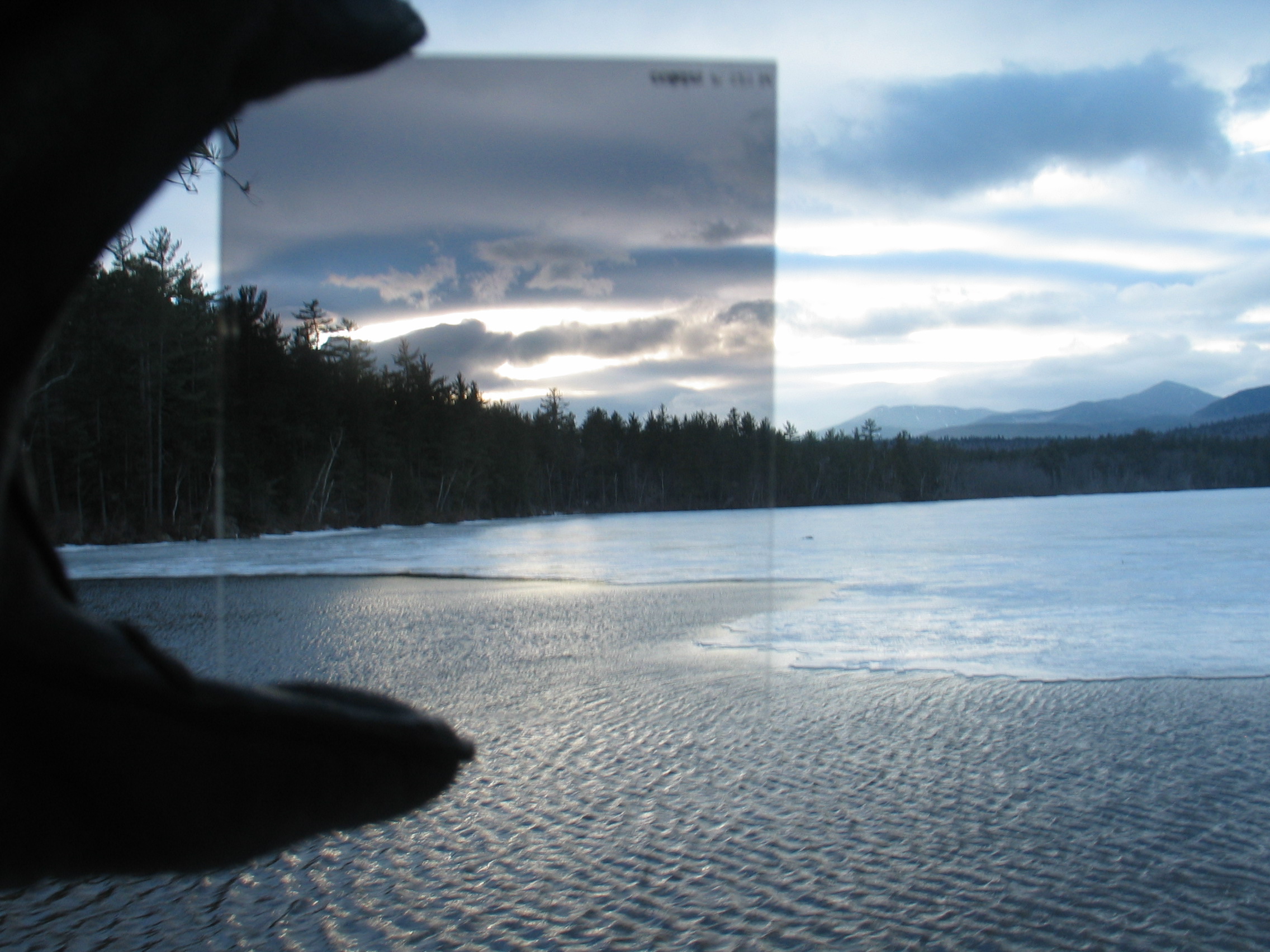
For exteror stuff, have you thought about getting a couple of ND grads? Used sparingly, they can really help expose the sky and foreground perfectly- especially this time of year with the sun at such a harsh angle
One of the problems is that you'll get more realistic saturated autumn colours on an overcast day than you will with bright sunshine. A polariser might be of help.
And Lightroom 2 with the beta camera profiles 
GetCarter said:
hill79 said:
eta - I tend to use 'Vivid' too, colours come out looking more how I expect with that setting... maybe I have 'Vivid' eyesight? :S
FYI - if you shoot RAW you can change to and from VIVID too.. all in CS3This seems like an excessive contrast (dynamic range) issue rather than white balance.
My answer, but you may not like it, is to shoot RAW, process the file once for shadows and once for highlights, then composite the two in Photoshop to get the best of both. You get the extra benefit of being able to twiddle WB afterwards.
If you're not into RAW yet, and the subject is stationery, use a tripod and take two JPGs, one for shadows and one for highlights, and compositing as above.
Final and worst answer, if you use JPG and the subject is moving, is to take one JPG for highlights and hoof up the midrange to lighten shadow detail - but it will emphasise noise and look a bit washy.
My answer, but you may not like it, is to shoot RAW, process the file once for shadows and once for highlights, then composite the two in Photoshop to get the best of both. You get the extra benefit of being able to twiddle WB afterwards.
If you're not into RAW yet, and the subject is stationery, use a tripod and take two JPGs, one for shadows and one for highlights, and compositing as above.
Final and worst answer, if you use JPG and the subject is moving, is to take one JPG for highlights and hoof up the midrange to lighten shadow detail - but it will emphasise noise and look a bit washy.
Fordo said:
as mentioned, raw will help squeeze out the maximum lattitude from that camera.
For exteror stuff, have you thought about getting a couple of ND grads? Used sparingly, they can really help expose the sky and foreground perfectly- especially this time of year with the sun at such a harsh angle
What filter is that you're holding up there? what sort of extra kit would I need to use something like that?For exteror stuff, have you thought about getting a couple of ND grads? Used sparingly, they can really help expose the sky and foreground perfectly- especially this time of year with the sun at such a harsh angle
I've got a circular polariser which I've had mixed results with, usually the sky looks good but everything else seems a bit flat, I guess thats a by product of what the polariser does.
I'm now shooting in RAW and using lightroom 2, I'll have to look for the beta profile for the D40, I don't think I've ever looked at that so I'm not sure if its being used.
its a graduated nd filter. ND simply means neutral density- its supposed to not alter the colour.
They come in varying strengths, and vary in how strong the gradient is.

If overused, photos can look a little top gearish. But theyre perefct for situations where the sky gets over exposed compared to the foreground. A graduated ND, properly used, will allow the sky and foreground to be correctly exposed.
And despite what people say, you cant properly recreate it in post. Yes, raw does allow you to pull back some cloud detail, but it wont look as good as an nd grad properly used.
You can get tinted grads too, but personally, i prefer nd ones- tints can look a little gimiky, then i can add a tint in post if I feel it needs it
you can of course combine 2 or more different exposures in post to get the same effect, but it can sometimes look a little un-natural, and i just prefer getting the photo as good as i can in the field. means less time messing in post, and more time in pub!
They come in varying strengths, and vary in how strong the gradient is.
If overused, photos can look a little top gearish. But theyre perefct for situations where the sky gets over exposed compared to the foreground. A graduated ND, properly used, will allow the sky and foreground to be correctly exposed.
And despite what people say, you cant properly recreate it in post. Yes, raw does allow you to pull back some cloud detail, but it wont look as good as an nd grad properly used.
You can get tinted grads too, but personally, i prefer nd ones- tints can look a little gimiky, then i can add a tint in post if I feel it needs it
you can of course combine 2 or more different exposures in post to get the same effect, but it can sometimes look a little un-natural, and i just prefer getting the photo as good as i can in the field. means less time messing in post, and more time in pub!
Edited by Fordo on Monday 27th October 21:51
Gassing Station | Photography & Video | Top of Page | What's New | My Stuff