
Red looks Pink
Discussion


dtmpower said:
I took several pictures at today's Breakfast Club.
Here is a slight problem I have. The red in my pictures has come out in a pinky shade. I have Gimp or Picasa to touch them up. Any suggestions on the best way to fix it ?

Theres no problem with the photo - that car has been out in the sun too longHere is a slight problem I have. The red in my pictures has come out in a pinky shade. I have Gimp or Picasa to touch them up. Any suggestions on the best way to fix it ?

I think what has happened is that the red channel on the sensor has saturated, but the green and blue are still picking up reflected light from the blue sky. This has the effect that the red is a relatively low value. Unfortunately on phones and cheap compacts when you set it to underexpose all it does is dim the digital value after it has been read out of the sensor, making the pink look even muddier. Experiment to find out 
Sorry for the thread ressurection, but this was the first link on google believe it or not!
I've been messing about with my wee Fujifilm S1730 for a few months now and am quite comfortable with the basics, but when looking back through some photos of the MX5 it has been pointed out to me that it has taken on a lovely pink shade in some of the photos;
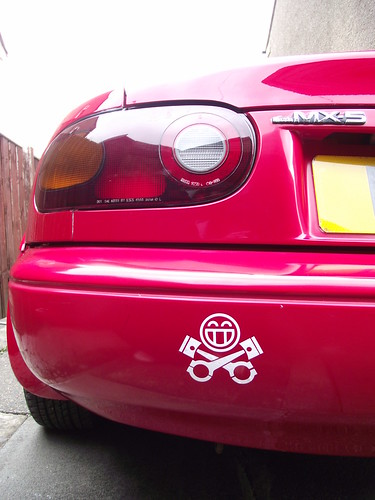
DSCF3142 by St_Anger1, on Flickr
Obviously, the paint isn't as good as the day it rolled out the factory, but it's not really noticably faded in real life and the red is a much deeper colour than the photos make out. I know that this can be edited using photoshop and stuff, but is there any way of changing a setting on the camera (like the white balance or something) to make it take them properly?
I've been messing about with my wee Fujifilm S1730 for a few months now and am quite comfortable with the basics, but when looking back through some photos of the MX5 it has been pointed out to me that it has taken on a lovely pink shade in some of the photos;
DSCF3142 by St_Anger1, on Flickr
Obviously, the paint isn't as good as the day it rolled out the factory, but it's not really noticably faded in real life and the red is a much deeper colour than the photos make out. I know that this can be edited using photoshop and stuff, but is there any way of changing a setting on the camera (like the white balance or something) to make it take them properly?
Gassing Station | Photography & Video | Top of Page | What's New | My Stuff