
My iPhone TomTom Cradle + App Review
Discussion


Right, so a few weeks ago I bought the TomTom app for my iPhone using Clinton's offer on iTunes vouchers which saved me £20 on the purchase price of the App. I didn't really use the app as I could never manage to get a GPS fix (+ I didn't have a mount so there wouldn't be any point) I knew there would be a car cradle out soon so I just sat tight until it came available.
About a week ago it arrives on the Apple Store site for £99 . (HOW MUCH??) this is just for the plastic cradle!! - However it has a GPS receiver built in so shouldn't suffer from any GPS Fix woes...so I was kinda forced to bite the bullet and buy the cradle as I had already spent something like £60 something on the app that was basically useless. So...I pre ordered it.
Roll forward to 2 days ago and on my doorstep is the cradle.(not recorded delivery or a card through the letterbox or anything - just sat on my porch) The unit is high quality plastic and branded TomTom at the bottom. It sticks to the car windscreen with a twist mechanism that sucks it to the screen and locks it there very securely. It also has a rotating ratchet type thing to allow you to put the iPhone in the cradle Portrait and to rotate it landscape at ease - nice.
For first time installation you have to pair the phone with the TomTom cradle via bluetooth with the passcode that is provided in the manual. - This allows the iPhone to communicate with the GPS receiver in the mount. Then touch the app and away you go.Next time you put the iPhone in the mount it connect automatically and there is a verification tone to let you know it's good to go. Then, Instant GPS fix and usual TomTom UI.
One thing that is worth noting is that the cradle comes with a mini usb 12v charging cable that HAS to be plugged in all the time if you want the iPhone to use the inbuilt GPS. - in doing so you are also obliged to have the iPhone charging at the same time.
Another great feature is the cradle has a 3.5mm jack in the bottom so you can hook a 3.5mm to 3.5mm lead to your cars Aux socket to play music through your cars speakers. (I couldn't test this as the muppet who fitted my Parrot hands free seems to have disconnected this Doh!) BUT ... the cable isn't provided which I think is a bit mean.
I went on a drive to test the unit and accuracy and frankly was disappointed. The map lags behind your actual position a good couple of seconds. Looking when passing streets on my left, according to the map I still hadn't got there yet which is pretty unacceptable. Worse yet were multiple exit roundabouts where 'turn left' is announced about a second after you had already done so.
Not a good start, and a pretty basic requirement of a Navigation Device. Not only this but the UI is very slow to react. Tap 'Postcode' to enter a destination and it leaves you pressing it for a good 2-3 seconds before it actually goes into postcode entering screen (very annoying!)
However, I have just looked at my phone and noticed TomTom have released an update that says will improve the lack of accurate positioning and laggy response, and at over 1Gig in size, should be quite comprehensive. So I will keep you updated as to how this changes the experience once I have tested it on the way home. (If you want me to)
The mount is a great product in it's own right and is great for holding / charging the phone whilst driving. - Just pricey.
Now, I know a lot of people will think I am mad for spending about £160+ on this but the main reason I have is because it has great potential for improvements. TomTom have said that map updates will be Free, as will fixed camera databases. Also, TomTom will hopefully add in the Live Traffic feature which sounds a no brainier as all the technology is there. I am just hoping TomTom have rushed the release and will continue to improve / update it as time goes by.
Oh and I almost forgot. I tested it last night whilst driving, and I received a call in the middle of driving (I didn't answer obviosly) and whilst the phone was ringing and my GF face appeared and 'Slide to Answer' Ring Ring! it still gave voice instructions such as in 200 yards Turn left, but no visual. So it maintains where you are and still guides you by voice.
Thanks for reading
About a week ago it arrives on the Apple Store site for £99 . (HOW MUCH??) this is just for the plastic cradle!! - However it has a GPS receiver built in so shouldn't suffer from any GPS Fix woes...so I was kinda forced to bite the bullet and buy the cradle as I had already spent something like £60 something on the app that was basically useless. So...I pre ordered it.
Roll forward to 2 days ago and on my doorstep is the cradle.(not recorded delivery or a card through the letterbox or anything - just sat on my porch) The unit is high quality plastic and branded TomTom at the bottom. It sticks to the car windscreen with a twist mechanism that sucks it to the screen and locks it there very securely. It also has a rotating ratchet type thing to allow you to put the iPhone in the cradle Portrait and to rotate it landscape at ease - nice.
For first time installation you have to pair the phone with the TomTom cradle via bluetooth with the passcode that is provided in the manual. - This allows the iPhone to communicate with the GPS receiver in the mount. Then touch the app and away you go.Next time you put the iPhone in the mount it connect automatically and there is a verification tone to let you know it's good to go. Then, Instant GPS fix and usual TomTom UI.
One thing that is worth noting is that the cradle comes with a mini usb 12v charging cable that HAS to be plugged in all the time if you want the iPhone to use the inbuilt GPS. - in doing so you are also obliged to have the iPhone charging at the same time.
Another great feature is the cradle has a 3.5mm jack in the bottom so you can hook a 3.5mm to 3.5mm lead to your cars Aux socket to play music through your cars speakers. (I couldn't test this as the muppet who fitted my Parrot hands free seems to have disconnected this Doh!) BUT ... the cable isn't provided which I think is a bit mean.
I went on a drive to test the unit and accuracy and frankly was disappointed. The map lags behind your actual position a good couple of seconds. Looking when passing streets on my left, according to the map I still hadn't got there yet which is pretty unacceptable. Worse yet were multiple exit roundabouts where 'turn left' is announced about a second after you had already done so.
Not a good start, and a pretty basic requirement of a Navigation Device. Not only this but the UI is very slow to react. Tap 'Postcode' to enter a destination and it leaves you pressing it for a good 2-3 seconds before it actually goes into postcode entering screen (very annoying!)
However, I have just looked at my phone and noticed TomTom have released an update that says will improve the lack of accurate positioning and laggy response, and at over 1Gig in size, should be quite comprehensive. So I will keep you updated as to how this changes the experience once I have tested it on the way home. (If you want me to)
The mount is a great product in it's own right and is great for holding / charging the phone whilst driving. - Just pricey.
Now, I know a lot of people will think I am mad for spending about £160+ on this but the main reason I have is because it has great potential for improvements. TomTom have said that map updates will be Free, as will fixed camera databases. Also, TomTom will hopefully add in the Live Traffic feature which sounds a no brainier as all the technology is there. I am just hoping TomTom have rushed the release and will continue to improve / update it as time goes by.
Oh and I almost forgot. I tested it last night whilst driving, and I received a call in the middle of driving (I didn't answer obviosly) and whilst the phone was ringing and my GF face appeared and 'Slide to Answer' Ring Ring! it still gave voice instructions such as in 200 yards Turn left, but no visual. So it maintains where you are and still guides you by voice.
Thanks for reading
Edited by VXRTOM on Monday 19th October 14:33
Interesting.....i was thinking of the car kit but it seems VERY hard to get hold of right now. So i picked up a cheap £20 one to make do in the mean time...and the phone is 100% better for it.
Attached to the glass and in easy view of the sky i have no GPS problems at all...just driven a 2 hr round trip today from city to countryside - didnt have a poor signal once and was as fast and accurate (this is running the recent update) as any sat nav i have ever used.
Now wont bother with the proper car kit as i dont need to up the GPS signal and have no wish to play itubes music through the car speakers (i was lucky enough to pick up a car with a built in radio )
)
Attached to the glass and in easy view of the sky i have no GPS problems at all...just driven a 2 hr round trip today from city to countryside - didnt have a poor signal once and was as fast and accurate (this is running the recent update) as any sat nav i have ever used.
Now wont bother with the proper car kit as i dont need to up the GPS signal and have no wish to play itubes music through the car speakers (i was lucky enough to pick up a car with a built in radio
)I have an iPhone 3G too and recently loaded CoPilot Live 8 from the iTunes App's Store (did not need to do via a PC, loaded straight to phone in about 10 mins).
I have never had any GPS fix issues and so far it has absolutely no lag.
It's much better than I had expected and all for £25!
It's as sophisticated as any dedicated satnav I've used & very easy to use.
I have never had any GPS fix issues and so far it has absolutely no lag.
It's much better than I had expected and all for £25!
It's as sophisticated as any dedicated satnav I've used & very easy to use.
Kentish said:
I have an iPhone 3G too and recently loaded CoPilot Live 8 from the iTunes App's Store (did not need to do via a PC, loaded straight to phone in about 10 mins).
I have never had any GPS fix issues and so far it has absolutely no lag.
It's much better than I had expected and all for £25!
It's as sophisticated as any dedicated satnav I've used & very easy to use.
I've heard great things about the CoPilot but not tried it for myself. Sounds great value at a fraction of the price of the TomTom app.I have never had any GPS fix issues and so far it has absolutely no lag.
It's much better than I had expected and all for £25!
It's as sophisticated as any dedicated satnav I've used & very easy to use.
Thought I would update the thread, as now I have updated the TomTom app which promised to provide better GPS location on the map, and so far it is a million times better than what it was, and even gets a reliable GPS fix without the car kit which is good. However every route I enter into the TomTom seems to take me the most bizarre ridiculous routes going.
Does the CoPilot Live mean it has live traffic integration? Apparently there will be more updates to TT app before xmas.
VXRTOM said:
Kentish said:
I have an iPhone 3G too and recently loaded CoPilot Live 8 from the iTunes App's Store (did not need to do via a PC, loaded straight to phone in about 10 mins).
I have never had any GPS fix issues and so far it has absolutely no lag.
It's much better than I had expected and all for £25!
It's as sophisticated as any dedicated satnav I've used & very easy to use.
I've heard great things about the CoPilot but not tried it for myself. Sounds great value at a fraction of the price of the TomTom app.I have never had any GPS fix issues and so far it has absolutely no lag.
It's much better than I had expected and all for £25!
It's as sophisticated as any dedicated satnav I've used & very easy to use.
Does the CoPilot Live mean it has live traffic integration?
I don't use it to be honest as I like the Traffic UK app - it's so fast and shows you incidents on the map realative to where your current location is & it's free!
CoPilot is quite impressive though - I keep using it on every route I regularly use to try and test it and it is always spot on.
It has a lot of good features; works in tunnels, weather forecasts, mutliple turn indication, driver saftey screen, live search using internet, cheapest fuel finder, POI's, photo navigation, voice recognition, location sharing.
The route indication is very good - it's better than my Navman if I'm honest!
It also has the speed camera location warnings and the POI's only pop up when you stop so that they are not distracting. The speed of the road you are on is also known and if you exceed it you are given an audible warning which is quite handy.
Edited by Kentish on Saturday 31st October 00:21
alfabadass said:
Great review but its still a rip off though. You were better off with a dedicated TomTom system!
I agree.However, most times ive needed a satnav I don't have it with me as I don't want to keep it in the glovebox on the offchance of using it. I liked the idea of just wanging my iPhone out and using it.
I'm stil glad I bothered though as it's a nice mount and built very well.
Looks like you can now play about with the sound settings for the speed camera alert..BUT (and i just called tomtom to check this) you CANT turn off the annoying voice (turn left...i get it - i dont need to be told 3 times) and leave the speed camera alert on.
However...think i may have found a workaround on the web so i'll be fiddling later for anyone that wants to be warned about speed cams without hearing the directions read every 10 secs!
However...think i may have found a workaround on the web so i'll be fiddling later for anyone that wants to be warned about speed cams without hearing the directions read every 10 secs!
Tiggsy said:
Looks like you can now play about with the sound settings for the speed camera alert..BUT (and i just called tomtom to check this) you CANT turn off the annoying voice (turn left...i get it - i dont need to be told 3 times) and leave the speed camera alert on.
However...think i may have found a workaround on the web so i'll be fiddling later for anyone that wants to be warned about speed cams without hearing the directions read every 10 secs!
I'm interested in knowing how to achieve this ^. The voice volume won't go to zero either so that won't work However...think i may have found a workaround on the web so i'll be fiddling later for anyone that wants to be warned about speed cams without hearing the directions read every 10 secs!

Here are some screen shots from the £25 Co-Pilot Live 8 sat nav for the iPhone.
Complete view of phone with Co-Pilot in portrait mode, it adjusts automatically according to the orientation of the phone:-

Landscape mode as well as portrait:-

This is a view of the menu screen and a second view of the system in portrait format again:-
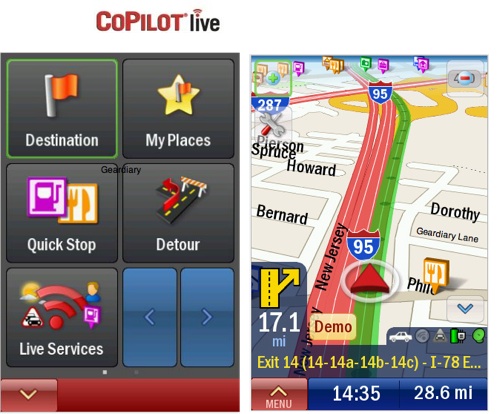
Complete view of phone with Co-Pilot in portrait mode, it adjusts automatically according to the orientation of the phone:-
Landscape mode as well as portrait:-
This is a view of the menu screen and a second view of the system in portrait format again:-
Sean67VRS said:
Great review VXRTOM but do you know if co/pilot will work with the tom tom cradle? I like the sound of co-pilot but don't want a naff cradle!!!!! I suspect it won't but if the pin is known it might!!!
Thanks Sean,Yes as far as I am aware the co-pilot will work with the TomTom cradle. In the instructions I got with the cradle it says that to use the cradle with any other apps, you have to download the 'TomTom car kit tool' app which is free from the app store to make it work.

Although it is pricey, I do thoroughly recommend the mount. Very Solid and the rotate feature is nice.
Gassing Station | In-Car Electronics | Top of Page | What's New | My Stuff