
More Garmin edge 1000 issues after update
Discussion


I do find that the 1000 has its issues, nothing major but quite frustrating for their supposed top model. After the update today the time and date was incorrect and took a few restarts for it to set itself again. It's also stopped automatically uploading using wifi AGAIN.
Anyone having any issues after upgrading to software Version 12?
Anyone having any issues after upgrading to software Version 12?
 king s
z4RRSchris said:
E65Ross said:
Mine seems fine now. I don't see a problem with the out front mount though?
you got a stages PM? the 1000 they moved the sensor so with an out front mount it drops out all the time. Yet another update, and when I try to update it keeps saying "unable to validate update" and when I went to turn it off, the power sign kept showing....so had to hold the power button in....and guess what....the white rubber pad over the button completely sunk in so I had no way of turning it on/off....
I've had to remove the rubber pad which exposes the button, and I can turn it on/off using a pencil or something similar. Not very happy and obviously now concerned about riding in the wet with it. I'm not sure as to whether to stick with it, or fork out for a new unit. What do you think? It's a very expensive mistake!!
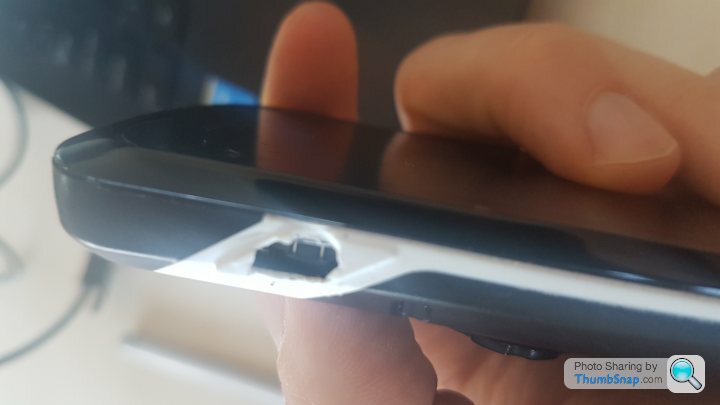
I've had to remove the rubber pad which exposes the button, and I can turn it on/off using a pencil or something similar. Not very happy and obviously now concerned about riding in the wet with it. I'm not sure as to whether to stick with it, or fork out for a new unit. What do you think? It's a very expensive mistake!!
I have a 520 so not so much to go wrong, the only issue I have is that my phone constantly drops in and out from the garmin making the feature absolutely useless.
Not sure if that's a phone issue or not but you'd think Bluetooth could maintain a decent signal from my back pocket to my bars!
Not sure if that's a phone issue or not but you'd think Bluetooth could maintain a decent signal from my back pocket to my bars!
vxsmithers said:
I have a 520 so not so much to go wrong, the only issue I have is that my phone constantly drops in and out from the garmin making the feature absolutely useless.
Not sure if that's a phone issue or not but you'd think Bluetooth could maintain a decent signal from my back pocket to my bars!
Well it's only the power button....so could go wrong on any device really....just bad luck I guess. At least I'll get a nice new unit with a brand new battery etc in there too Not sure if that's a phone issue or not but you'd think Bluetooth could maintain a decent signal from my back pocket to my bars!

all being well, I shouldn't actually be without one....Garmin are based around 10 miles from where I live and have said I can drop it in there
Going to do that on Tuesday when I get the chanceE65Ross said:
Yet another update, and when I try to update it keeps saying "unable to validate update" and when I went to turn it off, the power sign kept showing....so had to hold the power button in....and guess what....the white rubber pad over the button completely sunk in so I had no way of turning it on/off....
I've had to remove the rubber pad which exposes the button, and I can turn it on/off using a pencil or something similar. Not very happy and obviously now concerned about riding in the wet with it. I'm not sure as to whether to stick with it, or fork out for a new unit. What do you think? It's a very expensive mistake!!
Exactly the same issue: unable to validate update and power sign showing when turned off, (this drained the battery within a day).I've had to remove the rubber pad which exposes the button, and I can turn it on/off using a pencil or something similar. Not very happy and obviously now concerned about riding in the wet with it. I'm not sure as to whether to stick with it, or fork out for a new unit. What do you think? It's a very expensive mistake!!
Plugged into computer and eventually found a screen that told me to delete a log file from the device. I am sorry but I can't remember which one or where but went into My Computer, Opening the Garmin, Open Garmin Folder and then I forget. Deleted, tried to update and hey presto. All good again.
Luckily I didn't lever the power button off
 Good luck.
I only peeled the rubber away because it caved in and I had no way of using the device...It would have broken soon enough anyway judging by the fact I really didn't press the button that hard!
RE the failed update, it's happened to me in the past...and I've generally found that plugging it into the computer and loading garmin express seems to sort it out.
Be nice to get a nice new shiny one though. Although it's going to be a faff sorting out all my data fields, setting it up as I want, pairing it with my power meter, HRM, updating the firmware and maps on there, connecting it to my garmin account etc etc. Will take a couple of hours I suspect! If I remember....map updates alone can take ages. It's annoying you can't download the maps and manually put them onto the unit at a later date.
RE the failed update, it's happened to me in the past...and I've generally found that plugging it into the computer and loading garmin express seems to sort it out.
Be nice to get a nice new shiny one though. Although it's going to be a faff sorting out all my data fields, setting it up as I want, pairing it with my power meter, HRM, updating the firmware and maps on there, connecting it to my garmin account etc etc. Will take a couple of hours I suspect! If I remember....map updates alone can take ages. It's annoying you can't download the maps and manually put them onto the unit at a later date.
Edited by E65Ross on Friday 7th April 09:02
Gassing Station | Pedal Powered | Top of Page | What's New | My Stuff