
Projector advice
Discussion


I am in the process of having a house built with a decent sized finished basement at 21' x 15'. I am going to set up a home cinema room and I am drawing the plans up now even though the house will not be ready until July next year. The basement will have a similar plan to this,

The Family room space is my office, so that divider wall will remian. The kitche/Dining room is going to be one combined room. So, there is only one suitible wall for a screen which is on the 15' end. This will be my restricting factor for my ultimate screen size as the window is in the basment as well. I know nothing about screens but there is one major consideration.The basement has quite a few windows and a set of patio doors as shown in the "first floor" plan. I would prefer not to have to close all of the blinds each time I use the set up. Any ideas on Screen?
Amp

Denon 1712 which can be had for $300
Speakers, I am thinking these

JBL
They were down to $500 a couple of weeks ago and regret not buying them then.
Here's the major question,
Projector, my original plan was to pick up one of these

Optoma Technology HD20 1700 ANSI Lumens 16:9 Projector
I can pick one up for around $650 refurbished.
However, a spanner was throw into the works today!!! I went to Best buy and saw one of these,
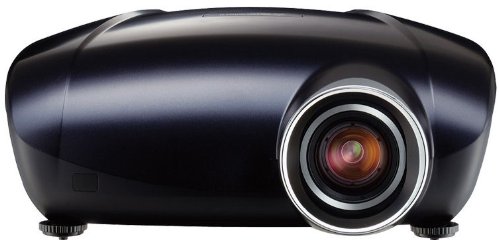
Mitsubishi HC6800
They have a display model with out remote control for $900. That seems like a bargin to me, but is it? I have read the reviews of the HC6800 and they say it is a good all rounder but not the best at anything. Problem is they are compairing it to other $3k projectors so I can not tell if the Mitsi is 10 times better than the Optoma or if my money is better spent ont he Optoma (or else where).
Can anyone help? Overall budget for this is whatever I can get away with! I was hoping to do this for $2k
The Family room space is my office, so that divider wall will remian. The kitche/Dining room is going to be one combined room. So, there is only one suitible wall for a screen which is on the 15' end. This will be my restricting factor for my ultimate screen size as the window is in the basment as well. I know nothing about screens but there is one major consideration.The basement has quite a few windows and a set of patio doors as shown in the "first floor" plan. I would prefer not to have to close all of the blinds each time I use the set up. Any ideas on Screen?
Amp
Denon 1712 which can be had for $300
Speakers, I am thinking these
JBL
They were down to $500 a couple of weeks ago and regret not buying them then.
Here's the major question,
Projector, my original plan was to pick up one of these
Optoma Technology HD20 1700 ANSI Lumens 16:9 Projector
I can pick one up for around $650 refurbished.
However, a spanner was throw into the works today!!! I went to Best buy and saw one of these,
Mitsubishi HC6800
They have a display model with out remote control for $900. That seems like a bargin to me, but is it? I have read the reviews of the HC6800 and they say it is a good all rounder but not the best at anything. Problem is they are compairing it to other $3k projectors so I can not tell if the Mitsi is 10 times better than the Optoma or if my money is better spent ont he Optoma (or else where).
Can anyone help? Overall budget for this is whatever I can get away with! I was hoping to do this for $2k
You haven't alowed any budget for a screen that I can see, yet if you have lots of windows and therefore potential for ambient light, you'll need a decent screen designed to help with ambient light. Much cheaper is to be able to black out the room, then you might even get by with a painted wall. As this is a UK forum you might get better information on $ priced deals over on AVSForum:
http://www.avsforum.com/avs-vb/
Note the 's' after AV as there is a UK based AVforums (which has the 's' after 'forum'.
I don't have any experience of the projectors you have listed, I'm more familiar with the JVC DILA models, so sorry I can't help on this score.
http://www.avsforum.com/avs-vb/
Note the 's' after AV as there is a UK based AVforums (which has the 's' after 'forum'.
I don't have any experience of the projectors you have listed, I'm more familiar with the JVC DILA models, so sorry I can't help on this score.
In truth I haven't really thought much about the nudget because if I did I would have to get authorization from the management (Mrs h0b0). If I go into this with out prior knowledge and spread the purchases over the next 9 months I have much more chance of success.
So, I have read on line that people have managed to get the Mitsubishi for $500. Some have checked their lamp life and found less than 50 hours. I am going to offer them $400 tomorrow and see how far that gets me. At that price I could sell it second hand for a profit if it doesn't work out.
So, I have read on line that people have managed to get the Mitsubishi for $500. Some have checked their lamp life and found less than 50 hours. I am going to offer them $400 tomorrow and see how far that gets me. At that price I could sell it second hand for a profit if it doesn't work out.
It's not so much about the budget, just to highlight that a room that isn't ideal in terms of ambient light (or reflected light due to light coloured decor) can mean that you need to consider a specialist (read expensive) screen. Otherwise the image might look quite disappointing, even with a very high end projector. You might then get questioned by the one-who-holds-the-finance why the picture looks so poor after you've spent all that money.
I wouldn't bank on making a profit out of selling a used projector either. I've lost more money on selling nearly new projectors than I care to mention...if it's worth more than your $400 then a dealer will know this.
why the picture looks so poor after you've spent all that money. I wouldn't bank on making a profit out of selling a used projector either. I've lost more money on selling nearly new projectors than I care to mention...if it's worth more than your $400 then a dealer will know this.
I have a HD20. I would swap it in an instant for a HC6800 though. The advice about blacking out the room is good. This makes the biggest difference to the image, more so than just having a better projector. It doesn't have to cost a lot, it's more effort put in than money, but the results can be excellent. I wouldn't dream of having a projector in a room that wasn't light controlled and treated to be honest, a plain white room is how I started out, but the difference blackout treatment makes to image and the experience is just too great to not do it. Check this out for some advice on how to do it and some sample images.
How to blackout your home cinema / theater
How to blackout your home cinema / theater
Edited by swiftpete on Sunday 25th December 14:55
Ok. I will get the projector bought and will figure out the room light. I think it is going to be dark anyway as it is a basement. But I will then get descrete blackout blinds for the windows and doors.
I have bought the speakers at $500 which seems a bargain. Going to pick up a sub and amp next.
I have bought the speakers at $500 which seems a bargain. Going to pick up a sub and amp next.
What are the thoughts on screen paint? I have seen a product called "Goo" which gets great reviews compared to even decent screens. I am assuming I should go with white as it will be better suited than grey.
2 thoughts on construction of the screen,
1). the house will be brand new so the walls will be flat.
2). Alternatively, I can get a board and paint that. I could then creat a 3" border and cover that in black felt.
The second option may look better. What do you think? I have been on all the forums but feel over whelmed by information so thought I would continue asking here as the info has been very useful.
2 thoughts on construction of the screen,
1). the house will be brand new so the walls will be flat.
2). Alternatively, I can get a board and paint that. I could then creat a 3" border and cover that in black felt.
The second option may look better. What do you think? I have been on all the forums but feel over whelmed by information so thought I would continue asking here as the info has been very useful.
I haven't seen 'goo' in action, but I do know that you have to be very careful with application: Any rough patches will stand out, most noticably when the image pans across the screen, then you magically 'see' the screen'. I've had this with a poor quality electric screen and it pulls you out of the film. Goo has a bit of a cult following, so the threads on AVForums might be a little 'evangelical' too (but then so are some of the 'DaLite HP' threads too, seems the nature of screen threads). At least it's not too expensive to try and you could always save up for a ready made screen if you aren't satisfied. Just don't bank on a new house having flat walls.
The grey colour might suit your room better if there is some ambient light remaining or it there are light coloured walls, as it will give you better contrast than a white screen in such a room. If the room is perfectly dark and has dark walls, ceiling, etc then white would be preferable.
Another thing to think of is the screen shape: Think about your intended use first. Are you going to mostly watch films from BluRays or are you likely to watch sports, TV shows and concerts? If it's mostly films, have a look at your collection and see how many discs are '2.40:1' or '2.35:1'. In my case I found it was virtually all of them, so I chose a screen that shape (Aspect ratio). This way I don't have black bars on my screen (in the beginning these were 'zoomed' off the screen, but now I use an anamorphic lens and there are a few projectors that can do this zoom via a memory setting). If I do watch a TV show or concert, I adjust the projector (remove the A lens in my case) and there are black bars even side of my screen,, but these are easy to cover with black panels or material.
If you think that you'll be mostly watching TV shows, sports or concerts (or just don't want the bother of zooming/buying a lens) then go for a 16:9 screen. Whichever you do though, have a think beforehand as I see many posts about 'why the black bars on my screen?' by owners of 16:9 screens.
The grey colour might suit your room better if there is some ambient light remaining or it there are light coloured walls, as it will give you better contrast than a white screen in such a room. If the room is perfectly dark and has dark walls, ceiling, etc then white would be preferable.
Another thing to think of is the screen shape: Think about your intended use first. Are you going to mostly watch films from BluRays or are you likely to watch sports, TV shows and concerts? If it's mostly films, have a look at your collection and see how many discs are '2.40:1' or '2.35:1'. In my case I found it was virtually all of them, so I chose a screen that shape (Aspect ratio). This way I don't have black bars on my screen (in the beginning these were 'zoomed' off the screen, but now I use an anamorphic lens and there are a few projectors that can do this zoom via a memory setting). If I do watch a TV show or concert, I adjust the projector (remove the A lens in my case) and there are black bars even side of my screen,, but these are easy to cover with black panels or material.
If you think that you'll be mostly watching TV shows, sports or concerts (or just don't want the bother of zooming/buying a lens) then go for a 16:9 screen. Whichever you do though, have a think beforehand as I see many posts about 'why the black bars on my screen?' by owners of 16:9 screens.
Gassing Station | Home Cinema & Hi-Fi | Top of Page | What's New | My Stuff