
Connecting iPad to DVD/Hi-fi for sound only
Discussion


Google has failed me on my quest for help so I'm asking here. I have bought the Belkin cable as pictured below, and if I connect the Red/White plugs into the Audio in on the back of my DVD/Home cinema system I can play music through the speakers from the iPad no problem. But, if I plug the same plugs into the Audio in on the back of the TV I get no sound - even when changing between AV/HDMI and so on.
What has thrown me is that I can have sound from the TV/Sky box or PS3 through the same speakers.
I'm probably not making much sense so please ask me if you need more clarity!

What has thrown me is that I can have sound from the TV/Sky box or PS3 through the same speakers.
I'm probably not making much sense so please ask me if you need more clarity!
Road2Ruin said:
The audio sockets on the Tv are probably outputs not inputs. You can hear the sky/ps3 because the sound is coming from the HDMI cable to the TV.
Unfortunately for the OP, you are correct...they will be audio outputs on the TV. He will need a home cinema amplifier with the requisite inputs for the iPad.FunBusMk2 said:
Thanks for the replies. I've just double checked and its definitely Audio and marked "Component inputs"?
Are you talking about the three grouped together? Red, white and yellow? If so then they are for the component input from a video source not sure they will work with just the audio as never tried it. It usually says what AV channel they are on next to it. If it works then all you should need to do is plug them in press play and change the TV to that relevant AV channel. As I say though I am not sure it will work withou the video signal too as a lot of TVs shut down without the video signal as they think something is wrong.Could I ask if the splitter below would allow me to have 2 devices connected to the hi-fi at the same time? Therefore I could leave the iPad adapter plugged in permanently?
http://www.ecrater.co.uk/p/13150378/1-rca-av-male-...
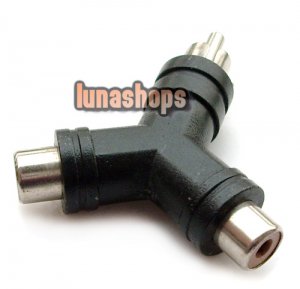
http://www.ecrater.co.uk/p/13150378/1-rca-av-male-...
Yes it would I did this many years ago with something similar. However, there is sometimes a loss of quality at high volume due to interference from the other thing plugged in (it wasn't much of a problem though). This happened even if it was off. Of course that may not be the case with the items you have but it was with mine.
component input is yellow (yellow) and l/r audio (white/red) so you can use that input for audio only if you wish, you'd just need to select the component in on your tv. I don't know why you'd want to connect it to your tv instead of hifi for sound though as tv speakers are generally rubbish. The splitter will work if your hifi has only one spare input, though don't run the two things connected to it at the same time as you will overload the input.
I get ya. That should work fine into the component in's audio connections, not sure why you're not getting sound out from your tv when connected that way. Composite is the yellow, component is r/g/b- my mistake earlier (always forget which way 'round those go!).
I take it you have selected the 'component in' setting on your tv when you've tried getting sound from your ipad?
Sounds like best option is just have the ipad connected directly to your hifi.
I take it you have selected the 'component in' setting on your tv when you've tried getting sound from your ipad?
Sounds like best option is just have the ipad connected directly to your hifi.
Edited by chazola on Monday 16th January 16:16
chazola said:
component input is yellow (yellow) and l/r audio (white/red) so you can use that input for audio only if you wish, you'd just need to select the component in on your tv. I don't know why you'd want to connect it to your tv instead of hifi for sound though as tv speakers are generally rubbish. The splitter will work if your hifi has only one spare input, though don't run the two things connected to it at the same time as you will overload the input.
Yellow is COMPOSITE video, not component which are Red, Green, Blue.Gassing Station | Home Cinema & Hi-Fi | Top of Page | What's New | My Stuff