
Help!! Anyone with a beovision?
Discussion


I need help
I've spent the last 40 minutes trying to set up a f king simple Apple TV .
I succeeded in getting Apple TV but with the sound from the tv and then I succeeded in being unable to play any source. How fking complicated to they have to fking well make this?
Anyway, first simple question:
How do you toggle between input sources?
As it stands the sky box is scarted into the back and if I press DTV I have sky. The apple is plugged into the dvi socket . How do I toggle to that? I've even had the fking manuals out like a massive girl and they are no fking help at all. Can you tell I'm annoyed?
Anyway thanks in anticipation
I've spent the last 40 minutes trying to set up a f
king simple Apple TV . I succeeded in getting Apple TV but with the sound from the tv and then I succeeded in being unable to play any source. How f
king complicated to they have to fking well make this?Anyway, first simple question:
How do you toggle between input sources?
As it stands the sky box is scarted into the back and if I press DTV I have sky. The apple is plugged into the dvi socket . How do I toggle to that? I've even had the f
king manuals out like a massive girl and they are no fking help at all. Can you tell I'm annoyed?Anyway thanks in anticipation
I've been into the menu and there seems to be no way to toggle between them. It's a waste of fking time if the dvi doesn't carry audio anyway. Thanks for trying but I know the basics and you are never going to guess how I need to do it- you will have to know your way round a beovision to do it. I have a Sony in the kitchen in it is exactly as you describe it
king time if the dvi doesn't carry audio anyway. Thanks for trying but I know the basics and you are never going to guess how I need to do it- you will have to know your way round a beovision to do it. I have a Sony in the kitchen in it is exactly as you describe itblindswelledrat said:
I don't even know what that means
Well, normally, if I was running DVD from a laptop, I would have to run audio from the headphone jack to the audio in, (red and yellow pledges on the back of the TV), to take the audio. The Apple TV had an optical out, so if the TV has an optical in, then you could carry audio that way. You should be able to tell the TV which audio to use in the menu, (if there is more than one method). What make and model beovision is it?
blindswelledrat said:
You can set the audio in the menu, h, but I don't have a wire to make any connections as I thought a dvi was the same as hdmi. The model is a beovision 7 mark 3 32 inch
HdmI to dvi cable to the TV. 3.5mm to phono cable to the phono sockets on av4 in the back of the TV. The back panel that comes off should have a diagram that shows you where the phono inputs are.Menu on the remote, connections, select AV4. Set HD input to DVI, for "source" scroll through until you find one of the inputs that relates to a spare button on your remote (Vmem)
Save
Press Vmem on remote.
Job jobbed
If your TV is connected to other B&O TVs or speakers in other rooms, you can now press Vmem in any room yo get the audio you play from, or airplay to, the apple tv
OK, how you would do it would be to plug in the DVI, this would be your video. Then in the top right of your panel is an 'L R'. This would be where you would plug in your audio. However, as your TV is a bit older, it doesn't have optical audio, of HDMI, which buggers you a bit.
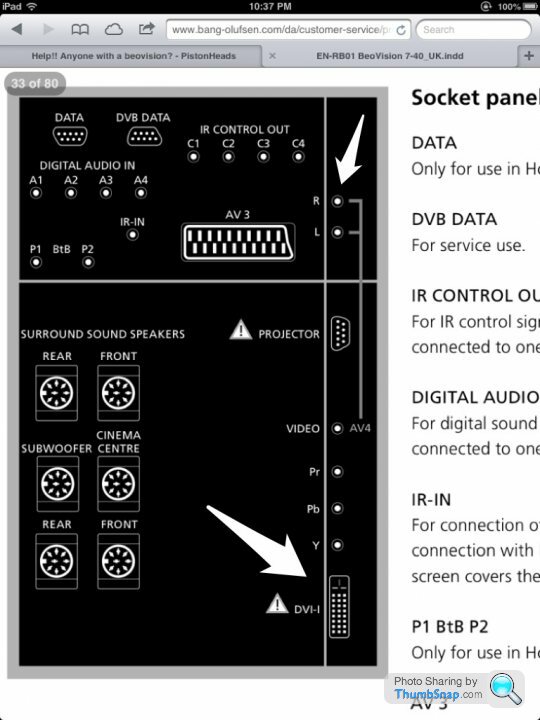
You could purchase an optical to analogue converter, which would allow you to connect the audio, or just plug the optical audio directly into any audio equipmet you may be using. Talk sense seems to know what he is on about... Vmem? Never heard of it! :
You could purchase an optical to analogue converter, which would allow you to connect the audio, or just plug the optical audio directly into any audio equipmet you may be using. Talk sense seems to know what he is on about... Vmem? Never heard of it! :
Edited by TheHeretic on Thursday 11th April 20:43
TheHeretic said:
OK, how you would do it would be to plug in the DVI, this would be your video. Then in the top right of your panel is an 'L R'. This would be where you would plug in your audio. However, as your TV is a bit older, it doesn't have optical audio, of HDMI, which buggers you a bit.
You could purchase an optical to analogue converter, which would allow you to connect the audio.
Or assign the whole thing to AV3 instead of AV 4 and use one of those scart to composite adapters you get with a wii etc. you just then set the HD input to av3 instead of av4You could purchase an optical to analogue converter, which would allow you to connect the audio.
talkssense said:
HdmI to dvi cable to the TV. 3.5mm to phono cable to the phono sockets on av4 in the back of the TV. The back panel that comes off should have a diagram that shows you where the phono inputs are.
Menu on the remote, connections, select AV4. Set HD input to DVI, for "source" scroll through until you find one of the inputs that relates to a spare button on your remote (Vmem)
Save
Press Vmem on remote.
Job jobbed
If your TV is connected to other B&O TVs or speakers in other rooms, you can now press Vmem in any room yo get the audio you play from, or airplay to, the apple tv
Thanks. Will try that at half time if I can find an audio lead anywhere. Any reason you plucked av4 instead of 2 or 3 in that description?Menu on the remote, connections, select AV4. Set HD input to DVI, for "source" scroll through until you find one of the inputs that relates to a spare button on your remote (Vmem)
Save
Press Vmem on remote.
Job jobbed
If your TV is connected to other B&O TVs or speakers in other rooms, you can now press Vmem in any room yo get the audio you play from, or airplay to, the apple tv
blindswelledrat said:
Thanks. Will try that at half time if I can find an audio lead anywhere. Any reason you plucked av4 instead of 2 or 3 in that description?
The phono inputs are tied to av4, as in heretics picture.To add PC as a source(assuming you have a beo4)
Press standby (red dot) and list together. The display on the remote should show "add?"
Press centre button on remote. Press right until display (on remote, not TV) shows PC. Press centre button again.
Press "list" on remote until display on remote shows PC. Press centre button to select PC spurce(hopefully)
talkssense said:
The phono inputs are tied to av4, as in heretics picture.
To add PC as a source(assuming you have a beo4)
Press standby (red dot) and list together. The display on the remote should show "add?"
Press centre button on remote. Press right until display (on remote, not TV) shows PC. Press centre button again.
Press "list" on remote until display on remote shows PC. Press centre button to select PC spurce(hopefully)
Can I use this to add vmem as an option for av4?To add PC as a source(assuming you have a beo4)
Press standby (red dot) and list together. The display on the remote should show "add?"
Press centre button on remote. Press right until display (on remote, not TV) shows PC. Press centre button again.
Press "list" on remote until display on remote shows PC. Press centre button to select PC spurce(hopefully)
Gassing Station | Home Cinema & Hi-Fi | Top of Page | What's New | My Stuff