
Panasonic - a neat trick..
Discussion


I was getting annoyed with my Panasonic TV not turning on on the HDMI input, it would always default to DVB (even with 'AV' selected in the menu). Then I discovered there's a hidden menu setting...
Press and hold the '-' button on the side of the screen and press 'AV' on the remote 3 times. It gives you a 'hotel' menu which allows you to specify the input the TV starts on (which HDMI, even!) as well as things like default volume (I always have mine down as it comes through the stereo).
VERY useful little menu, thought I'd pass it on!
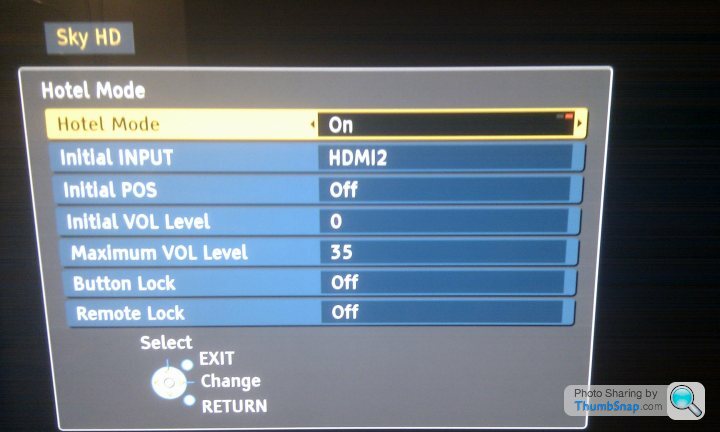
Press and hold the '-' button on the side of the screen and press 'AV' on the remote 3 times. It gives you a 'hotel' menu which allows you to specify the input the TV starts on (which HDMI, even!) as well as things like default volume (I always have mine down as it comes through the stereo).
VERY useful little menu, thought I'd pass it on!

BliarOut said:
Funk said:
Glad this has been helpful to people! Surprised it's not something that's more widely known about to be frank!
It's bloody annoying of Panasonic to give you the option in the regular menu and for it not to work 
Mr AJ said:
Funk said:
I know it seems lazy, but I turn the TV and Sky on from the Sky remote - it's a pain to have to dig out the TV one to hit 'AV'...!
After pressing the TV button on the sky remote you could just press the 'Help' button to cycle through the AV slots. 
Still, the Hotel Mode is the more elegant solution...!
Edited by Funk on Monday 15th November 11:12
Thats something I didnt know about, what model is your TV? It would be usefull to test it on other models to see if it works on those also.
TBH ive set loads up using the AV option in the normal menu and have never had one that hasnt worked. The only problem I have come across is the Auto standby option in the SKY menu, the TV will only switch to AV if the AV device is active and not in standby.
TBH ive set loads up using the AV option in the normal menu and have never had one that hasnt worked. The only problem I have come across is the Auto standby option in the SKY menu, the TV will only switch to AV if the AV device is active and not in standby.
Cheers Funk, this has been bugging me on my Samsung too and I'd never heard of "Hotel Mode" for tellies before.
A quick Google search later and mine is all sorted too, for Samsungs with the tv on standby you press Info, Menu, Mute and the Power on (all separately). Loads and loads of options, just choose Hotel Mode and then select which source and volume you want on power on.
A quick Google search later and mine is all sorted too, for Samsungs with the tv on standby you press Info, Menu, Mute and the Power on (all separately). Loads and loads of options, just choose Hotel Mode and then select which source and volume you want on power on.
Bugeyeandy said:
Cheers Funk, this has been bugging me on my Samsung too and I'd never heard of "Hotel Mode" for tellies before.
A quick Google search later and mine is all sorted too, for Samsungs with the tv on standby you press Info, Menu, Mute and the Power on (all separately). Loads and loads of options, just choose Hotel Mode and then select which source and volume you want on power on.
It works! Thank you! I even phoned up Samsung to ask how to do this and was told 'not possible'A quick Google search later and mine is all sorted too, for Samsungs with the tv on standby you press Info, Menu, Mute and the Power on (all separately). Loads and loads of options, just choose Hotel Mode and then select which source and volume you want on power on.
On my Samsung it didn't affect the ability to select any other features once hotel mode was selected.
Strangely in the workshop menus you can also change the model code of the tv, on mine all this seemed to do is vary the on screen graphics a bit for volume, brightness etc...
Lots of other settings in these menus too, even has some test patterns to enable you to adjust the tv properly (if I had a clue how to do that!)
Strangely in the workshop menus you can also change the model code of the tv, on mine all this seemed to do is vary the on screen graphics a bit for volume, brightness etc...
Lots of other settings in these menus too, even has some test patterns to enable you to adjust the tv properly (if I had a clue how to do that!)
Bugeyeandy said:
On my Samsung it didn't affect the ability to select any other features once hotel mode was selected.
Strangely in the workshop menus you can also change the model code of the tv, on mine all this seemed to do is vary the on screen graphics a bit for volume, brightness etc...
Lots of other settings in these menus too, even has some test patterns to enable you to adjust the tv properly (if I had a clue how to do that!)
Don't fStrangely in the workshop menus you can also change the model code of the tv, on mine all this seemed to do is vary the on screen graphics a bit for volume, brightness etc...
Lots of other settings in these menus too, even has some test patterns to enable you to adjust the tv properly (if I had a clue how to do that!)
 k about with things in that menu, as you can lose all picture permanently.
Gassing Station | Home Cinema & Hi-Fi | Top of Page | What's New | My Stuff