
Can you run two phone lines out of the 'master' box?
Discussion


Ok, so when I bought the house, I had the master phone socket behind the TV. One of these;
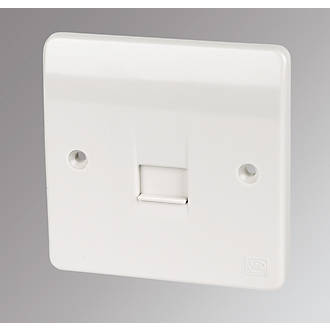
Ths is the only one I had.
Because I wanted to connect the pc/router/ethernet cable all together in another room, I removed the phone line from the wall outside (which ran into behind the TV), ran it across the front of the house to the other side of the building, put a new master socket in, and all works fine. The TV/skybox never connected to the internet, because i've never bothered with it.
Now I want to upgrade my tv, and it seems bt/sky etc all want some sort of phoneline connection from the box to the phone line. Now i have the reverse problem, that i'd have to run phone line from the tv to the pc master phone socket and it'd be a nightmare.
So in short, this is what I have outside;

The wire running off to the right is toward the PC.
Can I leave the phone wire going to the master pc socket, and run a second phone wire from this box to the left, back into the now redundant master socket behind the tv? So essentially, two phone wires coming out of this box, one to the right for the router, and a new one to the left into the box behind the TV for a skybox?
Ths is the only one I had.
Because I wanted to connect the pc/router/ethernet cable all together in another room, I removed the phone line from the wall outside (which ran into behind the TV), ran it across the front of the house to the other side of the building, put a new master socket in, and all works fine. The TV/skybox never connected to the internet, because i've never bothered with it.
Now I want to upgrade my tv, and it seems bt/sky etc all want some sort of phoneline connection from the box to the phone line. Now i have the reverse problem, that i'd have to run phone line from the tv to the pc master phone socket and it'd be a nightmare.
So in short, this is what I have outside;
The wire running off to the right is toward the PC.
Can I leave the phone wire going to the master pc socket, and run a second phone wire from this box to the left, back into the now redundant master socket behind the tv? So essentially, two phone wires coming out of this box, one to the right for the router, and a new one to the left into the box behind the TV for a skybox?
In essence yes. You just need to wire it up the same as you would if you plugged in a line splitter into the master socket in the house.
Which would have been a better idea to start with. I suspect a BT engineer would have a fit if you have any issues and need them to come and look at your setup where you have played about "their" side of the master socket.
Which would have been a better idea to start with. I suspect a BT engineer would have a fit if you have any issues and need them to come and look at your setup where you have played about "their" side of the master socket.
I'm sure someone who's a qualified telecom engineer will come along soon and give you the formal answer, but my view is no - you can't do exactly what you're looking to do.
However, I THINK you can probably achieve your aim. The telephone wire you have probably contains 4 separate pairs of wires. A telephone only needs one of these pairs.
You should be able to take a free pair from the wire in your new master socket and punch those down onto pins 2 and 5 (same pins as the working line is using). Then go back to the box on the wall outside and use some jelly connectors (available on eBay) to join your new pair to the pair used on the original master socket.
The only thing I'm not sure of is if having the same signal running up and then down two pairs in the same wire will cause interference.
However, I THINK you can probably achieve your aim. The telephone wire you have probably contains 4 separate pairs of wires. A telephone only needs one of these pairs.
You should be able to take a free pair from the wire in your new master socket and punch those down onto pins 2 and 5 (same pins as the working line is using). Then go back to the box on the wall outside and use some jelly connectors (available on eBay) to join your new pair to the pair used on the original master socket.
The only thing I'm not sure of is if having the same signal running up and then down two pairs in the same wire will cause interference.
No, you can't tee off a new cable from the box outside; the incoming cable needs to hit one (& only one) master box & then extensions are taken from that. You'll need to run another cable back from the PC master box to the outside box & then on to the TV secodary box.
If you do have spare pairs in the cable you can in theory use them as described above but you'll have ADSL/VDSL signals going both ways in the cable & you may well get poor performance. You can try it though.
Note it will be instantly obvious you've been messing with the cabling & it's an offence to do so. I've no idea what the penalty is.
If you do have spare pairs in the cable you can in theory use them as described above but you'll have ADSL/VDSL signals going both ways in the cable & you may well get poor performance. You can try it though.
Note it will be instantly obvious you've been messing with the cabling & it's an offence to do so. I've no idea what the penalty is.
Harpoon said:
Is it definitely a phone connection you need for the TV box? Or is it Ethernet?
I thought Sky had got rid of the requirement to plug in a Sky box and a quick search suggests Sky Q doesn't even have a phone port.
Yeah this is true according the sky engineer we recently used.I thought Sky had got rid of the requirement to plug in a Sky box and a quick search suggests Sky Q doesn't even have a phone port.
You no longer need the phoneline for sky boxes.
The sky box should be able to connect to your router using wifi.
Not sure about the BT boxes,and some of the Talk talk ones will need ethernet. You can do this by using a powerline plug in job.
The best connection for your router is straight off the BT line into a single master socket with no extensions off it. You shouldnt need extensions in this day and age, DECT phones are really good, theres no need for extra wiring and it can slow your broadband down.
As others have rightly pointed out the grey box is on the BT side of the network. In the days when I used to work for BT a cup of tea would would make most engineers overlook any "diy" faults on the line as it would get booked onto the network, but I think in this day and age you would be getting the bill.
The sky box should be able to connect to your router using wifi.
Not sure about the BT boxes,and some of the Talk talk ones will need ethernet. You can do this by using a powerline plug in job.
The best connection for your router is straight off the BT line into a single master socket with no extensions off it. You shouldnt need extensions in this day and age, DECT phones are really good, theres no need for extra wiring and it can slow your broadband down.
As others have rightly pointed out the grey box is on the BT side of the network. In the days when I used to work for BT a cup of tea would would make most engineers overlook any "diy" faults on the line as it would get booked onto the network, but I think in this day and age you would be getting the bill.
Op you cant do as you suggested , for voice that will work but it will mess up your broadband its called star wiring or a bridge tap apart from the naughtiness of messing with openreach property , you need as suggested an ethernet connection to the tv location or to move the router there .
bristolracer said:
You no longer need the phoneline for sky boxes.
The sky box should be able to connect to your router using wifi.
Not sure about the BT boxes,and some of the Talk talk ones will need ethernet. You can do this by using a powerline plug in job.
The best connection for your router is straight off the BT line into a single master socket with no extensions off it. You shouldnt need extensions in this day and age, DECT phones are really good, theres no need for extra wiring and it can slow your broadband down.
As others have rightly pointed out the grey box is on the BT side of the network. In the days when I used to work for BT a cup of tea would would make most engineers overlook any "diy" faults on the line as it would get booked onto the network, but I think in this day and age you would be getting the bill.
The fault system can now see if there is a bridge tap / star wiring issue and its recorded on the job notes , bit more difficult nowadays to “lose” these faults elsewhere.The sky box should be able to connect to your router using wifi.
Not sure about the BT boxes,and some of the Talk talk ones will need ethernet. You can do this by using a powerline plug in job.
The best connection for your router is straight off the BT line into a single master socket with no extensions off it. You shouldnt need extensions in this day and age, DECT phones are really good, theres no need for extra wiring and it can slow your broadband down.
As others have rightly pointed out the grey box is on the BT side of the network. In the days when I used to work for BT a cup of tea would would make most engineers overlook any "diy" faults on the line as it would get booked onto the network, but I think in this day and age you would be getting the bill.
Mr Pointy said:
No, you can't tee off a new cable from the box outside; the incoming cable needs to hit one (& only one) master box & then extensions are taken from that. You'll need to run another cable back from the PC master box to the outside box & then on to the TV secodary box.
If you do have spare pairs in the cable you can in theory use them as described above but you'll have ADSL/VDSL signals going both ways in the cable & you may well get poor performance. You can try it though.
Note it will be instantly obvious you've been messing with the cabling & it's an offence to do so. I've no idea what the penalty is.
Most of this is cobblers.If you do have spare pairs in the cable you can in theory use them as described above but you'll have ADSL/VDSL signals going both ways in the cable & you may well get poor performance. You can try it though.
Note it will be instantly obvious you've been messing with the cabling & it's an offence to do so. I've no idea what the penalty is.
Op.
You can run from the grey box to a different socket, however, you should only use one or the other, especially for your internet and disconnect the one that will be redundant.
Nearly all about equipment now comes with WiFi and Ethernet connectability, so it would be better to just use the point you have, use a router/switch to spread the internet.
We always say that anything that can be plugged in, plug it in.
Leave WiFi for phones tablets etc.
Alucidnation said:
Mr Pointy said:
No, you can't tee off a new cable from the box outside; the incoming cable needs to hit one (& only one) master box & then extensions are taken from that. You'll need to run another cable back from the PC master box to the outside box & then on to the TV secodary box.
If you do have spare pairs in the cable you can in theory use them as described above but you'll have ADSL/VDSL signals going both ways in the cable & you may well get poor performance. You can try it though.
Note it will be instantly obvious you've been messing with the cabling & it's an offence to do so. I've no idea what the penalty is.
Most of this is cobblers.If you do have spare pairs in the cable you can in theory use them as described above but you'll have ADSL/VDSL signals going both ways in the cable & you may well get poor performance. You can try it though.
Note it will be instantly obvious you've been messing with the cabling & it's an offence to do so. I've no idea what the penalty is.
Op.
You can run from the grey box to a different socket, however, you should only use one or the other, especially for your internet and disconnect the one that will be redundant.
Nearly all about equipment now comes with WiFi and Ethernet connectability, so it would be better to just use the point you have, use a router/switch to spread the internet.
We always say that anything that can be plugged in, plug it in.
Leave WiFi for phones tablets etc.
 t. One of knows what they are doing & it's not you.
Mr Pointy said:
Alucidnation said:
Mr Pointy said:
No, you can't tee off a new cable from the box outside; the incoming cable needs to hit one (& only one) master box & then extensions are taken from that. You'll need to run another cable back from the PC master box to the outside box & then on to the TV secodary box.
If you do have spare pairs in the cable you can in theory use them as described above but you'll have ADSL/VDSL signals going both ways in the cable & you may well get poor performance. You can try it though.
Note it will be instantly obvious you've been messing with the cabling & it's an offence to do so. I've no idea what the penalty is.
Most of this is cobblers.If you do have spare pairs in the cable you can in theory use them as described above but you'll have ADSL/VDSL signals going both ways in the cable & you may well get poor performance. You can try it though.
Note it will be instantly obvious you've been messing with the cabling & it's an offence to do so. I've no idea what the penalty is.
Op.
You can run from the grey box to a different socket, however, you should only use one or the other, especially for your internet and disconnect the one that will be redundant.
Nearly all about equipment now comes with WiFi and Ethernet connectability, so it would be better to just use the point you have, use a router/switch to spread the internet.
We always say that anything that can be plugged in, plug it in.
Leave WiFi for phones tablets etc.
t. One of knows what they are doing & it's not you.Mr Pointy said:
No, you can't tee off a new cable from the box outside; the incoming cable needs to hit one (& only one) master box & then extensions are taken from that. You'll need to run another cable back from the PC master box to the outside box & then on to the TV secodary box.
If you do have spare pairs in the cable you can in theory use them as described above but you'll have ADSL/VDSL signals going both ways in the cable & you may well get poor performance. You can try it though.
Note it will be instantly obvious you've been messing with the cabling & it's an offence to do so. I've no idea what the penalty is.
That will get you voice to both locations but not internet , the router could be be plugged into either location ( as long as the main isnt a service specific faceplate ) the tv / decoder needs an ethernet connection from the router .If you do have spare pairs in the cable you can in theory use them as described above but you'll have ADSL/VDSL signals going both ways in the cable & you may well get poor performance. You can try it though.
Note it will be instantly obvious you've been messing with the cabling & it's an offence to do so. I've no idea what the penalty is.
Mr Pointy said:
Alucidnation said:
Mr Pointy said:
No, you can't tee off a new cable from the box outside; the incoming cable needs to hit one (& only one) master box & then extensions are taken from that. You'll need to run another cable back from the PC master box to the outside box & then on to the TV secodary box.
If you do have spare pairs in the cable you can in theory use them as described above but you'll have ADSL/VDSL signals going both ways in the cable & you may well get poor performance. You can try it though.
Note it will be instantly obvious you've been messing with the cabling & it's an offence to do so. I've no idea what the penalty is.
Most of this is cobblers.If you do have spare pairs in the cable you can in theory use them as described above but you'll have ADSL/VDSL signals going both ways in the cable & you may well get poor performance. You can try it though.
Note it will be instantly obvious you've been messing with the cabling & it's an offence to do so. I've no idea what the penalty is.
Op.
You can run from the grey box to a different socket, however, you should only use one or the other, especially for your internet and disconnect the one that will be redundant.
Nearly all about equipment now comes with WiFi and Ethernet connectability, so it would be better to just use the point you have, use a router/switch to spread the internet.
We always say that anything that can be plugged in, plug it in.
Leave WiFi for phones tablets etc.
t. One of knows what they are doing & it's not you.Megaflow said:
That’s odd, because I did exactly what the OP is asking several years ago in my first house and it worked fine.
On fttc ? I suspect not .what used to be fine for voice and to a degree adsl will knock hell out of a higher speed connection .Edited by bimsb6 on Wednesday 10th April 21:29
This bloke looks like he knows what he’s talking about.
https://www.google.co.uk/search?q=how+to+install+t...
https://www.google.co.uk/search?q=how+to+install+t...
spurring an additional pair from the external connection works for voice but not for ADSL and FTTC..it creates a bridge tap issue and slows down the connection.
The grey box is called a BT66..others have said it will work..ignore them ..it may work..but wont work well and will be highlighted when the line ever gets tested.
It's possible to back feed an extension on the spare pair of wires for voice only via the extension plate.
easy enough if you know what you're doing
The grey box is called a BT66..others have said it will work..ignore them ..it may work..but wont work well and will be highlighted when the line ever gets tested.
It's possible to back feed an extension on the spare pair of wires for voice only via the extension plate.
easy enough if you know what you're doing
Andrew_S said:
This bloke looks like he knows what he’s talking about.
https://www.google.co.uk/search?q=how+to+install+t...
He doesn’t need an extn he needs a data extn / ethernet connection .https://www.google.co.uk/search?q=how+to+install+t...
Gassing Station | Homes, Gardens and DIY | Top of Page | What's New | My Stuff