
rtsp code for iegeek camera is it possible
Discussion


Hi,
Has anyone been able to write the rtsp code to enable OBS to stream from an iegeek wifi camera. Im trying to find out if its possible. I understand making the rtsp requires
rtsp://(username)(password)@(ip address) rtspport)(info on where the camera is).
I believe the rtsp for my camera is 554 and I have been able to write the rtsp line up to that point as I know the username, password and ip address. I just dont know what I should be writing after the rtsp port number. Ive tried googling it and have tried multiple endings with no success. Im trying to be able to stream my camera to youtube eventually if its possible.
Thanks
Has anyone been able to write the rtsp code to enable OBS to stream from an iegeek wifi camera. Im trying to find out if its possible. I understand making the rtsp requires
rtsp://(username)(password)@(ip address)
rtspport)(info on where the camera is). I believe the rtsp for my camera is 554 and I have been able to write the rtsp line up to that point as I know the username, password and ip address. I just dont know what I should be writing after the rtsp port number. Ive tried googling it and have tried multiple endings with no success. Im trying to be able to stream my camera to youtube eventually if its possible.
Thanks
richelli said:
I’m trying to access it from my house using the OBS software on my pc, but the camera is not on my home network, it’s at a family members.
Focus on getting it working on the local network first - iirc RTSP is a protocol for advertising how you can connect to the camera, not actually connecting to it, so remote connection is difficult.Thanks for the advice. I don’t really have an option to connect it locally. It’s in a bird box on another property and I can view it remotely and pull video off it but wanted to live stream it. I just don’t know how to finish the code off. Would the code be different if it was fitted within my own network. Don’t really understand it all just trying to figure it out.
What's the exact model of your iegeek camera? Am I understanding you right that the camera is not on your own network, but in another house? If so, do you have TCP port 554 forwarded in the router to the camera?
As someone has suggested, worth getting it working locally first before sending it out to the wildernees as that just adds a bunch more links in the chain that you need to get right.
Edit: I see we crossed paths and I understand the location side now. Model number and port forwarding confirmation would still be useful though.
As someone has suggested, worth getting it working locally first before sending it out to the wildernees as that just adds a bunch more links in the chain that you need to get right.
Edit: I see we crossed paths and I understand the location side now. Model number and port forwarding confirmation would still be useful though.
Edited by tux850 on Thursday 16th March 22:50
It an iegeek 2mp ip camera, model ie20. I would have to check the port forwarding setting on the router. I can access it remotely via ip camera software from my house using a pc and watch it live and via the phone app so not sure if that means the port is forwarded or not. I can check tomorrow on the port forwarding on the house router.
richelli said:
Would the code be different if it was fitted within my own network.
Yes, the URL would be different - on the same network you'd be using the IP address of the camera, externally you'd be using the external IP address and then have port forwarding in place. And you've no idea if the URL is right, but the cameras not accessible for a million other reasons.But this might not work at all - in my case my camera uses a fixed RTSP port, but a randomised video port such that it can only be accessed externally via the manufacturers app and nothing else as you can't port forward it (AFAIK).
That's why I suggested getting it working locally first so you know you have the right address.
If you use the "IP Cams" iOS app it's able to scan the network for cameras and once your connected from the settings you can see the URL it's using.
richelli said:
It an iegeek 2mp ip camera, model ie20. I would have to check the port forwarding setting on the router. I can access it remotely via ip camera software from my house using a pc and watch it live and via the phone app so not sure if that means the port is forwarded or not. I can check tomorrow on the port forwarding on the house router.
The manufacturer software probably works completely differently to how your trying to use it, so that it can work even if the ports aren't forwarded.Unfortunately my camera's web interface is done in flash so the only way I can access it remotely is via their app. Would be great if I could get RTSP working remotely.
richelli said:
It an iegeek 2mp ip camera, model ie20.
Okay thanks. According to this page the path is simply /11 hence the full URL would be:rtsp://<username>:<password>@<ipaddress>:554/11
Edit: Reading further down the page there are some alternative paths worth trying (which might represent different resolution feeds, if they work at all):
/1
/12
/1/h264major
richelli said:
I would have to check the port forwarding setting on the router.
I'd expect you would know if it's in place as it's an active step that would need to be taken (unless of course someone else has done it!).richelli said:
I can access it remotely via ip camera software from my house using a pc and watch it live and via the phone app so not sure if that means the port is forwarded or not.
As Jakg says there are some workarounds possible, including having the camera constantly uploading to the manufacturer's 'cloud' and their app then accessing the steam from there. I don't like such approaches and would always want to access direct (for a variety of reasons).Edited by tux850 on Thursday 16th March 23:17
Jakg said:
Unfortunately my camera's web interface is done in flash so the only way I can access it remotely is via their app. Would be great if I could get RTSP working remotely.
There is often usually an alternative method of accessing the stream, even when the published default is Flash based through app or browser. What's the camera?Thanks tux850 I'll try some of those ideas tomorrow it's much appreciated.
Getting the cameras setup using the Camhipro app didn't need any access to the port forwarding it was just connecting using a qr code and to access the cameras via the computer from home I just need to enter the cameras UID off the manufacturer's sticker and enter the username and password.
I thought it might just be simple to stream from a remote camera but maybe not as straight forward as first thought. I have another camera coming tomorrow which is the same igeek camera for another build I was going to do, so I can try and use that camera on my own network to see if I can get it to connect.
Getting the cameras setup using the Camhipro app didn't need any access to the port forwarding it was just connecting using a qr code and to access the cameras via the computer from home I just need to enter the cameras UID off the manufacturer's sticker and enter the username and password.
I thought it might just be simple to stream from a remote camera but maybe not as straight forward as first thought. I have another camera coming tomorrow which is the same igeek camera for another build I was going to do, so I can try and use that camera on my own network to see if I can get it to connect.
Yeah these things are 'simple' once you've got them working, and you'd certainly fly through adding any subsequent cameras once you know exactly what's needed, but getting to that stage really can be a case of working on each link of that chain I mentioned any one of which will stop it working if it's not right.
To be fair to the manfacturers they've got to somehow build quite a complex product/service that somehow works out of the box in all conceivable scenarios and setups with minimal dependency on the user having to get too involved on the technical side of things hence they don't tend to shout too much about what's happening behind the scenes and how to access the underyling streams etc preferring you to just go all-in with their plug-and-play approach. Their approach can often double up as a revenue stream for them too.
To be fair to the manfacturers they've got to somehow build quite a complex product/service that somehow works out of the box in all conceivable scenarios and setups with minimal dependency on the user having to get too involved on the technical side of things hence they don't tend to shout too much about what's happening behind the scenes and how to access the underyling streams etc preferring you to just go all-in with their plug-and-play approach. Their approach can often double up as a revenue stream for them too.
Are you sure its an ie20, can't find that on their website but did find this https://www.iegeek.com/pages/security-camera-ig20-... which says this "Your RTSP port of main stream is rtsp://192.168.1.38:554/11 and RTSP port of secondary stream rtsp://192.168.1.38:554/12." at the bottom.
tux850 said:
Jakg said:
Unfortunately my camera's web interface is done in flash so the only way I can access it remotely is via their app. Would be great if I could get RTSP working remotely.
There is often usually an alternative method of accessing the stream, even when the published default is Flash based through app or browser. What's the camera?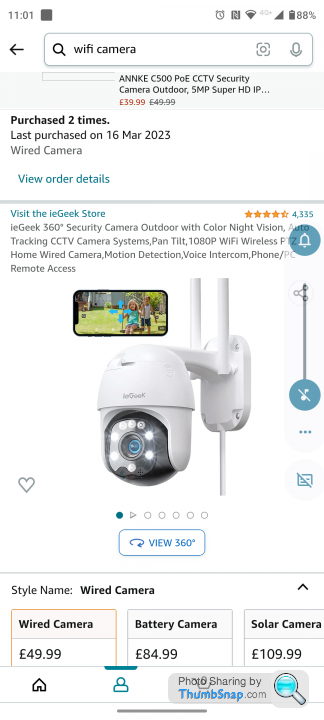
 |https://thumbsnap.com/nLq789m3[/url]
ARHarh said:
Are you sure its an ie20, can't find that on their website but did find this https://www.iegeek.com/pages/security-camera-ig20-... which says this "Your RTSP port of main stream is rtsp://192.168.1.38:554/11 and RTSP port of secondary stream rtsp://192.168.1.38:554/12." at the bottom.
So I go another camera delivered today which is the same iegeek camera. I have set it up at home om my wifi and using the rtsp port info you have given I can connect to the camera using OBS which is great. I then tried to write the code to include the user name and password and ip adress of the remote camera and no luck connecting yet. richelli said:
ARHarh said:
Are you sure its an ie20, can't find that on their website but did find this https://www.iegeek.com/pages/security-camera-ig20-... which says this "Your RTSP port of main stream is rtsp://192.168.1.38:554/11 and RTSP port of secondary stream rtsp://192.168.1.38:554/12." at the bottom.
So I go another camera delivered today which is the same iegeek camera. I have set it up at home om my wifi and using the rtsp port info you have given I can connect to the camera using OBS which is great. I then tried to write the code to include the user name and password and ip adress of the remote camera and no luck connecting yet. You will more than likely need to forward ports to make it work.
So a little update.
I went to the house where the camera is situated and set the port 554 to port forward. I actually setup port 8080, 80 and 554 to port forward as I wasnt sure which one.
I took my laptop and connected to the camera whilst onsite using the wifi network in the property just to make sure its all connectable from there using OBS. I connected using the following line.
rtsp://(ipaddress of camera):554/12
Now back at home and using my pc which is now on a different wifi network I tried connecting using OBS with the following line,
rtsp://admin: password @ (ip address of the camera):554/12
admin and password being the admin login and password of the iegeek camera.
But unfortunately it wouldn't connect. So as previoulsy mentioned it looks to be a bit of a nightmare to connect remotely.
I went to the house where the camera is situated and set the port 554 to port forward. I actually setup port 8080, 80 and 554 to port forward as I wasnt sure which one.
I took my laptop and connected to the camera whilst onsite using the wifi network in the property just to make sure its all connectable from there using OBS. I connected using the following line.
rtsp://(ipaddress of camera):554/12
Now back at home and using my pc which is now on a different wifi network I tried connecting using OBS with the following line,
rtsp://admin: password @ (ip address of the camera):554/12
admin and password being the admin login and password of the iegeek camera.
But unfortunately it wouldn't connect. So as previoulsy mentioned it looks to be a bit of a nightmare to connect remotely.
Edited by richelli on Saturday 18th March 21:07
Edited by richelli on Saturday 18th March 21:09
Edited by richelli on Saturday 18th March 21:17
I have no comprehension of what you are trying to do above with all the code  but I have 2 iegeek cameras on my house and I can view them anywhere on Mac and phone, including when I'm abroad? HIP2PClient on the Mac (which appears to be Windows-derived) and an app (IPCam? Phone's not next to me) on the phone.
but I have 2 iegeek cameras on my house and I can view them anywhere on Mac and phone, including when I'm abroad? HIP2PClient on the Mac (which appears to be Windows-derived) and an app (IPCam? Phone's not next to me) on the phone.Gassing Station | Homes, Gardens and DIY | Top of Page | What's New | My Stuff