
Simple Estate Agent 2D Floor Plan Software
Discussion


I need to produce some basic floor plan drawings for a couple of houses.
I want a simple 2D Black and white plan, with windows doors, stairs, pus bathroom and kitchen furniture and appliances. Pretty much what an estate agent would produce for a house sale (rather than architects type drawings). Something like this....
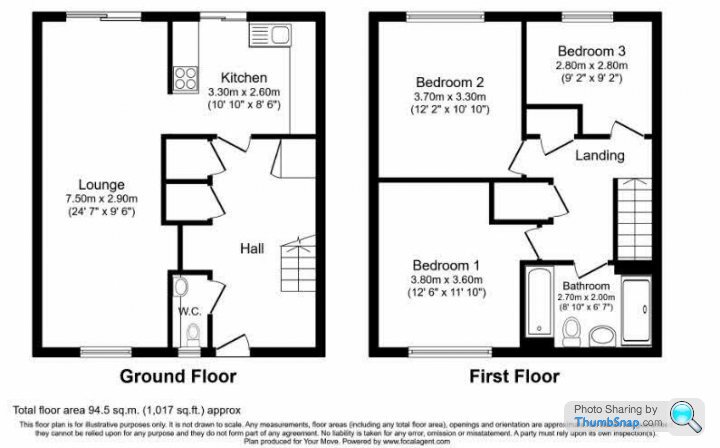
It needs to be drag and drop (ie simple and intuative) as it's a one off thing.
I've tried Seet Home 3D., and RoomSketcher. Both are OK but have flaws. Sweet Home doesn't have sliding patio doors and, it wants to colour in stairs as a block. RoomShetxher was better but when you put appliances in like a cooker it doesn't show them on a 2D plan.
Has anyone else done similar and found a simple solution?
I want a simple 2D Black and white plan, with windows doors, stairs, pus bathroom and kitchen furniture and appliances. Pretty much what an estate agent would produce for a house sale (rather than architects type drawings). Something like this....
It needs to be drag and drop (ie simple and intuative) as it's a one off thing.
I've tried Seet Home 3D., and RoomSketcher. Both are OK but have flaws. Sweet Home doesn't have sliding patio doors and, it wants to colour in stairs as a block. RoomShetxher was better but when you put appliances in like a cooker it doesn't show them on a 2D plan.
Has anyone else done similar and found a simple solution?
Edited by 98elise on Wednesday 3rd January 18:35
Ex EA here - can’t help with your query directly, but Floor Plans are usually done for agents by the same people who do the EPCs, I would contact a local provider for a quote - as they aren’t generally very expensive and it would save you the time and faff of having to learn how to do it and possibly the cost of having to buy software.
I think autodesk do a free trial of autocad. I reckon if you watched a few tutorials of the basics on youtube you could do these fairly quick.
Its just simple commands like drawing lines then using move, copy, rotate etc.
If not i could maybe help you out depending how quickly you need them.
Its just simple commands like drawing lines then using move, copy, rotate etc.
If not i could maybe help you out depending how quickly you need them.
Cow Corner said:
Ex EA here - can’t help with your query directly, but Floor Plans are usually done for agents by the same people who do the EPCs, I would contact a local provider for a quote - as they aren’t generally very expensive and it would save you the time and faff of having to learn how to do it and possibly the cost of having to buy software.
Thanks, I assumed it was done by the agents, but it makes sense they would farm that out if someone is already visiting the property for a survey.It's not something I want to pay for as I offered to do as a favour for a mate thinking it would be simple in one of the free programs!
Tony_T said:
I think autodesk do a free trial of autocad. I reckon if you watched a few tutorials of the basics on youtube you could do these fairly quick.
Its just simple commands like drawing lines then using move, copy, rotate etc.
If not i could maybe help you out depending how quickly you need them.
I'll have a look. I wanted to avoid a proper CAD program though as it's quite a bit more complicated to learn, hence me aiming for drag and drop floor plan software.Its just simple commands like drawing lines then using move, copy, rotate etc.
If not i could maybe help you out depending how quickly you need them.
Thanks for the offer of help. Fortunately if I need professional help my brother does full blown CAD for work.

98elise said:
I'll have a look. I wanted to avoid a proper CAD program though as it's quite a bit more complicated to learn, hence me aiming for drag and drop floor plan software.
Thanks for the offer of help. Fortunately if I need professional help my brother does full blown CAD for work.
Just get him to do it, it’ll take him 5 mins.Thanks for the offer of help. Fortunately if I need professional help my brother does full blown CAD for work.
Dave. said:
98elise said:
I'll have a look. I wanted to avoid a proper CAD program though as it's quite a bit more complicated to learn, hence me aiming for drag and drop floor plan software.
Thanks for the offer of help. Fortunately if I need professional help my brother does full blown CAD for work.
Just get him to do it, it’ll take him 5 mins.Thanks for the offer of help. Fortunately if I need professional help my brother does full blown CAD for work.
It's not even a big issue, I just suggested adding a floor plan to a mates AirBnB images. I said I could knock it up easily.
As it happens I think I can do it using M&S office. IIRC there is a floor planner in one of the office tools
smokey mow said:
Thanks I'll have a look at that as well.Jeremy-75qq8 said:
Roomsketcher is simple to use.
I've already tried it a it was very good, except when you put an oven in the kitchen it looks just like a normal cupboard in 2D view. I want get the positioning of fixed appliances (kitchen and bathroom) shown in the plan, like an estate agents drawing.
Rob. said:
I've used Autocad fairly regularly for several years, and I don't think I could knock out something in the exact same style as one of those floor plans in matter of minutes. Would surely be much easier on a different piece of software.
Yeah tbf it's probably 3-4 hours to do a floor plan like the one above. sooty61 said:
I have created floor plans in Excel manually before, but it looks like there is a template now. Worth a try
Select File > New.
Select Templates > Maps and Floor Plans.
Select the floor plan you want and select Create.
I'm certain Visio has a floor planner as well.Select File > New.
Select Templates > Maps and Floor Plans.
Select the floor plan you want and select Create.
I think Excel or Visio is the best way forward.
I know you mentioned trying Sweet Home 3D, did you notice that there are downloadable libraries of other types of items for the plan? Perhaps the appropriate patio doors could be in one of those. I've been trying it recently to create a floor plan for various things I'm doing here, but I don't need massive detail.
smokey mow said:
This is the winner When I logged in using my email it already had my house as a "project" from 2003 so I've clearly used it before!
It took me about 30 minutes to draw a plan. It's easy to use and very intuative.
The only drawback is its slightly limited in the free version, but fine for what I need.
Gassing Station | Homes, Gardens and DIY | Top of Page | What's New | My Stuff