
SmartLife remote
Discussion


My house is full of smart devices including the heating because it’s individual electric heaters plus lighting, ceiling fans, lamps, blinds etc. works great BUT…
The guest rooms can be a pain because guests need to use the remotes. I’ve thought about getting a couple of old iPhones and having the SmartLife app on them and sit them on a charger but I would want them to auto launch the smart life app and not allow anything else.
Is there some kind of commercially available SmartLife remote with a touch screen so that for each room I can load on the controls for the devices in that room?
Stared to Google but couldn’t quite find anything. Any suggestions? I’m sure the old iPhone idea is probably the most cost effective but not sure if it can be locked down as desired
The guest rooms can be a pain because guests need to use the remotes. I’ve thought about getting a couple of old iPhones and having the SmartLife app on them and sit them on a charger but I would want them to auto launch the smart life app and not allow anything else.
Is there some kind of commercially available SmartLife remote with a touch screen so that for each room I can load on the controls for the devices in that room?
Stared to Google but couldn’t quite find anything. Any suggestions? I’m sure the old iPhone idea is probably the most cost effective but not sure if it can be locked down as desired
We use Alexa voice control for lights and curtains, plus motion sensors in hallways, bathrooms, and cupboards. Switches are in place for manual override.
Heating is done on schedules, no need for user intervention.
Everything is also controllable using Home Assistant on Android tablets. In "kiosk mode", tablets can be "locked down"
I still prefer a physical remote for AV kit, everything else I keep simple for the casual user.
Heating is done on schedules, no need for user intervention.
Everything is also controllable using Home Assistant on Android tablets. In "kiosk mode", tablets can be "locked down"
I still prefer a physical remote for AV kit, everything else I keep simple for the casual user.
craigjm said:
My house is full of smart devices including the heating because it s individual electric heaters plus lighting, ceiling fans, lamps, blinds etc. works great BUT
The guest rooms can be a pain because guests need to use the remotes. I ve thought about getting a couple of old iPhones and having the SmartLife app on them and sit them on a charger but I would want them to auto launch the smart life app and not allow anything else.
Is there some kind of commercially available SmartLife remote with a touch screen so that for each room I can load on the controls for the devices in that room?
Sorry to be OT but the amount of complicated and expensive technology people voluntarily use to perform an incredibly simple action baffles me. An iPhone to switch a light on?The guest rooms can be a pain because guests need to use the remotes. I ve thought about getting a couple of old iPhones and having the SmartLife app on them and sit them on a charger but I would want them to auto launch the smart life app and not allow anything else.
Is there some kind of commercially available SmartLife remote with a touch screen so that for each room I can load on the controls for the devices in that room?
Simpo Two said:
craigjm said:
My house is full of smart devices including the heating because it s individual electric heaters plus lighting, ceiling fans, lamps, blinds etc. works great BUT
The guest rooms can be a pain because guests need to use the remotes. I ve thought about getting a couple of old iPhones and having the SmartLife app on them and sit them on a charger but I would want them to auto launch the smart life app and not allow anything else.
Is there some kind of commercially available SmartLife remote with a touch screen so that for each room I can load on the controls for the devices in that room?
Sorry to be OT but the amount of complicated and expensive technology people voluntarily use to perform an incredibly simple action baffles me. An iPhone to switch a light on?The guest rooms can be a pain because guests need to use the remotes. I ve thought about getting a couple of old iPhones and having the SmartLife app on them and sit them on a charger but I would want them to auto launch the smart life app and not allow anything else.
Is there some kind of commercially available SmartLife remote with a touch screen so that for each room I can load on the controls for the devices in that room?
Yes getting up and walking to the light to turn it on has never been an issue, and if you have smart lights that don't work from a switch located where your Nan would expect it then its not really smart.
Shouting at alexa in a room full of people talking to turn a light on is not really a good solution either.
Having you lights turn on if the light level drops or the sun sets is good, having to go round your house last thing at night and turn all the lights off is a pain, having all your lights turn off when you press one button is good. Dimming the lights in your living room by getting up and walking to each light because you want to watch TV is not good, switching on your TV and having that trigger a new lighting scene is good. I could go on.
Mr_J said:
I've got a NEEO remote somewhere that would be a good solution. You could control everything from it and it had a very intuitive interface.
That’s the kind of thing I was thinking about to only display what is controllable in that room. Appears to be a neater solution than using an old phone and trying to lock it so only SmartLife appears You have two problems to resolve in your solution I think. First getting the phone to only run smartlife, then getting smartlife to only display the relevent controls.
For the latter you might be able to set up a new smartlife account for each room and then share the devices from your primary account. I've done that with Tapo but not tried on Smartlife.
You can get wireless controllers but I have never tried them, only simple switches
For the latter you might be able to set up a new smartlife account for each room and then share the devices from your primary account. I've done that with Tapo but not tried on Smartlife.
You can get wireless controllers but I have never tried them, only simple switches
egomeister said:
You have two problems to resolve in your solution I think. First getting the phone to only run smartlife, then getting smartlife to only display the relevent controls.
For the latter you might be able to set up a new smartlife account for each room and then share the devices from your primary account. I've done that with Tapo but not tried on Smartlife.
You can get wireless controllers but I have never tried them, only simple switches
Yeah the second issue can be solved easily For the latter you might be able to set up a new smartlife account for each room and then share the devices from your primary account. I've done that with Tapo but not tried on Smartlife.
You can get wireless controllers but I have never tried them, only simple switches
I used SAMSUNG SMARTTHINGS ... runs on ANDROID , APPLE and WINDOWS.....
Used to use ACTIONTILES but now gone and use SHARPTOOLS for single icon'ed screen on a couple of SAMSUNG TABLETS and my phones (an old phone stuck on my kitchen wall).
Routines to turn outside lights on when gate opened after sunset and garage lights when doors opened, turn on greenhouse heater when below 34 degrees etc. Plus voice notifications to my SONOS speakers and control by ALEXA.
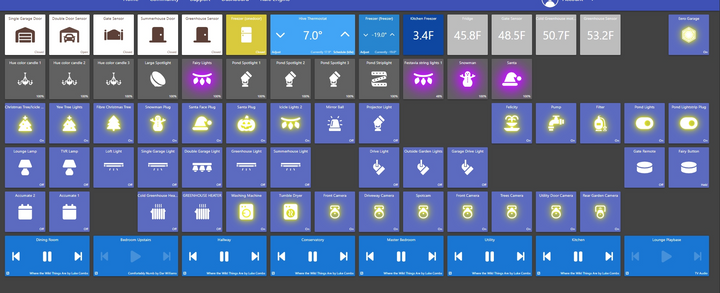
Used to use ACTIONTILES but now gone and use SHARPTOOLS for single icon'ed screen on a couple of SAMSUNG TABLETS and my phones (an old phone stuck on my kitchen wall).
Routines to turn outside lights on when gate opened after sunset and garage lights when doors opened, turn on greenhouse heater when below 34 degrees etc. Plus voice notifications to my SONOS speakers and control by ALEXA.
Edited by The Three D Mucketeer on Sunday 21st December 13:31
The Gauge said:
Alexa might find that remote for you, or an app 
It would be great if she could sort through all those boxes we moved with 4 years ago and have never unpacked!It's a shame that support for the Kickstarter NEEO remotes appears to have ended. It was a great item. We moved, bought lots of new stuff and I never got around to setting it up for the new house.
Gassing Station | Homes, Gardens and DIY | Top of Page | What's New | My Stuff