
Grrr, how do you post a photo?!
Discussion


Damn it! How do you post a photo on PH?!?
I have a photo bucket account but when I paste the [IMG] text and click preview, it says "This photo has been moved or deleted"
For example, if I remove the spaces from
[ IMG ]http://i346.photobucket.com/albums/p401/JustwatchMe_photos/S7305862.jpg[/IMG ]
I get:

What am I doing wrong?
I have a photo bucket account but when I paste the [IMG] text and click preview, it says "This photo has been moved or deleted"
For example, if I remove the spaces from
[ IMG ]http://i346.photobucket.com/albums/p401/JustwatchMe_photos/S7305862.jpg[/IMG ]
I get:
What am I doing wrong?
Edited by FreeLitres on Saturday 17th July 17:47
Just tried it myself with that picture and it wouldn't work
Odd, the picture is definitely there in the users photobucket account.
http://s346.photobucket.com/albums/p401/JustwatchM...
And directly pasting the address into my browser loads it fine
http://i346.photobucket.com/albums/p401/JustwatchM...
Odd, the picture is definitely there in the users photobucket account.
http://s346.photobucket.com/albums/p401/JustwatchM...
And directly pasting the address into my browser loads it fine
http://i346.photobucket.com/albums/p401/JustwatchM...
Edited by Marf on Saturday 17th July 17:51
Marf said:
Just tried it myself with that picture and it wouldn't work
Odd, the picture is definitely there in the users photobucket account.
http://s346.photobucket.com/albums/p401/JustwatchM...
I get a page not found on the user's account.Odd, the picture is definitely there in the users photobucket account.
http://s346.photobucket.com/albums/p401/JustwatchM...
FreeLitres said:
Damn it! How do you post a photo on PH?!?
I have a photo bucket account but when I paste the [IMG] text and click preview, it says "This photo has been moved or deleted"
For example, if I remove the spaces from
[ IMG ]http://i346.photobucket.com/albums/p401/JustwatchMe_photos/S7305862.jpg[/IMG ]
I get:
What am I doing wrong?
Why not use the Upload an image link when making the post? It is up there ^^^^, about 4 inches.I have a photo bucket account but when I paste the [IMG] text and click preview, it says "This photo has been moved or deleted"
For example, if I remove the spaces from
[ IMG ]http://i346.photobucket.com/albums/p401/JustwatchMe_photos/S7305862.jpg[/IMG ]
I get:
What am I doing wrong?
Edited by FreeLitres on Saturday 17th July 17:47
Famous Graham said:
Marf said:
Just tried it myself with that picture and it wouldn't work
Odd, the picture is definitely there in the users photobucket account.
http://s346.photobucket.com/albums/p401/JustwatchM...
I get a page not found on the user's account.Odd, the picture is definitely there in the users photobucket account.
http://s346.photobucket.com/albums/p401/JustwatchM...
Edited by Marf on Saturday 17th July 17:54
Marf said:
Yep me too now. I guess the user was in the process of removing the pictures when we were trying to link to them a few minutes ago.
I haven't deleted the picture that I have been trying to upload.Now some of the direct links dont even work for me! They are still on there though
Marf said:
750turbo said:
Why not use the Upload an image link when making the post? It is up there ^^^^, about 4 inches.
At a guess because the OP was linking from someone elses photobucket account and hence wouldn't have a local copy of the file.Ah so it is your photobucket account. Once its uploaded it should be visible, there is no connection to the local copy. I assumed it wasn't your PB account and hence wouldnt have had a local copy 
Go to your album and do a hard refresh ctrl+f5 and see if the pictures are there, you may be looking at a cached version of the page.
Go to your album and do a hard refresh ctrl+f5 and see if the pictures are there, you may be looking at a cached version of the page.
Edited by Marf on Saturday 17th July 17:59
Shaw Tarse said:
Have you got the photo on your computer?
Yes it's on my PC.Let me try the "upload an image" button -
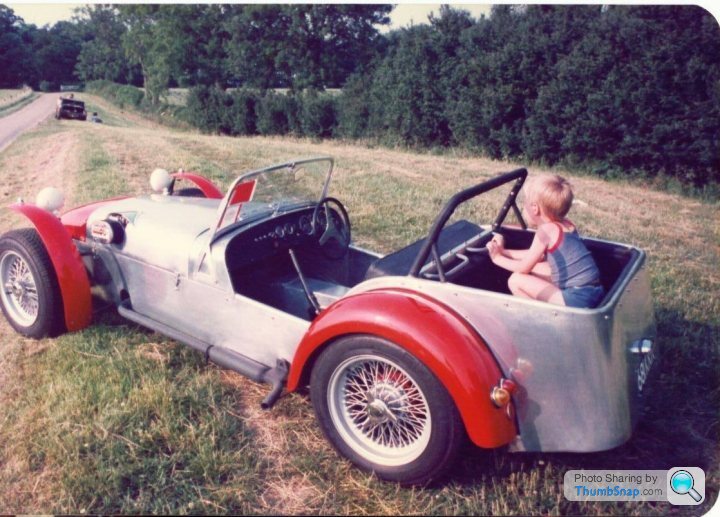
Still, it would be great to use Photobucket so if anyone else has any ideas to get it working, let me know. I just tried the hard refresh as mentioned above.
ETA: That is a pic of me as a kid by the way in Dad's custom 4-seater
Edited by FreeLitres on Saturday 17th July 18:08

Thought I better add, I was just trying to figure this out in response to a request in this thread:
http://www.pistonheads.com/gassing/topic.asp?h=0&a...
I have also added a pic of me in my Dad's Lotus 6 is anyone is interested.
http://www.pistonheads.com/gassing/topic.asp?h=0&a...
I have also added a pic of me in my Dad's Lotus 6 is anyone is interested.
Mr Will said:
It's definitely at Photobucket's end, it's not a private album or anything similar is it?
I don't think it is unless they have changed the settings. I have used my Photobucket account to post on various watch forums.The Photo upload button on PH works fine, so I will stick with that.
Thanks anyway
Gassing Station | Website Feedback | Top of Page | What's New | My Stuff