
So What Does a VMax Day look Like?
Discussion


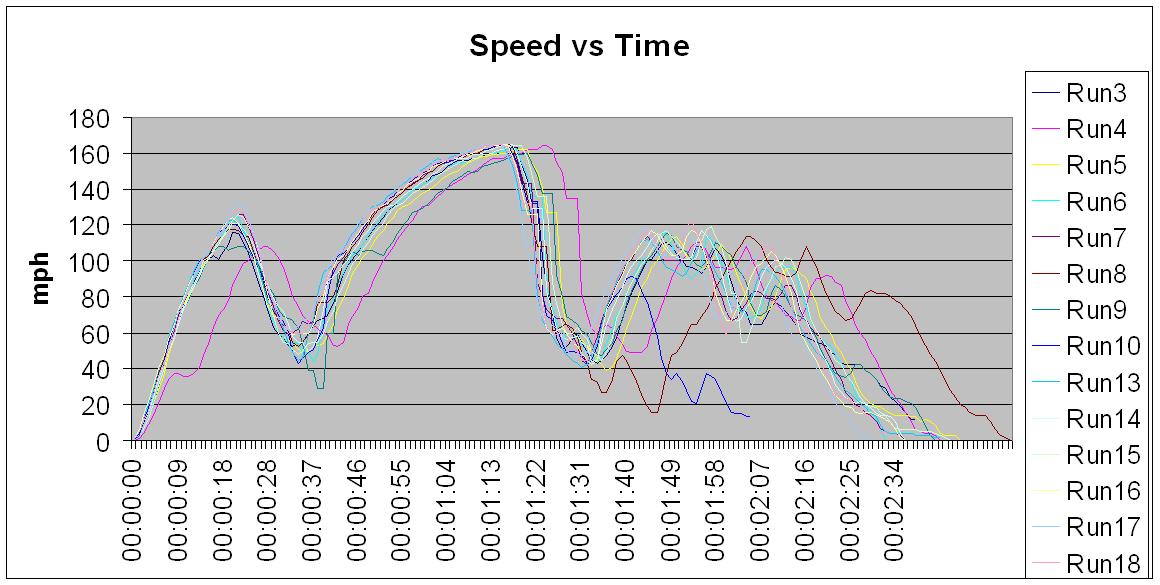
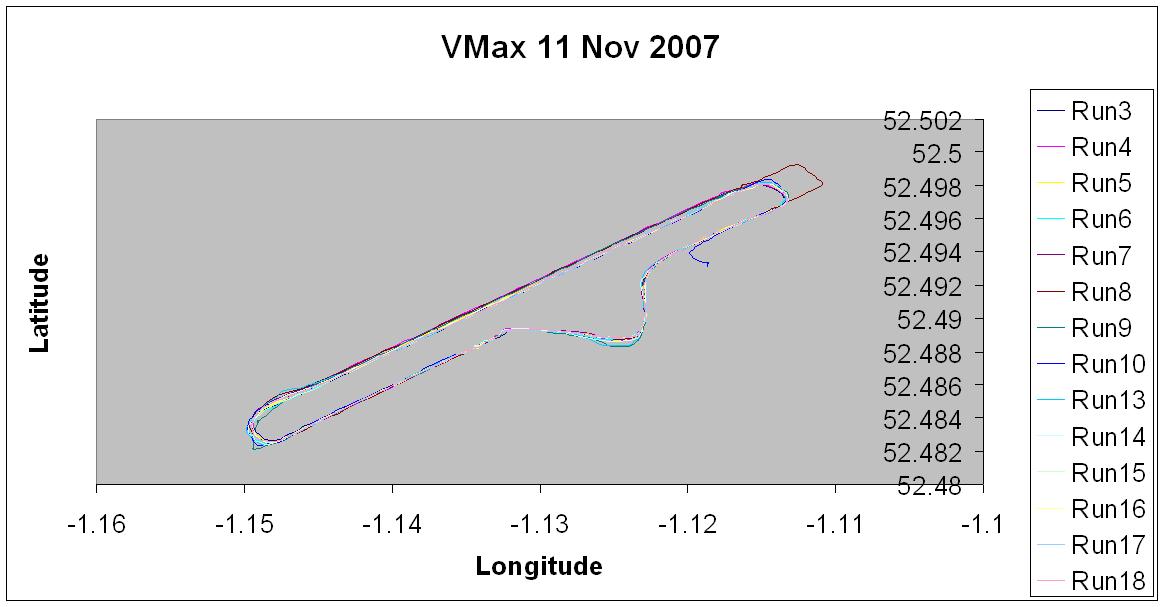

jumplead said:
Jeremy what do you use to get that sort of logging? is it one of the Racelogic units?
I actually used a (free) application for my TomTom sat nav called Tripmaster.It is pretty good, and provides logging options that are good enough for the VMax type events. It also has a really big speed display option which is nice when at full tilt down the runway ...
heres a great bit of free logging software for anyone with a newish GPS nokia phone, after the file is made you can overlay it onto goggle earth
http://research.nokia.com/research/projects/Sports...
http://research.nokia.com/research/projects/Sports...
jeremyc said:
jumplead said:
Jeremy what do you use to get that sort of logging? is it one of the Racelogic units?
I actually used a (free) application for my TomTom sat nav called Tripmaster.It is pretty good, and provides logging options that are good enough for the VMax type events. It also has a really big speed display option which is nice when at full tilt down the runway ...
 )
)TonyHetherington said:
jeremyc said:
jumplead said:
Jeremy what do you use to get that sort of logging? is it one of the Racelogic units?
I actually used a (free) application for my TomTom sat nav called Tripmaster.It is pretty good, and provides logging options that are good enough for the VMax type events. It also has a really big speed display option which is nice when at full tilt down the runway ...
)jeremyc said:
jumplead said:
Jeremy what do you use to get that sort of logging? is it one of the Racelogic units?
I actually used a (free) application for my TomTom sat nav called Tripmaster.It is pretty good, and provides logging options that are good enough for the VMax type events. It also has a really big speed display option which is nice when at full tilt down the runway ...
Viper said:
heres a great bit of free logging software for anyone with a newish GPS nokia phone, after the file is made you can overlay it onto goggle earth
http://research.nokia.com/research/projects/Sports...
There's one for the TomTom too - google for "TomTom tyre"http://research.nokia.com/research/projects/Sports...
TonyHetherington said:
I've installed the program, Jeremy, but not had much chance to play with it.
For the logging, do you just turn it on and then download all the data into csv format once you've finished your run? It's then with that data that you can plot the above?!
Yup: you can turn logging on and off as you've probably seen; each time it is started it begins a new log file (uniquely named with date and time).For the logging, do you just turn it on and then download all the data into csv format once you've finished your run? It's then with that data that you can plot the above?!
Simply download the CSV files, do a bit of tidying up of the data and use it to plot a graph.
 I did try taking my laptop along on the day but the novelty of downloading whilst there wore off - I now just wait until I'm home, and use the time there for more driving.

If you really want to get sexy you could investigate true X-Y-Z scatter graphing capabilities which would allow the speed in each run to be plotted on the Z axis against the position in X and Y.
 Before you look, Excel doesn't have it as standard ....
I like it 
So you use the X/Y co-ordinates to plot the track plan? That's a great idea. I think I might just play with it a few times on the way to work to get it sorted, to have proper go at VMax (I'll be there at the next one, with new car )
Annoyingly I can't find an instruction manual for it, so apologies for question, but do you use it with the tripmaster screen full, or do you just minimise it to keep it logging? It's not a pretty screen that's for sure.
So you use the X/Y co-ordinates to plot the track plan? That's a great idea. I think I might just play with it a few times on the way to work to get it sorted, to have proper go at VMax (I'll be there at the next one, with new car
)Annoyingly I can't find an instruction manual for it, so apologies for question, but do you use it with the tripmaster screen full, or do you just minimise it to keep it logging? It's not a pretty screen that's for sure.
TonyHetherington said:
So you use the X/Y co-ordinates to plot the track plan? That's a great idea. I think I might just play with it a few times on the way to work to get it sorted, to have proper go at VMax (I'll be there at the next one, with new car )
Annoyingly I can't find an instruction manual for it, so apologies for question, but do you use it with the tripmaster screen full, or do you just minimise it to keep it logging? It's not a pretty screen that's for sure.
)Annoyingly I can't find an instruction manual for it, so apologies for question, but do you use it with the tripmaster screen full, or do you just minimise it to keep it logging? It's not a pretty screen that's for sure.
 Use the lat/long coordinates from the log file plotted on an X-Y graph for the journey outline.
The manual is on the web page you downloaded the application from.
If I remember correctly, the screen layout and content can be customised to declutter it (and change colours/background); I run with the tripmaster display since it provides confirmation that the logging is running (and you've correctly stopped it) as well as containing the logging start/stop buttons.
I await a depiction of Tony's journey to work.


Gassing Station | Events & Meetings | Top of Page | What's New | My Stuff