
Fuse Box Wired Dash Cam
Discussion


Has anyone wired a dash cam into the fuse box of their DB9 (mine is a MY14)? I'd like to do this in a way that power is only drawn from the battery when the engine in running, with all wires discreetly hidden. Years ago (on my Porsche) I had a SatNav wired into the driver footwell fuse box; there was a blank fuse slot that only came on with the ignition
On a related note if anyone has any dashcam recommendations let me know
On a related note if anyone has any dashcam recommendations let me know
magycks said:
abanks said:
Yes, I fitted my Nextbase to my DB9 using the same method as below, I hid all the wires behind the trim using a trim tool.
method as below? do you have details you can share?The method is pretty simple. Take off the cover in the cabin fuse box. Use a multi-meter to find a switched live.
Use one of these to turn that fuse socket into a dual circuit :
https://www.amazon.co.uk/Add-Circuit-Piggy-Holder-...
I usually then connect the new circuit to a cigarette lighter socket that I can hide under the dash, and I keep the dashcam plugged into that.
ETA : And on the Aston, I believe I used one of the bolts securing the metal fuse box cover as the earth.
Yes, My nextbase came with the vehicle hardwiring kit which included the piggy back fuse. I used a circuit that wakes up when the vehicle is live and the piggy back fuse and then ran the cable behind the A Pillar trim and down to the fuse box by gently easing the trim out enough to cover the wiring. It works well and the wire pops out just by the sun visor post, the camera then starts when the vehicle wakes up. The detection whilst parked function uses the battery in the camera.
I did a lot of research into dash cams about 18 months ago, and at that time I bought and fitted a BlackVue DR750s-2CH.
I was close to buying the DOD RC500S-2CH, as I believe it gave a clearer picture while driving, with the same hardware and specs. However, at that time DOD's parking mode was far inferior (unsure if that's still the case), and leaving the car unattended was my main concern. So I had to sacrifice a little video quality, though its still full HD 1080p front and rear.
The 'rear' camera is smaller and very discreet, so I installed it on the front windscreen, on the passenger side of the map lights and up against the headlining, with the wiring through the headliner. I can't see it while driving, and from outside you can hardly even tell its there.
I put the larger 'front' camera at the top of the rear windscreen, up against the rear window frame. The frame hides most of the camera from your vision in the rear view mirror, but not all of it.
BlackVue now have a DR-900S-2CH which is 4K resolution, not sure what its like but I'd definitely be checking it out.
I was close to buying the DOD RC500S-2CH, as I believe it gave a clearer picture while driving, with the same hardware and specs. However, at that time DOD's parking mode was far inferior (unsure if that's still the case), and leaving the car unattended was my main concern. So I had to sacrifice a little video quality, though its still full HD 1080p front and rear.
The 'rear' camera is smaller and very discreet, so I installed it on the front windscreen, on the passenger side of the map lights and up against the headlining, with the wiring through the headliner. I can't see it while driving, and from outside you can hardly even tell its there.
I put the larger 'front' camera at the top of the rear windscreen, up against the rear window frame. The frame hides most of the camera from your vision in the rear view mirror, but not all of it.
BlackVue now have a DR-900S-2CH which is 4K resolution, not sure what its like but I'd definitely be checking it out.
abanks said:
Yes, My nextbase came with the vehicle hardwiring kit which included the piggy back fuse. I used a circuit that wakes up when the vehicle is live and the piggy back fuse and then ran the cable behind the A Pillar trim and down to the fuse box by gently easing the trim out enough to cover the wiring. It works well and the wire pops out just by the sun visor post, the camera then starts when the vehicle wakes up. The detection whilst parked function uses the battery in the camera.
Do you have a photo of this? would be great to see the install you've done; i'm looking for something quite discreet and well integrated.QuantumV8 said:
I did a lot of research into dash cams about 18 months ago, and at that time I bought and fitted a BlackVue DR750s-2CH.
I put the larger 'front' camera at the top of the rear windscreen, up against the rear window frame. The frame hides most of the camera from your vision in the rear view mirror, but not all of it.
The BlackVue's parking mode looks like one of the best i've seen; have you had any real world experience with this? Interesting you placed the front camera on the rear windshield; presume it would also be pretty discreet up front? I can't really rear mount as i have the volante I put the larger 'front' camera at the top of the rear windscreen, up against the rear window frame. The frame hides most of the camera from your vision in the rear view mirror, but not all of it.
Another vote for Blackvue - I use them on all my cars - very unobtrusive with excellent wifi rather than a screen. You can also configure them over the cloud which allows things like remote monitoring and an alert on your phone if the car is moved.
I would also recommend the 'Blackvue Power Magic Pro' to connect your chosen dash cam to. This little box in turn connects to your fuse box and via dip switches you can set it to turn off after a chosen time period and/or a drop in battery voltage. This allows the camera to work in parking mode very effectively. The box requires a constant live and a switched live which can be easily found with a meter. Use the piggy back fuse holders as previously suggested but just make sure you get the correct size, Standard/Mini/Micro.
I would also recommend the 'Blackvue Power Magic Pro' to connect your chosen dash cam to. This little box in turn connects to your fuse box and via dip switches you can set it to turn off after a chosen time period and/or a drop in battery voltage. This allows the camera to work in parking mode very effectively. The box requires a constant live and a switched live which can be easily found with a meter. Use the piggy back fuse holders as previously suggested but just make sure you get the correct size, Standard/Mini/Micro.
AlistairMcD said:
Another vote for Blackvue - I use them on all my cars - very unobtrusive with excellent wifi rather than a screen. You can also configure them over the cloud which allows things like remote monitoring and an alert on your phone if the car is moved.
I would also recommend the 'Blackvue Power Magic Pro' to connect your chosen dash cam to. This little box in turn connects to your fuse box and via dip switches you can set it to turn off after a chosen time period and/or a drop in battery voltage. This allows the camera to work in parking mode very effectively. The box requires a constant live and a switched live which can be easily found with a meter. Use the piggy back fuse holders as previously suggested but just make sure you get the correct size, Standard/Mini/Micro.
I was looking at the Blackvue offerings... only thing is they seem incredibly expensive vs even the flagship models from competitors. The Amazon reviews don't fill me with confidence either... lots of negative or average ratings largely around 'average video', product quality & failure.I would also recommend the 'Blackvue Power Magic Pro' to connect your chosen dash cam to. This little box in turn connects to your fuse box and via dip switches you can set it to turn off after a chosen time period and/or a drop in battery voltage. This allows the camera to work in parking mode very effectively. The box requires a constant live and a switched live which can be easily found with a meter. Use the piggy back fuse holders as previously suggested but just make sure you get the correct size, Standard/Mini/Micro.
magycks said:
abanks said:
Yes, My nextbase came with the vehicle hardwiring kit which included the piggy back fuse. I used a circuit that wakes up when the vehicle is live and the piggy back fuse and then ran the cable behind the A Pillar trim and down to the fuse box by gently easing the trim out enough to cover the wiring. It works well and the wire pops out just by the sun visor post, the camera then starts when the vehicle wakes up. The detection whilst parked function uses the battery in the camera.
Do you have a photo of this? would be great to see the install you've done; i'm looking for something quite discreet and well integrated.Here you go:
1. Cable is behind trim under sun visor, its not as big as this photo makes it look. Use a trim tool to avoid any damage.

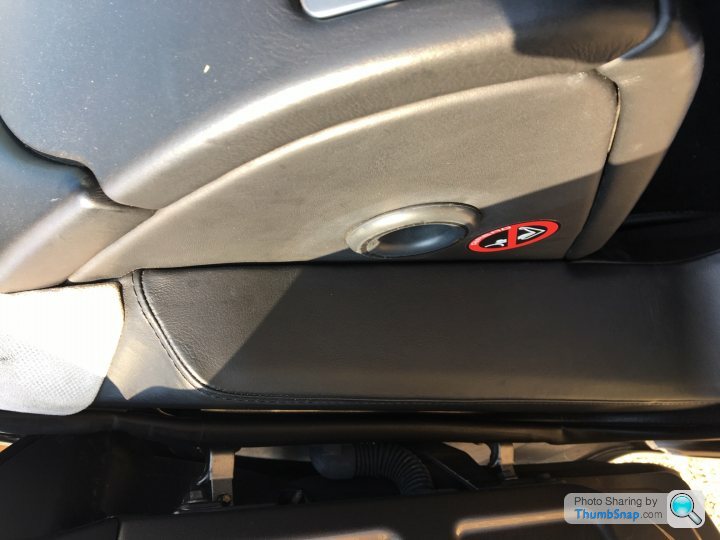
2. Cable is behind trim between air hole / air bag sticker and side trim again use a trim tool to avoid any damage.(sorry photo is rotated)
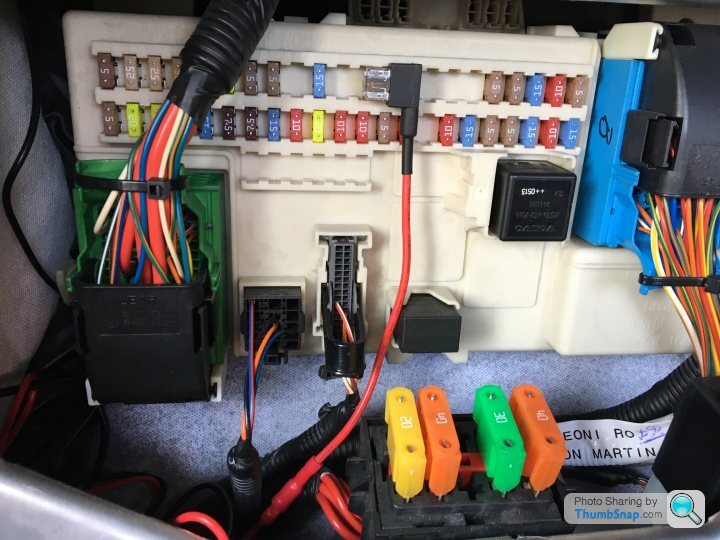
3. Piggy back fuse (Red wire) & earth (black wire) is on metal post with a nut on top at the top left side of fuse box. (if I remember correctly)
Gassing Station | Aston Martin | Top of Page | What's New | My Stuff