
Flügplatz Blue V12 Vantage S manual
Discussion


Hi all,
Just picked up a 300 mile 2017 AM V12 Vantage S dogleg manual 7 speed!
Epic car...sound, engine, craftsmanship, looks, etc..
I cannot for the life of me get the Apple CarPlay working???
It definitely has it, the USB port has the CarPlay symbol, tried 5 different cables including apple OEM cable)
all boxes on the iPhone X checked and this phone works flawlessly in 3 other cars with CarPlay.
rebooted phone/restarted car..all the recommendations on apple website
Very frustrating
please help!
Just picked up a 300 mile 2017 AM V12 Vantage S dogleg manual 7 speed!
Epic car...sound, engine, craftsmanship, looks, etc..
I cannot for the life of me get the Apple CarPlay working???
It definitely has it, the USB port has the CarPlay symbol, tried 5 different cables including apple OEM cable)
all boxes on the iPhone X checked and this phone works flawlessly in 3 other cars with CarPlay.
rebooted phone/restarted car..all the recommendations on apple website
Very frustrating
please help!
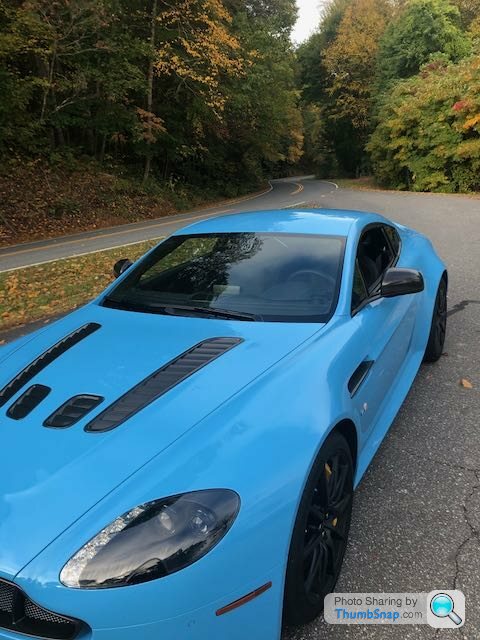
Epic looking car my friend, well done.
You get this cracker and Al gets the Elwood at the same time......it's fantastic to start seeing more and more interesting colours.
Mine is a 2017 and it connected the first time I plugged the phone in.....and then I swiftly turned it off as it confused me
Do other functions work via the cable being connected, like standard music streaming ?
You get this cracker and Al gets the Elwood at the same time......it's fantastic to start seeing more and more interesting colours.
Mine is a 2017 and it connected the first time I plugged the phone in.....and then I swiftly turned it off as it confused me
Do other functions work via the cable being connected, like standard music streaming ?
Little things first: do you have one or two usb sockets? If 2 CarPlay only works on the “main” socket (identify by trial and error).
Second: I found the only cable that would work was a genuine Apple cable. Are you sure you have one of those?
You should get the CarPlay symbol on the main AMI screen, then in you go. As others have said there is some messing around on the first connection - I remember this but don’t now remember what it was or how I got past it.
Second: I found the only cable that would work was a genuine Apple cable. Are you sure you have one of those?
You should get the CarPlay symbol on the main AMI screen, then in you go. As others have said there is some messing around on the first connection - I remember this but don’t now remember what it was or how I got past it.
Big Ry said:
Epic looking car my friend, well done.
You get this cracker and Al gets the Elwood at the same time......it's fantastic to start seeing more and more interesting colours.
Mine is a 2017 and it connected the first time I plugged the phone in.....and then I swiftly turned it off as it confused me
Do other functions work via the cable being connected, like standard music streaming ?
well, i was streaming music and phone calls via bluetooth on the way homeYou get this cracker and Al gets the Elwood at the same time......it's fantastic to start seeing more and more interesting colours.
Mine is a 2017 and it connected the first time I plugged the phone in.....and then I swiftly turned it off as it confused me
Do other functions work via the cable being connected, like standard music streaming ?
BlackWidow13 said:
Little things first: do you have one or two usb sockets? If 2 CarPlay only works on the “main” socket (identify by trial and error).
Second: I found the only cable that would work was a genuine Apple cable. Are you sure you have one of those?
You should get the CarPlay symbol on the main AMI screen, then in you go. As others have said there is some messing around on the first connection - I remember this but don’t now remember what it was or how I got past it.
yes, it has 2 USB portsSecond: I found the only cable that would work was a genuine Apple cable. Are you sure you have one of those?
You should get the CarPlay symbol on the main AMI screen, then in you go. As others have said there is some messing around on the first connection - I remember this but don’t now remember what it was or how I got past it.
the one on the left has the Apple CarPlay symbol, so that is the one you are supposed to use, but no luck...I even switched to the other one to see if the circuits were crossed at the factory...no deals
No CarPlay symbol on the main screen
I have set this up in seconds on my GT3RS, Stelvio Quadrofoglio, wife's Volvo XC 60 and son'd VW Golf GTI...so I recognize what to do..


kfmcmahon said:
actually, when i hook up either USB port, I do not see any USB connection icon on the sat-nav screen....should I be seeing it?
I don’t think so. I think should should have a CarPlay icon on the main AMI screen but it is greyed out until you hardwire connect the phone. I’d check but mine is in storage ATM.
I found this thread regarding firmware / software
https://www.pistonheads.com/gassing/topic.asp?t=16...
that says :
App 2.3.1
Base 1.053
my car is outdated :
App 2.2.7
Base 1.046
Is there any way other than going to the dealership (300 miles away) to do a firmware update? like via USB stick?
https://www.pistonheads.com/gassing/topic.asp?t=16...
that says :
App 2.3.1
Base 1.053
my car is outdated :
App 2.2.7
Base 1.046
Is there any way other than going to the dealership (300 miles away) to do a firmware update? like via USB stick?
Gassing Station | Aston Martin | Top of Page | What's New | My Stuff