
Vantage clock question
Discussion


Hi all. Quick couple of questions about the analogue clock in my UK 2015 V8V. I appreciate that the clock gets its time from the satnav, which in my car is the Garmin SD-card based system. I've had the car nearly 3 years and it's still on the original Aston maps but rather than pay a fortune for an Aston update I've inserted a Garmin SD card with their latest maps; these work perfectly but it does mean occasionally the car tells me the maps are out of date - but I don't believe this should affect the time from the satellites. When the car is unused in the garage it's always hooked up to a battery conditioner. Now the issues.
Firstly, daylight saving. I noticed a week or so ago my clock was an hour out and was still on GMT. I don't often look at it so it could have been wrong ever since the clocks changed. I went into the settings to confirm the clock was on "automatic", which it was. I then delved further into the settings and the satnav told me that the time it was receiving from the satellites was GMT and not BST, so the clock was correctly displaying the time the satnav was giving it. To temporarily fix the issue I took the clock off "automatic adjustment" and set it one hour forward, but I'm pretty sure that in previous years in spring and autumn the clock has adjusted itself forward and back perfectly without intervention. Anyone any idea why my car won't automatically show BST?
Secondly. Time keeping. About the same time as I noticed the daylight saving, as I was now looking at the clock a lot more to check it, I noticed at key-on that the hands were moving round the dial before they settled on the time. When they stop, they are on the correct time (but see the point about BST, above). Again, I've never noticed the clock doing this before in nearly 3 years. Is this a consequence of the clock setting now being on manual? I've checked the time on the clock after the car has been in the garage for a day by looking through a window rather than opening a door (so I don't wake the car up) and it's telling the correct time, so it doesn't appear to be adjusting for an error when the satnav wakes.
It's only a minor irritation as once its settled the clock tells the correct time, manually adjusting for daylight saving twice per year is no big deal (although I shouldn't have to) and everything else on the radio/CD player/satnav seems to work perfectly. The only thing I have done recently other than drive the car is change the audio settings, but I can't believe that's relevant.
Anyone ever have either issue, or have any idea what might be going on?
Firstly, daylight saving. I noticed a week or so ago my clock was an hour out and was still on GMT. I don't often look at it so it could have been wrong ever since the clocks changed. I went into the settings to confirm the clock was on "automatic", which it was. I then delved further into the settings and the satnav told me that the time it was receiving from the satellites was GMT and not BST, so the clock was correctly displaying the time the satnav was giving it. To temporarily fix the issue I took the clock off "automatic adjustment" and set it one hour forward, but I'm pretty sure that in previous years in spring and autumn the clock has adjusted itself forward and back perfectly without intervention. Anyone any idea why my car won't automatically show BST?
Secondly. Time keeping. About the same time as I noticed the daylight saving, as I was now looking at the clock a lot more to check it, I noticed at key-on that the hands were moving round the dial before they settled on the time. When they stop, they are on the correct time (but see the point about BST, above). Again, I've never noticed the clock doing this before in nearly 3 years. Is this a consequence of the clock setting now being on manual? I've checked the time on the clock after the car has been in the garage for a day by looking through a window rather than opening a door (so I don't wake the car up) and it's telling the correct time, so it doesn't appear to be adjusting for an error when the satnav wakes.
It's only a minor irritation as once its settled the clock tells the correct time, manually adjusting for daylight saving twice per year is no big deal (although I shouldn't have to) and everything else on the radio/CD player/satnav seems to work perfectly. The only thing I have done recently other than drive the car is change the audio settings, but I can't believe that's relevant.
Anyone ever have either issue, or have any idea what might be going on?
LTP said:
Hi all. Quick couple of questions about the analogue clock in my UK 2015 V8V. I appreciate that the clock gets its time from the satnav, which in my car is the Garmin SD-card based system. I've had the car nearly 3 years and it's still on the original Aston maps but rather than pay a fortune for an Aston update I've inserted a Garmin SD card with their latest maps; these work perfectly but it does mean occasionally the car tells me the maps are out of date - but I don't believe this should affect the time from the satellites. When the car is unused in the garage it's always hooked up to a battery conditioner. Now the issues.
Firstly, daylight saving. I noticed a week or so ago my clock was an hour out and was still on GMT. I don't often look at it so it could have been wrong ever since the clocks changed. I went into the settings to confirm the clock was on "automatic", which it was. I then delved further into the settings and the satnav told me that the time it was receiving from the satellites was GMT and not BST, so the clock was correctly displaying the time the satnav was giving it. To temporarily fix the issue I took the clock off "automatic adjustment" and set it one hour forward, but I'm pretty sure that in previous years in spring and autumn the clock has adjusted itself forward and back perfectly without intervention. Anyone any idea why my car won't automatically show BST?
Secondly. Time keeping. About the same time as I noticed the daylight saving, as I was now looking at the clock a lot more to check it, I noticed at key-on that the hands were moving round the dial before they settled on the time. When they stop, they are on the correct time (but see the point about BST, above). Again, I've never noticed the clock doing this before in nearly 3 years. Is this a consequence of the clock setting now being on manual? I've checked the time on the clock after the car has been in the garage for a day by looking through a window rather than opening a door (so I don't wake the car up) and it's telling the correct time, so it doesn't appear to be adjusting for an error when the satnav wakes.
It's only a minor irritation as once its settled the clock tells the correct time, manually adjusting for daylight saving twice per year is no big deal (although I shouldn't have to) and everything else on the radio/CD player/satnav seems to work perfectly. The only thing I have done recently other than drive the car is change the audio settings, but I can't believe that's relevant.
Anyone ever have either issue, or have any idea what might be going on?
I dont think any of the Vantages I had of that interface (AMi I) either kept the clock right, or adjusted for DST, despite the "automatic" setting. Just do it manually twice a year, and adjust the clock time when the variance gets beyond your personal tollerance Firstly, daylight saving. I noticed a week or so ago my clock was an hour out and was still on GMT. I don't often look at it so it could have been wrong ever since the clocks changed. I went into the settings to confirm the clock was on "automatic", which it was. I then delved further into the settings and the satnav told me that the time it was receiving from the satellites was GMT and not BST, so the clock was correctly displaying the time the satnav was giving it. To temporarily fix the issue I took the clock off "automatic adjustment" and set it one hour forward, but I'm pretty sure that in previous years in spring and autumn the clock has adjusted itself forward and back perfectly without intervention. Anyone any idea why my car won't automatically show BST?
Secondly. Time keeping. About the same time as I noticed the daylight saving, as I was now looking at the clock a lot more to check it, I noticed at key-on that the hands were moving round the dial before they settled on the time. When they stop, they are on the correct time (but see the point about BST, above). Again, I've never noticed the clock doing this before in nearly 3 years. Is this a consequence of the clock setting now being on manual? I've checked the time on the clock after the car has been in the garage for a day by looking through a window rather than opening a door (so I don't wake the car up) and it's telling the correct time, so it doesn't appear to be adjusting for an error when the satnav wakes.
It's only a minor irritation as once its settled the clock tells the correct time, manually adjusting for daylight saving twice per year is no big deal (although I shouldn't have to) and everything else on the radio/CD player/satnav seems to work perfectly. The only thing I have done recently other than drive the car is change the audio settings, but I can't believe that's relevant.
Anyone ever have either issue, or have any idea what might be going on?

I just thought I'd revive this as my car has now been to a dealer who confirmed that the Garmin-based nav system should pick up the time from the satellites and adjust for BST/GMT automatically (the earlier Volvo-based DVD one may not have). Apparently the reason my system refused to accept that the time in the UK was on daylight saving was that there's clearly something not right as the nav system seems to think it's currently 2041 (no, not a typo - it thinks it's 20 years in the future). Data files sent off to Gaydon by the dealer.
Awaiting feedback from Gaydon Tech to see if it's software, hardware or if more investigation/data is required. I'll update this with findings in case it happens to any other PHer
One of the other symptoms caused by this problem is, if I manually set the time correctly, the nav system still uses the satellite time to work out things like ETA, so for journeys of less than an hour it currently tells me that I will arrive at my destination before I actually left .
.
I know Astons are fast but I may have to call mine Jo Grant
Awaiting feedback from Gaydon Tech to see if it's software, hardware or if more investigation/data is required. I'll update this with findings in case it happens to any other PHer
One of the other symptoms caused by this problem is, if I manually set the time correctly, the nav system still uses the satellite time to work out things like ETA, so for journeys of less than an hour it currently tells me that I will arrive at my destination before I actually left
.I know Astons are fast but I may have to call mine Jo Grant
Edited by LTP on Wednesday 21st July 19:40
A 2015 Aston Martin with all kinds of clever electronics, but cannot change the time automatically twice a year.
This reminded me about one of my old computers. Every time following the UK clocks change, a screen message appears saying the time has been changed. Amazing how it still knows which weekend. The PC is 1999 vintage, Windows 98. Sixteen years before your car was built !
" I noticed at key-on that the hands were moving round the dial before they settled on the time. When they stop, they are on the correct time (but see the point about BST, above). Again, I've never noticed the clock doing this before in nearly 3 years."
Mines done that once, a few weeks back, that I noticed anyway. No idea why and not noticed it since.
On the pc/laptop front my Mac was always 16 minutes fast. Any resets I did, no effect, always went back to 16 out. Not creeping, just 16, always. Now it's finally had to be replaced, I keep forgetting it's now showing the right time so gat caught out for meetings!!
Mines done that once, a few weeks back, that I noticed anyway. No idea why and not noticed it since.
On the pc/laptop front my Mac was always 16 minutes fast. Any resets I did, no effect, always went back to 16 out. Not creeping, just 16, always. Now it's finally had to be replaced, I keep forgetting it's now showing the right time so gat caught out for meetings!!
Jon39 said:
A 2015 Aston Martin with all kinds of clever electronics, but cannot change the time automatically twice a year.
A bit unfair. It appears it's a broken Aston Martin that cannot change its daylight settings. It used to do it finebogie said:
My 2012 Roadster with Garmin is setting itself for BST/DST ...never really thought about it until now, just accepted it was working !
So did I - until it wasn't.In case anyone suggests it, I have done a "hard reset" by disconnecting the battery and letting the car sit for 10 minutes or so. Made no difference to the clock but a hell of a game getting the passenger's seat to work again. I contemplated putting a new battery in just in case its a manifestation of the infamous "dying battery" syndrome (as far as I know it's the original, so nearly 6 years old now) but it's always on a conditioner, starts the car fine and I decided to wait to see what Gaydon says.
Edited by LTP on Thursday 22 July 16:16
LTP said:
Jon39 said:
A 2015 Aston Martin with all kinds of clever electronics, but cannot change the time automatically twice a year.
A bit unfair. It appears it's a broken Aston Martin that cannot change its daylight settings. It used to do it fineSorry Paul, I must have been too lazy. Had the impression from someone, that pre-Garmin cars might not adjust automatically. Even that might not make sense, because a 2015 car probably does have Garmin.
Jon39 said:
Sorry Paul, I must have been too lazy. Had the impression from someone, that pre-Garmin cars might not adjust automatically. Even that might not make sense, because a 2015 car probably does have Garmin.
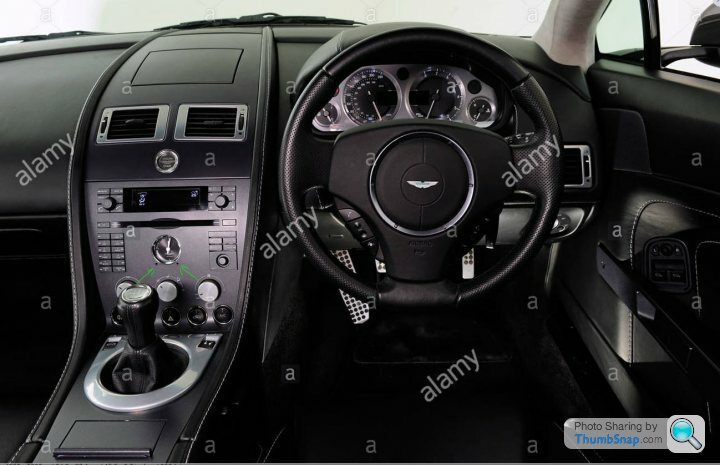
But the cars with the later dash (below) the satnav drives the clock and it should auto update. This is the dash I have.

Edited by LTP on Thursday 22 July 19:22
I said I'd keep this thread up-to-date until it reaches a conclusion or until I give up on the clock..
A couple of weeks ago I took the Vantage out, glanced down at the clock and noticed it was telling the correct time. I double-checked that I hadn't left it set manually (I hadn't) so the bloody thing has now decided to fix itself and read BST correctly, without any intervention. Which it still is today.
I heard back from the main dealer who initially ran diagnostics on the problem and they told me AML Service at Gaydon recommended I buy and fit the latest official Aston maps SD card to fix the problem. What a surprise. . (I'd already tried removing and refitting the Garmin SD card with the 2021 maps I'm using with no effect so I knew with almost certainty that wasn't the problem)
The car is due for its annual service and MOT in the next few weeks, so I'll ask the dealer to run the diagnostics again and recheck what year the car thinks it is.
I hate intermittent problems, or ones that apparently fix themselves.
A couple of weeks ago I took the Vantage out, glanced down at the clock and noticed it was telling the correct time. I double-checked that I hadn't left it set manually (I hadn't) so the bloody thing has now decided to fix itself and read BST correctly, without any intervention. Which it still is today.
I heard back from the main dealer who initially ran diagnostics on the problem and they told me AML Service at Gaydon recommended I buy and fit the latest official Aston maps SD card to fix the problem. What a surprise.
. (I'd already tried removing and refitting the Garmin SD card with the 2021 maps I'm using with no effect so I knew with almost certainty that wasn't the problem)The car is due for its annual service and MOT in the next few weeks, so I'll ask the dealer to run the diagnostics again and recheck what year the car thinks it is.
I hate intermittent problems, or ones that apparently fix themselves.
Edited by LTP on Tuesday 21st September 11:08
The old clock in the original dash was so much simpler and I actually think it looked better too. I’ve got the updated (I guess middle of the three) dash and clock, same as you LTP, and it doesn’t have any problems adjusting for GMT/BST but it often runs fast, and when that happens I can never get it to read correctly. Manual adjustment is through the sat nav menu, but that route doesn’t seem to allow fine changes (from memory it moves 10/15 minutes at a time?) When my car last went in for a service and MOT I asked them to reset the clock, and so far it’s been fine. I’m not sure what they did though. Is it just a battery or fuse disconnect, or are there darker forces at work somewhere?!!
Best Regards
Minglar
Best Regards
Minglar
I've had similar issues with my 2013 DB9. Eventually it would lose the correct time and show a few minutes ahead of the digital clock. It used to drive my OCD mad. The dealer would do a reset on it every time it went in for a service which would synchronise it. Thankfully it has stayed accuate for a while now and auto adjusts for BST. I think the reset involved pulling the plug, from the rear of the clock somehow, from behind the dash.
Just updating this to say that the issue is still ongoing. After the recent change from BST to GMT, my clock is wrong again, now being an hour fast. Again.
Next step is to fit an official SD card as Gaydon recommend just to prove that this doesn't fix the issue (as I'm 99% sure it won't, as is my dealer).
To be continued....
Next step is to fit an official SD card as Gaydon recommend just to prove that this doesn't fix the issue (as I'm 99% sure it won't, as is my dealer).
To be continued....
Gassing Station | Aston Martin | Top of Page | What's New | My Stuff