
New Aston Infotainment Media Player Headaches
Discussion


Just got a new Vantage and I can't tell you how frustrating this Infotainment System is. This seems to be lacking the basic functions that even the bare bones infotainment on the McLaren I used to have, had, which is sad. Obviously this is not Vantage specific and anyone with one of the new cars might have figured out some things that might help. I posted this on the US forum and got no help, it seems like I'm the only person who actually uses the system, everyone else I guess uses Carplay.
The big headache is just trying to play music from a usb drive that's been plugged in. I'd be OK with just "Play everything on the drive in folder order, and pick up where you left off after stopping and starting the car". Can't seem to do that. What I see is:
- No way to select more than one folder to play at a time (or more than one Artist either).
- No matter what you've selected, when you power off and power on the car, it forgets what you had selected or where it was.
- On power on, if you were playing from the USB stick, it does get into a mode where it will play all the folders on the drive, but it also starts from the same arbitrary place. If you had switched to another source and restarted the car and than switched back to USB, it starts in that same multi-folder mode, but in a completely random place.
- No way to select that multi-folder mode other that when the car first powers on.
- Doesn't show how many files are in the current list its playing or where it is in the list.
- Scrolling through any of these lists is horrible, almost impossible to quickly get to any spot in a long list.
- Doesn't seem to have any ability to load a play list.
It would be usable if there was a way to select that multi-folder mode and it remembered where it left off when it restarts. But nope. Has anyone found any way to poke this thing into usefulness or some hidden function/buttons that I might have missed?
As a side note, the radio side is also dumb. For SiriusXM, it allows you to select what stations are favorites, but there's no way to tell it to cycle through just your favorites, it can only cycle through all stations. The only thing "favorites" does it put in in the favorites list which you have to show and then manually scroll and select which station to switch to. Can't do that while driving. Seems similar on the FM Radio side, but not quite, but I haven't figured out that behavior yet. My first car, a 1975 Firebird with the factory radio, had the ability to save stations and select them without taking my eyes off the road, not this.
So frustrating. I just got the car so its got all the software updates its supposed to (and the display says its updated). So this seems to be the best Aston has.
The big headache is just trying to play music from a usb drive that's been plugged in. I'd be OK with just "Play everything on the drive in folder order, and pick up where you left off after stopping and starting the car". Can't seem to do that. What I see is:
- No way to select more than one folder to play at a time (or more than one Artist either).
- No matter what you've selected, when you power off and power on the car, it forgets what you had selected or where it was.
- On power on, if you were playing from the USB stick, it does get into a mode where it will play all the folders on the drive, but it also starts from the same arbitrary place. If you had switched to another source and restarted the car and than switched back to USB, it starts in that same multi-folder mode, but in a completely random place.
- No way to select that multi-folder mode other that when the car first powers on.
- Doesn't show how many files are in the current list its playing or where it is in the list.
- Scrolling through any of these lists is horrible, almost impossible to quickly get to any spot in a long list.
- Doesn't seem to have any ability to load a play list.
It would be usable if there was a way to select that multi-folder mode and it remembered where it left off when it restarts. But nope. Has anyone found any way to poke this thing into usefulness or some hidden function/buttons that I might have missed?
As a side note, the radio side is also dumb. For SiriusXM, it allows you to select what stations are favorites, but there's no way to tell it to cycle through just your favorites, it can only cycle through all stations. The only thing "favorites" does it put in in the favorites list which you have to show and then manually scroll and select which station to switch to. Can't do that while driving. Seems similar on the FM Radio side, but not quite, but I haven't figured out that behavior yet. My first car, a 1975 Firebird with the factory radio, had the ability to save stations and select them without taking my eyes off the road, not this.
So frustrating. I just got the car so its got all the software updates its supposed to (and the display says its updated). So this seems to be the best Aston has.
Hi Jay,
You are so right in everything you say about how bad the infotainment system is in the new Astons. I have a 2025 Vantage, and came from a 2019 Vantage (which was so much better).
Like you, I initially tried to play music off a USB stick (512GB Samsung USB C), and have been so disappointed by the factors that you describe that I have abandoned music playback from USB. Although we don’t have Sirius here in the UK, your findings in how disappointing this is don’t surprise me either.
I also don’t enjoy listening to music playback via Apple CarPlay, especially as this involves the playback of highly compressed music (320kb/s) over a lossy Bluetooth connection (Apple uses AAC at 256kb/s).
For me, the final nail in the coffin was the awful piped, ‘fake’ engine noise piped over the speakers. I asked the factory directly how I could turn this off, I was told that any attempt to cancel it would result in severe ramifications including voiding of warranty! They really want us to have this fake noise contamination in our cabins!
My solution was to go and find a top notch audio installer with whom I could work (Enhance Car Audio & Security in Sittingbourne, UK) to design an audio system from the ground up, and totally ignore the Aston system. You’ll see from the following diagram what the final installation looks like, and I’m pleased to report that I’m very pleased with my new system, especially as I can easily play back high resolution, quality music, using my Astell & Kern Digital Audio Player (DAP). Another huge advantage in not using any part of the Aston’s audio chain for listening to music is that I no longer have to tolerate Aston’s ‘Fake’ engine noise.
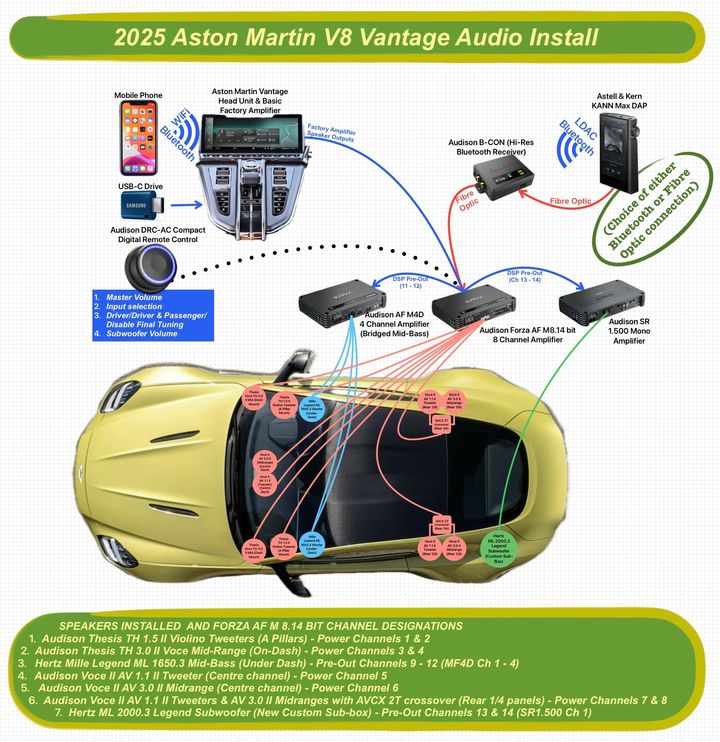
You’ll note that I still have the option to hear sound from the Aston head unit (e.g. Waze navigation instructions, telephone calls, etc.), by switching audio input from the DRC controller. My audio installer has adjusted the parametric frequency response of the ‘Aston head unit’ input to remove a significant quantity of bass (to remove most of the fake engine noise) - think of this input as ‘Diet Pepsi’! Meanwhile the second input (from the Astell & Kern DAP) is ‘full frequency’ DSP optimised - think of this as ‘Full Sugar Pepsi’!
I’ve recently completed an interview with the folks at ‘Driving Sounds’ magazine, and my car/audio install will be featuring in a future article.
I agree though that in these expensive cars, it is unacceptable that the audio is so very much worse than previous models of Aston. Add in the compulsory ‘fake’ engine noise, and it’s apparent that something needs to change.
You are so right in everything you say about how bad the infotainment system is in the new Astons. I have a 2025 Vantage, and came from a 2019 Vantage (which was so much better).
Like you, I initially tried to play music off a USB stick (512GB Samsung USB C), and have been so disappointed by the factors that you describe that I have abandoned music playback from USB. Although we don’t have Sirius here in the UK, your findings in how disappointing this is don’t surprise me either.
I also don’t enjoy listening to music playback via Apple CarPlay, especially as this involves the playback of highly compressed music (320kb/s) over a lossy Bluetooth connection (Apple uses AAC at 256kb/s).
For me, the final nail in the coffin was the awful piped, ‘fake’ engine noise piped over the speakers. I asked the factory directly how I could turn this off, I was told that any attempt to cancel it would result in severe ramifications including voiding of warranty! They really want us to have this fake noise contamination in our cabins!
My solution was to go and find a top notch audio installer with whom I could work (Enhance Car Audio & Security in Sittingbourne, UK) to design an audio system from the ground up, and totally ignore the Aston system. You’ll see from the following diagram what the final installation looks like, and I’m pleased to report that I’m very pleased with my new system, especially as I can easily play back high resolution, quality music, using my Astell & Kern Digital Audio Player (DAP). Another huge advantage in not using any part of the Aston’s audio chain for listening to music is that I no longer have to tolerate Aston’s ‘Fake’ engine noise.
You’ll note that I still have the option to hear sound from the Aston head unit (e.g. Waze navigation instructions, telephone calls, etc.), by switching audio input from the DRC controller. My audio installer has adjusted the parametric frequency response of the ‘Aston head unit’ input to remove a significant quantity of bass (to remove most of the fake engine noise) - think of this input as ‘Diet Pepsi’! Meanwhile the second input (from the Astell & Kern DAP) is ‘full frequency’ DSP optimised - think of this as ‘Full Sugar Pepsi’!
I’ve recently completed an interview with the folks at ‘Driving Sounds’ magazine, and my car/audio install will be featuring in a future article.
I agree though that in these expensive cars, it is unacceptable that the audio is so very much worse than previous models of Aston. Add in the compulsory ‘fake’ engine noise, and it’s apparent that something needs to change.
I've seen your previous posts as to what you did. Because I didn't want to deal with that, not to mention possible warranty implications, my car has the upgraded audio. From a sound quality perspective its actually pretty good, but you can certainly argue that for the price they charge for it, you can do better, like you have.
But to have the controls this bad is just unacceptable. If I delivered something like this I'd be embarrassed. This looks like someone did a "Proof of Concept" to show that they could read and play media files and put up some menus, but shipped it before anyone worked on implementing the real product. Its one thing if it was like this when they first introduced the system and released it before it was ready, but its been two years now. There's no excuse.
But to have the controls this bad is just unacceptable. If I delivered something like this I'd be embarrassed. This looks like someone did a "Proof of Concept" to show that they could read and play media files and put up some menus, but shipped it before anyone worked on implementing the real product. Its one thing if it was like this when they first introduced the system and released it before it was ready, but its been two years now. There's no excuse.
Jay_Davis said:
I've seen your previous posts as to what you did. Because I didn't want to deal with that, not to mention possible warranty implications, my car has the upgraded audio. From a sound quality perspective its actually pretty good, but you can certainly argue that for the price they charge for it, you can do better, like you have.
But to have the controls this bad is just unacceptable. If I delivered something like this I'd be embarrassed. This looks like someone did a "Proof of Concept" to show that they could read and play media files and put up some menus, but shipped it before anyone worked on implementing the real product. Its one thing if it was like this when they first introduced the system and released it before it was ready, but its been two years now. There's no excuse.
The software certainly does feel very ‘prototype’. Think the mistake was trying to develop something themselves - even VW couldn’t get it right, so what hope does a much smaller company have? At least my 2019 Vantage software worked - it was old and established ‘hand-me-down’ 4 generations old code from Mercedes, but at least it worked, was reliable and was intuitive!But to have the controls this bad is just unacceptable. If I delivered something like this I'd be embarrassed. This looks like someone did a "Proof of Concept" to show that they could read and play media files and put up some menus, but shipped it before anyone worked on implementing the real product. Its one thing if it was like this when they first introduced the system and released it before it was ready, but its been two years now. There's no excuse.
BTW, no warranty implications from my audio install - all is reversible back to OEM and has had the thumbs-up approval from my local AML MD! I did not like the sound of Aston’s B&W, (so-called premium) system - there’s so many better ways to spend that premium to get improved sound. I also don’t have to put up with fake engine noise!
Gassing Station | Aston Martin | Top of Page | What's New | My Stuff