
CIC no software update option- Help needed!
Discussion


Hi, just bought a 2008 3-Series (E93) vert. It is a September 2008 model with factory-fitted CIC Idrive (checked on buildsheet)- must be one of the first.
Want to do a software update, but under "Settings" there is no "Software Update" option. Spoke to the local BMW Garage and they said just put your USB stick (with the update - UPD01008.bin) into the centre armrest, switch on the ignition and it will automatically upload.
No it doesn't.
Have also tried putting the USB in after switching on the ignition and also tried the same two options with the glovebox USB port.
The system recognises that there is a USB in place but thinks it is music by "unknown artist". and tries to play it!.
The USB is FAT23 formatted.
I'm usually quite good with electronics but getting nowhere here.
Any help and advice gratefully received.
Want to do a software update, but under "Settings" there is no "Software Update" option. Spoke to the local BMW Garage and they said just put your USB stick (with the update - UPD01008.bin) into the centre armrest, switch on the ignition and it will automatically upload.
No it doesn't.
Have also tried putting the USB in after switching on the ignition and also tried the same two options with the glovebox USB port.
The system recognises that there is a USB in place but thinks it is music by "unknown artist". and tries to play it!.
The USB is FAT23 formatted.
I'm usually quite good with electronics but getting nowhere here.
Any help and advice gratefully received.
Had a similar problem with my Aug 2009 LCI e91. Early CIC had a problem with updates which required BMW dealer to update the cars software.
Found someone on ebay who could do it charge £100 including latest maps took car to near Pontefract and he did it whilst I went for a coffee took about an hour.
If any good for you(distance think I still have his phone no.
If look at Nav screen and it doesn't have the tick in the bottom left hand box it needs doing.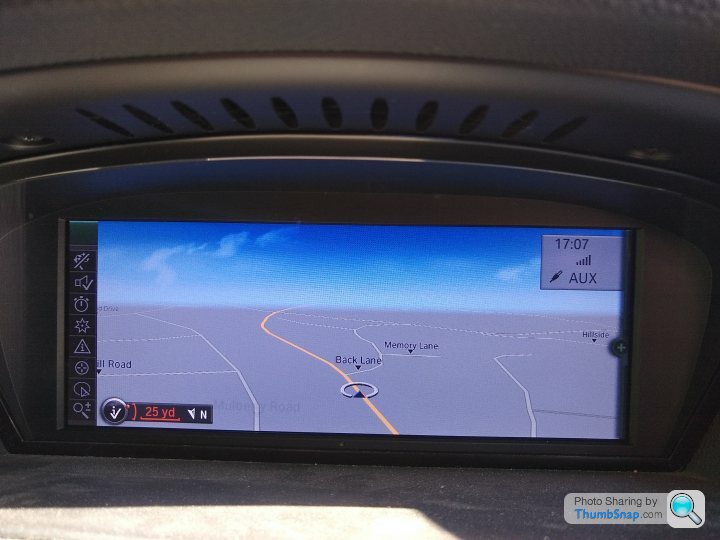
Found someone on ebay who could do it charge £100 including latest maps took car to near Pontefract and he did it whilst I went for a coffee took about an hour.
If any good for you(distance think I still have his phone no.
If look at Nav screen and it doesn't have the tick in the bottom left hand box it needs doing.
This is a current listing for him for a different problem
HTH
https://www.ebay.co.uk/itm/BMW-E60-E90-E70-CIC-iDr...
HTH
https://www.ebay.co.uk/itm/BMW-E60-E90-E70-CIC-iDr...
brums evil twin said:
Check in the glove box - this is where the USP socket is for updates. Cannot remember what year they started to put them there. The arm rest was just for charging and music only.
If there is not a USB in the glovebox its a dealer update only
Mine has the usb in the glove box and armrest but still wouldn't (will now) update from glovebox.if the ticks missing in the bottom left hand box. look an any decent map updaters site and they will advise same .Pre CIC unit maps can be updated from DVD,sIf there is not a USB in the glovebox its a dealer update only
Once cars CIC software is updated then maps can be updated by normal means.
Are you hoping just for map updates? Many people seem to say that the maps won't update if the tick icon isn't there, but mine has no tick, and the maps updated fine from the glovebox USB port.
But mine's a 2010 330i, and there's no armrest USB port, and maybe that makes a difference.
But mine's a 2010 330i, and there's no armrest USB port, and maybe that makes a difference.
Hoping to improve Bluetooth connectivity- got phone paired OK but cannot get audible books to stream properly. The update, UPD01008, May help.
Sat. Nav currently 2008 version. This really does need updating.
Can’t see how having 2 USBs could be a problem. They are seen as 2 separate item on iDrive and have tried uploading from both.
Sat. Nav currently 2008 version. This really does need updating.
Can’t see how having 2 USBs could be a problem. They are seen as 2 separate item on iDrive and have tried uploading from both.
Just to add, even with a software update you will not be able to do audio streaming with your kit you have in the car. The Bluetooth is a 'non streaming' kind.
You need to have a 'combox' fitted if you want to be able to stream audio over bluetooth. It also gives more features like being able to read texts on the info display, ability to view contact pictures, multiple bluetooth devices connected at the same time, iPod/iPhone control over USB, and BMW apps for certain apps.
I bought the bits and had Simon at Bavarian Coding come to me to do some coding and fitting work. It cost all in roughly £400. It's cheaper if you DIY, but the coding itself is a bit of a minefield. Prior to this I had just an AUX-in jack in the armrest, and bluetooth for calls only. Now I've got all of the above listed aspects, with a USB port in the armrest, and 2020 maps loaded up too.
I think it makes a big difference to the CIC system and makes it feel so much more modern. It makes it feel much more like an 'infotainment' system with the external connections.
You need to have a 'combox' fitted if you want to be able to stream audio over bluetooth. It also gives more features like being able to read texts on the info display, ability to view contact pictures, multiple bluetooth devices connected at the same time, iPod/iPhone control over USB, and BMW apps for certain apps.
I bought the bits and had Simon at Bavarian Coding come to me to do some coding and fitting work. It cost all in roughly £400. It's cheaper if you DIY, but the coding itself is a bit of a minefield. Prior to this I had just an AUX-in jack in the armrest, and bluetooth for calls only. Now I've got all of the above listed aspects, with a USB port in the armrest, and 2020 maps loaded up too.
I think it makes a big difference to the CIC system and makes it feel so much more modern. It makes it feel much more like an 'infotainment' system with the external connections.
Agree with Jaket comments above, first car for me with inbuilt sat nav so wanted ro uodate to latest maps. Once done not that impressed by BMW navigation system and went back to using Google maps or Tom Tom go on phone.
Connected phone speaker into system by wire into Aux in socket - decided bluetooth would be better and bought a AUKEY Bluetooth Receiver about £25 which does the job and allows to skip to next/last track but no detail of artist/track.
Since bought a 2018 F56 cooper S with full communication system which is great for streaming etc but still think Google maps and Tom Tom Go are better for navigation after running them together on same journey
Connected phone speaker into system by wire into Aux in socket - decided bluetooth would be better and bought a AUKEY Bluetooth Receiver about £25 which does the job and allows to skip to next/last track but no detail of artist/track.
Since bought a 2018 F56 cooper S with full communication system which is great for streaming etc but still think Google maps and Tom Tom Go are better for navigation after running them together on same journey
A cheaper alternative to the full combox install would be something like this:
https://www.amazon.co.uk/ViseeO-Tune2Air-Bluetooth...
but do some research on some model specific forums first to double check if this is what you need.
[edit] i think twokcc above has mentioned something similar.
https://www.amazon.co.uk/ViseeO-Tune2Air-Bluetooth...
but do some research on some model specific forums first to double check if this is what you need.
[edit] i think twokcc above has mentioned something similar.
margerison said:
A cheaper alternative to the full combox install would be something like this:
https://www.amazon.co.uk/ViseeO-Tune2Air-Bluetooth...
but do some research on some model specific forums first to double check if this is what you need.
[edit] i think twokcc above has mentioned something similar.
More expensive that one I have but gives track details etc which is a feature I would pay for but the tune2air only seems to work with iphone.https://www.amazon.co.uk/ViseeO-Tune2Air-Bluetooth...
but do some research on some model specific forums first to double check if this is what you need.
[edit] i think twokcc above has mentioned something similar.
Anyone know of similar that works with android
Gassing Station | BMW General | Top of Page | What's New | My Stuff