
E60 Apple Car Play unit
Discussion


There was a thread on BMW5.co.uk forum about units that replace the entire iDrive screen with a new unit that offered car play etc. It had a wealth of info but that forum seems to have now moved to facebook and I'm not a facebooker.
Does anyone have up to date info on which unit is our best bet these days and where to buy one in (or shipped to) the UK?
Got a lot of European driving coming up and I think it would be a great upgrade ahead of that.
Car is a 2007 LCI 525 touring. CCC idrive system I believe. Has Aux in etc and currently using a Dension for bluetooth etc.
Does anyone have up to date info on which unit is our best bet these days and where to buy one in (or shipped to) the UK?
Got a lot of European driving coming up and I think it would be a great upgrade ahead of that.
Car is a 2007 LCI 525 touring. CCC idrive system I believe. Has Aux in etc and currently using a Dension for bluetooth etc.
I fitted an Andream unit to my E92 (it’s the same unit for the E60) and have been really pleased with it. Mine has a loose connection so doesn’t display the OE menu correctly, I need to send it back but I might just but a second one and ask for a refund because like CarPlay! 
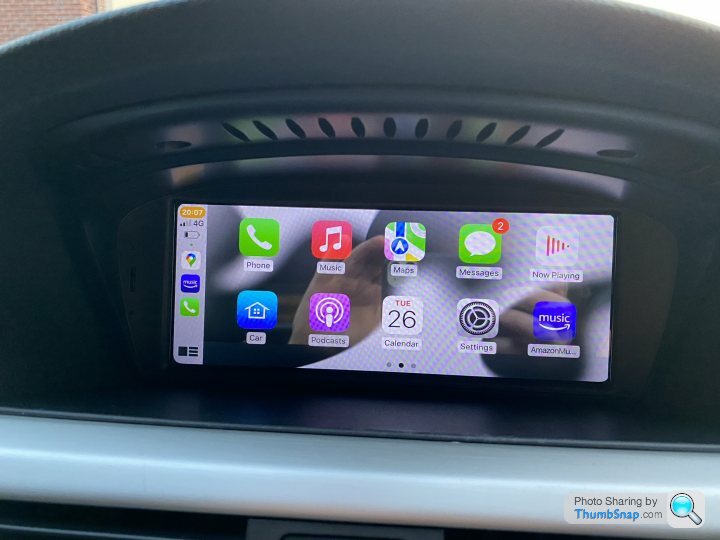
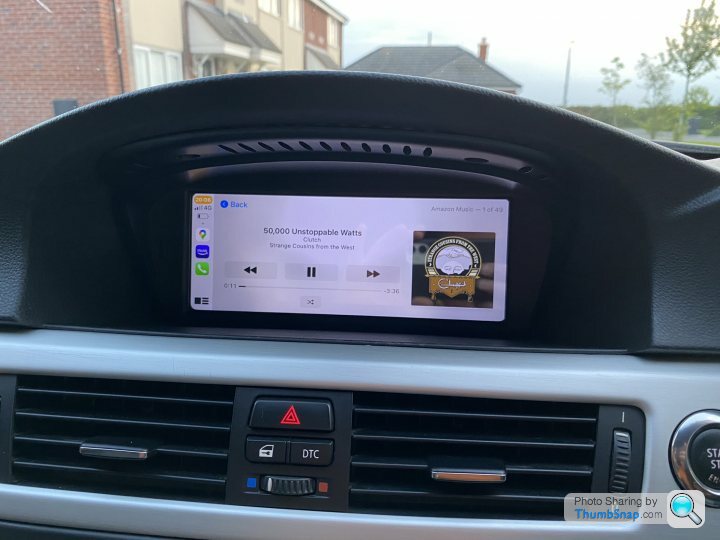
Install is easy enough despite it not coming with any instructions (thank you YouTube). I had to fiddle with the factory settings for which you need a code (1368). This meant it was the right sized screen and the correct idrive controller.
UK companies seem to sell the same unit for loads more.
Install is easy enough despite it not coming with any instructions (thank you YouTube). I had to fiddle with the factory settings for which you need a code (1368). This meant it was the right sized screen and the correct idrive controller.
UK companies seem to sell the same unit for loads more.
Lee630i said:
Was this just a plug and play screen replacement or did it involve any re wiring? I have an e63 with the ccc, the screen looks like it comes out easy enough but ideally want to avoid removing the 14 year old HVAC controls and trim
It was pretty much plug and play. You need to mow the optical cables (green wires) from the original quadlock into they new one (piece of cake). The new quadlock connector has a bunch of cables that plug into the screen that need threading up through gaps in the dash from the CCC unit to the new screen. You’ll need to remove the trim and HVAC controls to do this. It’ll be fine though, get some time removal tools and you’ll be grand. My 130i was 14 years old when I fitted a CarPlay solution to that and nothing broke. My 335i is 14 years old and getting those bits out was ok. Court_S said:
I fitted an Andream unit to my E92 (it’s the same unit for the E60) and have been really pleased with it. Mine has a loose connection so doesn’t display the OE menu correctly, I need to send it back but I might just but a second one and ask for a refund because like CarPlay!
Install is easy enough despite it not coming with any instructions (thank you YouTube). I had to fiddle with the factory settings for which you need a code (1368). This meant it was the right sized screen and the correct idrive controller.
UK companies seem to sell the same unit for loads more.
Fantastic info thanks. Can I ask where you bought your's? Install is easy enough despite it not coming with any instructions (thank you YouTube). I had to fiddle with the factory settings for which you need a code (1368). This meant it was the right sized screen and the correct idrive controller.
UK companies seem to sell the same unit for loads more.
Assume the code aspect is just an admin code to access certain setting on the unit? Not on the vehicle itself?
Gad-Westy said:
Fantastic info thanks. Can I ask where you bought your's?
Assume the code aspect is just an admin code to access certain setting on the unit? Not on the vehicle itself?
Direct from Andream. Took about four days to arrive and was £240 give or take. Assume the code aspect is just an admin code to access certain setting on the unit? Not on the vehicle itself?
Yeah, the code is just to access the factory settings menu.
One thing ti be careful if is to make sure the LVDS cable is connected to the screen last to avoiding upsetting stuff (it’s the 10 pin plug).
Court_S said:
Gad-Westy said:
Fantastic info thanks. Can I ask where you bought your's?
Assume the code aspect is just an admin code to access certain setting on the unit? Not on the vehicle itself?
Direct from Andream. Took about four days to arrive and was £240 give or take. Assume the code aspect is just an admin code to access certain setting on the unit? Not on the vehicle itself?
Yeah, the code is just to access the factory settings menu.
One thing ti be careful if is to make sure the LVDS cable is connected to the screen last to avoiding upsetting stuff (it’s the 10 pin plug).
As said previously, it seems UK sellers are selling the same box, rebranded for 3 times the amount.
Does that work with the iDrive controller?
If so that’s good value
I went a different route with this device. You keep the existing lo res screen and it uses that
Was a bit more expensive from memory around £400 but works well
https://integratedautomotive.co.uk/faqs/
If so that’s good value
I went a different route with this device. You keep the existing lo res screen and it uses that
Was a bit more expensive from memory around £400 but works well
https://integratedautomotive.co.uk/faqs/
Origin Unknown said:
Thanks for the steer re plugging in the LVDS cable to the screen last on the Andream, mine turned up this morning (I had a different thread on Apple CarPlay for my 640d). A job for this evening if time allows, anything else I should be aware of?
As said previously, it seems UK sellers are selling the same box, rebranded for 3 times the amount.
You’ll almost certainly need to adjust the screen option / idrive controller. You’ll need the factory settings code which for both mine and my mates was 1368. Other than the LVDS cable there’s nothing to watch out for. As said previously, it seems UK sellers are selling the same box, rebranded for 3 times the amount.
Tobermory said:
Does that work with the iDrive controller?
If so that’s good value
I went a different route with this device. You keep the existing lo res screen and it uses that
Was a bit more expensive from memory around £400 but works well
https://integratedautomotive.co.uk/faqs/
Yes, the Andream one uses the stock idrive controller. If so that’s good value
I went a different route with this device. You keep the existing lo res screen and it uses that
Was a bit more expensive from memory around £400 but works well
https://integratedautomotive.co.uk/faqs/
I used the Integrated Automotive solution before in my 130i LE. That worked well but I do prefer the better resolution of the modern screen.
Gad-Westy said:
There was a thread on BMW5.co.uk forum about units that replace the entire iDrive screen with a new unit that offered car play etc. It had a wealth of info but that forum seems to have now moved to facebook and I'm not a facebooker.
Does anyone have up to date info on which unit is our best bet these days and where to buy one in (or shipped to) the UK?
Got a lot of European driving coming up and I think it would be a great upgrade ahead of that.
Car is a 2007 LCI 525 touring. CCC idrive system I believe. Has Aux in etc and currently using a Dension for bluetooth etc.
The forums down FYI; issues with the back end of the form host and issues that aren't easily resolvedDoes anyone have up to date info on which unit is our best bet these days and where to buy one in (or shipped to) the UK?
Got a lot of European driving coming up and I think it would be a great upgrade ahead of that.
Car is a 2007 LCI 525 touring. CCC idrive system I believe. Has Aux in etc and currently using a Dension for bluetooth etc.
They're onto it, but it's taking time unfortunately
Well, it's in and amazingly worked first time. My kit came with a 5g/wifi antenna which I wasn't expecting. Maybe something to help signal on wireless carplay? It was really the only complicated aspect as I fitted the antenna just next to the passenger A-pillar which meant threading the cable across the back of the glove box and then up to the screen. Otherwise surprisingly straight forward and so far seems to work a treat. Thumbs up from me so far.
Gad-Westy said:
Well, it's in and amazingly worked first time. My kit came with a 5g/wifi antenna which I wasn't expecting. Maybe something to help signal on wireless carplay? It was really the only complicated aspect as I fitted the antenna just next to the passenger A-pillar which meant threading the cable across the back of the glove box and then up to the screen. Otherwise surprisingly straight forward and so far seems to work a treat. Thumbs up from me so far.
Good stuff. Did you need to change the settings for the idrive controller?A couple of questions for seasoned users.
When I start the car, the Andream unit comes onto its home screen but the radio will be playing. In order to use Andream I need to head over to the original iDrive, select aux-input and then go back to Andream unit. Any way of changing this behaviour? Either within iDrive, getting it to remember that I was using Aux last time or for the car to always boot into original iDrive rather than Andream? Not a biggie, but a little irritation.
I'm finding wireless carplay pretty unreliable too. Pretty much given up on that for now.
Overall though, very pleased.
When I start the car, the Andream unit comes onto its home screen but the radio will be playing. In order to use Andream I need to head over to the original iDrive, select aux-input and then go back to Andream unit. Any way of changing this behaviour? Either within iDrive, getting it to remember that I was using Aux last time or for the car to always boot into original iDrive rather than Andream? Not a biggie, but a little irritation.
I'm finding wireless carplay pretty unreliable too. Pretty much given up on that for now.
Overall though, very pleased.
Gad-Westy said:
A couple of questions for seasoned users.
When I start the car, the Andream unit comes onto its home screen but the radio will be playing. In order to use Andream I need to head over to the original iDrive, select aux-input and then go back to Andream unit. Any way of changing this behaviour? Either within iDrive, getting it to remember that I was using Aux last time or for the car to always boot into original iDrive rather than Andream? Not a biggie, but a little irritation.
I'm finding wireless carplay pretty unreliable too. Pretty much given up on that for now.
Overall though, very pleased.
Under the factory settings you can set the AUX mode (manual or auto) - you need manual to stop this.When I start the car, the Andream unit comes onto its home screen but the radio will be playing. In order to use Andream I need to head over to the original iDrive, select aux-input and then go back to Andream unit. Any way of changing this behaviour? Either within iDrive, getting it to remember that I was using Aux last time or for the car to always boot into original iDrive rather than Andream? Not a biggie, but a little irritation.
I'm finding wireless carplay pretty unreliable too. Pretty much given up on that for now.
Overall though, very pleased.
There is a code to access the factory menu - most seem to be 1368.
My wireless carplay works really well other than sounding a bit s
 t (noticeable due to have the HiFi system)
Court_S said:
Gad-Westy said:
A couple of questions for seasoned users.
When I start the car, the Andream unit comes onto its home screen but the radio will be playing. In order to use Andream I need to head over to the original iDrive, select aux-input and then go back to Andream unit. Any way of changing this behaviour? Either within iDrive, getting it to remember that I was using Aux last time or for the car to always boot into original iDrive rather than Andream? Not a biggie, but a little irritation.
I'm finding wireless carplay pretty unreliable too. Pretty much given up on that for now.
Overall though, very pleased.
Under the factory settings you can set the AUX mode (manual or auto) - you need manual to stop this.When I start the car, the Andream unit comes onto its home screen but the radio will be playing. In order to use Andream I need to head over to the original iDrive, select aux-input and then go back to Andream unit. Any way of changing this behaviour? Either within iDrive, getting it to remember that I was using Aux last time or for the car to always boot into original iDrive rather than Andream? Not a biggie, but a little irritation.
I'm finding wireless carplay pretty unreliable too. Pretty much given up on that for now.
Overall though, very pleased.
There is a code to access the factory menu - most seem to be 1368.
My wireless carplay works really well other than sounding a bit s
t (noticeable due to have the HiFi system)Has got me wondering about installing a reverse cam and PVR now as well I must admit!
While I'm on, do you know if there is a way to reconfigure the homescreen? On main page, I get three main options, original car, wireless carplay, wireless android auto. Wired car play, which is the one I use, requires a swipe to the next page. Ideally I'd like to shuffle around so that is on the first page.
Out of interest, have you found out all of your knowledge by trial and error or are there some instructions somewhere I should know about?
Cheers again.
Out of interest, have you found out all of your knowledge by trial and error or are there some instructions somewhere I should know about?
Cheers again.
Gad-Westy said:
While I'm on, do you know if there is a way to reconfigure the homescreen? On main page, I get three main options, original car, wireless carplay, wireless android auto. Wired car play, which is the one I use, requires a swipe to the next page. Ideally I'd like to shuffle around so that is on the first page.
Out of interest, have you found out all of your knowledge by trial and error or are there some instructions somewhere I should know about?
Cheers again.
Not sure if you can reorder the homescreen - would be good if you could. I doubt it has that capability though.Out of interest, have you found out all of your knowledge by trial and error or are there some instructions somewhere I should know about?
Cheers again.
There was a really useful thread on the 5 forum that I managed to remember info from. Unfortunately the site is offline / on FB at the moment so the thread is nor visible anymore.
Gassing Station | BMW General | Top of Page | What's New | My Stuff