
How to do a 'guest' network?
Discussion


I want to add a second 'guest' wifi network in my home if possible and I want to ask is it possible?
I have Sky fibre with the Sky Q Hub connected to the telephone network.
I also have a BT home hub 5 hat I'm not using so want it know if there is a way to connect the BT HH wirelessly to the Sky hub. I want to place the HH at the back of the house so it need to connect wirelessly to the Sky Hub.
Once the BT HH has logged onto to my usual wireless network,can it then broadcast on a different network that guests can log into?
If this can happen, can anybody give me pointers on how to do it?
Thanks.
Homeplugs are pretty bad IME.
I've got one of these plugged in near my existing wifi router and set up for guest networking duties.
You can disable everything to allow just this.
Piece of cake to set up and works brilliantly.
https://www.amazon.co.uk/ASUS-RT-AC51U-Dual-Band-W...
I've got one of these plugged in near my existing wifi router and set up for guest networking duties.
You can disable everything to allow just this.
Piece of cake to set up and works brilliantly.
https://www.amazon.co.uk/ASUS-RT-AC51U-Dual-Band-W...
TheAngryDog said:
out of interest, why would you want to do this for home Wi-Fi? Genuinely interested
I have thought about this. We have Sonos and a Network Server. No mobile signal here so when guests come over they connect to the network. If we have a guest network then we could limit what they can control.ash73 said:
TheAngryDog said:
out of interest, why would you want to do this for home Wi-Fi? Genuinely interested
It's handy if you have visitors and they or their kids want to hook up to the internet, you can prevent them accessing anything else on your network. First thing people ask these days is what's the wifi password?TheAngryDog said:
out of interest, why would you want to do this for home Wi-Fi? Genuinely interested
The plan was to put the BT home hub router next to the second TV in the dining room that the kids use for TV and Xbox. Run it all off one electrical plug which would be wifi controlled so come 7 o clock at night until 8am in the morning PLUS whenever they are naughty (which is often), I shut the electrics off by wifi controlled by the 'master' router. When the electric goes off, so does the TV, Xbox and 'their" network.
Because the 'master' network that I use is still working, I can still use internet AND because the wifi plug controlling the kids gear is controlled by the master network, I can still restart the electric to their devices, TV and Xbox whenever I choose, even remotely when I am away with work.
QR code generator for your wifi.
https://qifi.org/
means you can have a good strong password instead of one easy to type in for the guests.
https://qifi.org/
means you can have a good strong password instead of one easy to type in for the guests.
alock said:
A900ss said:
Run it all off one electrical plug which would be wifi controlled...
I would be disappointed if my 9 and 11 year old children couldn't work that out and plug it into a different socket. Teenagers should be doing it well enough that you don't even realise.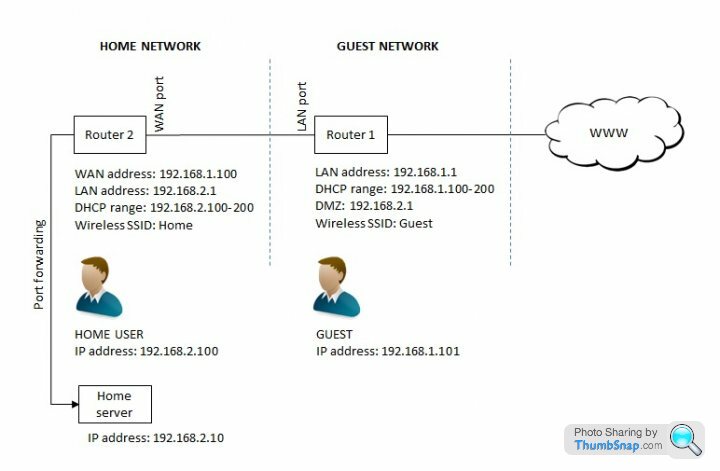
ash73 said:
Couple of ways you can do it, either get a router which has guest network capability, or configure your second router on a separate subnet and put it in the dmz of the first router; then their wireless networks will be isolated. Even the freebee ISP routers have dmz functionality. Ideally you should configure the router console on a random port to stop guests accessing it.
Two main issues with guest networks; most home routers don't implement them very well, guests are placed on the same subnet and many have security flaws; e.g. the tplink 9980 guest network is quietly compromised if you configure the firewall, the linksys doesn't even have encryption, iirc. Secondly it can be difficult to find APs that can extend a guest network around the house.
EDIT: Forgot to say, you would use the first router as the guest network, and your home network would hang off the second router; so guests can only go out through the primary router to the internet. The only thing wired into the first router would be the second router, via its WAN port, so they need to be physically side-by-side. Putting the second router in the dmz means all internet traffic is forwarded to it so you can set up any port forwarding on the second router.
Hi GuysTwo main issues with guest networks; most home routers don't implement them very well, guests are placed on the same subnet and many have security flaws; e.g. the tplink 9980 guest network is quietly compromised if you configure the firewall, the linksys doesn't even have encryption, iirc. Secondly it can be difficult to find APs that can extend a guest network around the house.
EDIT: Forgot to say, you would use the first router as the guest network, and your home network would hang off the second router; so guests can only go out through the primary router to the internet. The only thing wired into the first router would be the second router, via its WAN port, so they need to be physically side-by-side. Putting the second router in the dmz means all internet traffic is forwarded to it so you can set up any port forwarding on the second router.
Edited by ash73 on Saturday 14th January 13:20
I know this thread is pretty old now, but this is what I want to do with my sky sr102 router, I have got an asus router so I guess I connect my Ethernet lead from the lan port on my sky router then to the wan port on my asus router, then tick the dmz box on my asus router.
is this correct
Gassing Station | Computers, Gadgets & Stuff | Top of Page | What's New | My Stuff