
Weird startup screen on faulty PC
Discussion


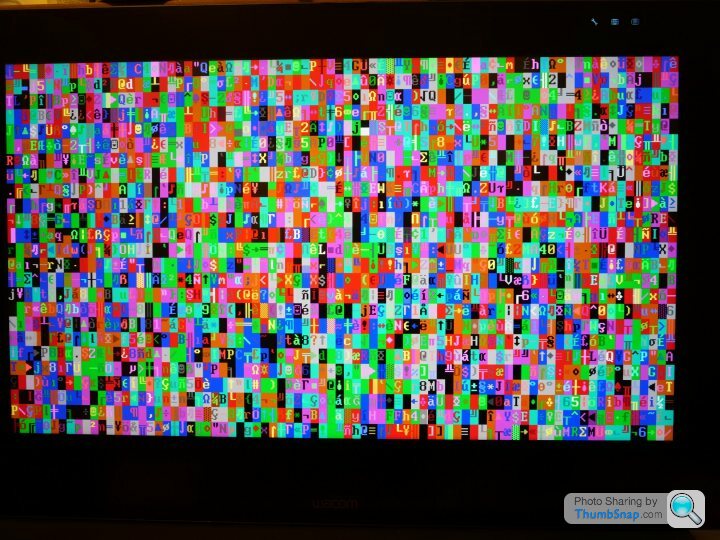
Jinx said:
Dead GPU?
I guess it might be. I was thinking the GPU needed upgrading anyway so first thought is to buy a better unit and install it, see if that fixes the problem. If it doesn't, sell the new unit or build a new PC around it.I'm thinking Nvidia 1080, current unit is Amd Radeon r9 200 series
singlecoil said:
I guess it might be. I was thinking the GPU needed upgrading anyway so first thought is to buy a better unit and install it, see if that fixes the problem. If it doesn't, sell the new unit or build a new PC around it.
I'm thinking Nvidia 1080, current unit is Amd Radeon r9 200 series
Easy way to tell, just plug the monitor directly to the motherboard.I'm thinking Nvidia 1080, current unit is Amd Radeon r9 200 series
singlecoil said:
deckster said:
Easy way to tell, just plug the monitor directly to the motherboard.
There doesn't, on the face of it (or rather on the back panel of it) to be a way a doing that. Any chance you could post a picture of the rear of the computer?

singlecoil said:
Yep no onboard GPU chip on that machine. New GPU it is (well you can try the old clean and bake to get a few more days from your R9 200 series (guessing it's the 290)?
deckster said:
Bugger me sideways. I've not seen a motherboard without a video connector, well, ever. You live and learn!
So yeah, given that, new graphics card is the obvious next step - I guess you've tried different cables in different ports?
Used to be standard that most Mobo's didn't have a graphics output. Wasn't until Intel started integrating their GPU with their CPU that it started to become standard. Up until then if you had onboard graphics it meant you had a GPU chip soldered in. I once had an AMD Athlon mainboard with an integrated GeForce 6200 (the 2005 vintage).So yeah, given that, new graphics card is the obvious next step - I guess you've tried different cables in different ports?
EDIT: OP, have you tried re-seating the graphics card? Could be a cheap solution.
singlecoil said:
It's an Asus P9 X79LE motherboard. Research specific to the software I mostly use (Davinci Resolve Studio) suggests the NVIDIA RTX 2080 Ti is the best choice. Opinions gratefully received.
Yes the 2080 Ti is definitely king of the GPUs (unless you go Titan RTX) so if you have the money it would be the card of choice. I'll be holding on to my 1080Ti for awhile though as I only have 1440p monitor.I tried the advice to reseat the card (although I had already ordered another GPU) and it worked for a couple of bootups, but then the strange stuff started again.
This morning I had another go, and after that it worked perfectly and kept on working.
So I was in a quandary as to whether or not to return the new card untouched. I decided to install it though, as I wanted a better one anyway.
Problem now is a blank screen. As far as the monitor is concerned there's no signal. I've reseated it and reseated the power cables (the pretty light display on the card is working). As has already been mentioned, there's no video output direct from the motherboard so I'm unsure of the best way to proceed.
According to research done so far I need to put the old card back in and disable the drivers, but the worry is that when I start up with the new card Windows will reinstall the old drivers.
mikef said:
singlecoil said:
I can’t answer your question, but why did it need an expansion card with yet more USB ports?They come with the motherboard, usually for plugging into the case ports, but not all cases and motherboards are compatible.
Gassing Station | Computers, Gadgets & Stuff | Top of Page | What's New | My Stuff