
Suggest a Nice keyboard?
Discussion


Currently using the thinkpads keyboard while hooked up to large monitor. Not ideal.. but the typing/usage is Perfect
Borrowed some Logitech k120 keyboard and it feels s te , I have tried other cheap keyboards and they also feel crap.
Need it just for typing & web. No gaming stuff.
Probably not looking for some clunky heavy ''gamer'' mechanical monster with disco lights and large bezels which costs 100 squids, just normal slim keyboard that feels light and typing is nice and not load/clunky/ste ?
Anyone knows one like that?
Wired is fine as well.
Borrowed some Logitech k120 keyboard and it feels s
te , I have tried other cheap keyboards and they also feel crap.Need it just for typing & web. No gaming stuff.
Probably not looking for some clunky heavy ''gamer'' mechanical monster with disco lights and large bezels which costs 100 squids, just normal slim keyboard that feels light and typing is nice and not load/clunky/s
te ?Anyone knows one like that?
Wired is fine as well.
Dunno , spending anything over 25-35 for a keyboard feels very very weird.
I know you use it everyday..but still.. So up to that probably.
I probably just really want the feel/experience of 1:1 thinkpad keyboard but not as a built in laptop keyboard,
I know you use it everyday..but still.. So up to that probably.
I probably just really want the feel/experience of 1:1 thinkpad keyboard but not as a built in laptop keyboard,
Edited by bagusbagus on Friday 20th September 12:27
Laptop keys are pretty st IMO. Nowhere near as nice as a good mechanical keyboard for typing experience. Any sort of budget membrane keyboard are ste, likely the logitech you tried is a membrane. Decent membranes exist but they cost a significant premium, something with Topre as an example.
The problem is that there are a lot of st mechanical keyboards out there with poor design choices as they are trying to fit things like RGB lighting, macro support, etc. into a £30 budget. As with everything you get what you pay for.
At about £30 you can squeek into one of these. As with all keyboards with lighting I've seen you can turn off the lighting using a keypress combo.The Outemu switches are better than Cherrys IMO, but still a budget switch. I bought two of these for my kids, the font on the keys is terrible but at least the keycaps are double cap ABS and decent quality, for £30 you would struggle to beat them.
If you want a top quality typing experience you have to pay for it. Something with Gateron Silent Black Inks or Zilents in a decent case that has insulting foam between the base and the PCB and a seperate layer between the PCB and the plate would be very quiet. A set of those switches would be more than your budget alone.
t IMO. Nowhere near as nice as a good mechanical keyboard for typing experience. Any sort of budget membrane keyboard are ste, likely the logitech you tried is a membrane. Decent membranes exist but they cost a significant premium, something with Topre as an example. The problem is that there are a lot of s
t mechanical keyboards out there with poor design choices as they are trying to fit things like RGB lighting, macro support, etc. into a £30 budget. As with everything you get what you pay for.At about £30 you can squeek into one of these. As with all keyboards with lighting I've seen you can turn off the lighting using a keypress combo.The Outemu switches are better than Cherrys IMO, but still a budget switch. I bought two of these for my kids, the font on the keys is terrible but at least the keycaps are double cap ABS and decent quality, for £30 you would struggle to beat them.
If you want a top quality typing experience you have to pay for it. Something with Gateron Silent Black Inks or Zilents in a decent case that has insulting foam between the base and the PCB and a seperate layer between the PCB and the plate would be very quiet. A set of those switches would be more than your budget alone.
tankplanker said:
Laptop keys are pretty st IMO. Nowhere near as nice as a good mechanical keyboard for typing experience. Any sort of budget membrane keyboard are ste, likely the logitech you tried is a membrane. Decent membranes exist but they cost a significant premium, something with Topre as an example.
The problem is that there are a lot of st mechanical keyboards out there with poor design choices as they are trying to fit things like RGB lighting, macro support, etc. into a £30 budget. As with everything you get what you pay for.
At about £30 you can squeek into one of these. As with all keyboards with lighting I've seen you can turn off the lighting using a keypress combo.The Outemu switches are better than Cherrys IMO, but still a budget switch. I bought two of these for my kids, the font on the keys is terrible but at least the keycaps are double cap ABS and decent quality, for £30 you would struggle to beat them.
If you want a top quality typing experience you have to pay for it. Something with Gateron Silent Black Inks or Zilents in a decent case that has insulting foam between the base and the PCB and a seperate layer between the PCB and the plate would be very quiet. A set of those switches would be more than your budget alone.
the few mechanicals I have seen, have all been extremely noisy /clunky - are they all like that? Haven't really used one myself,just from what I have seen they all seem Design/light show & ''gaming experience'' over everything else?t IMO. Nowhere near as nice as a good mechanical keyboard for typing experience. Any sort of budget membrane keyboard are ste, likely the logitech you tried is a membrane. Decent membranes exist but they cost a significant premium, something with Topre as an example. The problem is that there are a lot of s
t mechanical keyboards out there with poor design choices as they are trying to fit things like RGB lighting, macro support, etc. into a £30 budget. As with everything you get what you pay for.At about £30 you can squeek into one of these. As with all keyboards with lighting I've seen you can turn off the lighting using a keypress combo.The Outemu switches are better than Cherrys IMO, but still a budget switch. I bought two of these for my kids, the font on the keys is terrible but at least the keycaps are double cap ABS and decent quality, for £30 you would struggle to beat them.
If you want a top quality typing experience you have to pay for it. Something with Gateron Silent Black Inks or Zilents in a decent case that has insulting foam between the base and the PCB and a seperate layer between the PCB and the plate would be very quiet. A set of those switches would be more than your budget alone.
I just want a tool for writing/doing stuff not to have something ''cool looking''
I have to agree that laptop keyboards are all utter crap,except thinkpads...
Don't overthink this. Just go onto Amazon and buy something that you like the look of from a known brand (you can't go wrong with Logitech or Microsoft keyboards) for a price you feel comfortable with. It will I guarantee you be absolutely fine.
And don't contemplate spending £100 on a mechanical keyboard for even a nanosecond, unless you already have a beard and an extensive vinyl collection.
And don't contemplate spending £100 on a mechanical keyboard for even a nanosecond, unless you already have a beard and an extensive vinyl collection.
There is a whole sub culture to mechanical keyboards, gets very nerdy and very expensive very quickly. High end self build keyboards can be north of £700.
Most gaming keyboards from the likes of Razer or Corsair are just st, and they are at the top end of mass market gaming keyboards. I would still put them ahead of your average logitech or microsoft keyboard, at not least because the former will have a proper mechanical switch in it if you avoid the optical switch bullst.
Switch type has the biggest effect on noise, something like a Cherry blue is designed to be clickly (and is one of the worst sounding modern switches), a Cherry brown would be much quieter as it doesn't click. Keycap quality also impacts on this. Then case design and build quality. A metal case can cause pinging unless its insulated properly, plastic tends to be better at the low end but it is a cheap fix.
Quality keyboard with Zilents: https://www.youtube.com/watch?v=NwVoDqHef7g
Thats about as quiet as you'll get for a mechanical.
Logitech,Thinkpad, and a more noisy mech keyboard in comparison: https://www.youtube.com/watch?v=CChHFq7VSnw
Most gaming keyboards from the likes of Razer or Corsair are just s
t, and they are at the top end of mass market gaming keyboards. I would still put them ahead of your average logitech or microsoft keyboard, at not least because the former will have a proper mechanical switch in it if you avoid the optical switch bullst.Switch type has the biggest effect on noise, something like a Cherry blue is designed to be clickly (and is one of the worst sounding modern switches), a Cherry brown would be much quieter as it doesn't click. Keycap quality also impacts on this. Then case design and build quality. A metal case can cause pinging unless its insulated properly, plastic tends to be better at the low end but it is a cheap fix.
Quality keyboard with Zilents: https://www.youtube.com/watch?v=NwVoDqHef7g
Thats about as quiet as you'll get for a mechanical.
Logitech,Thinkpad, and a more noisy mech keyboard in comparison: https://www.youtube.com/watch?v=CChHFq7VSnw
I use one of these at work and really like it. Lovely to type on and not noisy/disturbing in an office environment: https://www.microsoft.com/accessories/en-gb/produc...
At home I have one of these which soldiers on: https://www.engadget.com/products/logitech/dinovo/...
I like it so much I bought another one to keep as a spare for when the first one dies - I'm hoping the battery won't be toast by the time I come to use it! The first one has been working faultlessly since I bought it about a decade ago.
At home I have one of these which soldiers on: https://www.engadget.com/products/logitech/dinovo/...
I like it so much I bought another one to keep as a spare for when the first one dies - I'm hoping the battery won't be toast by the time I come to use it! The first one has been working faultlessly since I bought it about a decade ago.
I love my Logitech Craft keyboard but at £150 it's not a cheap device, they are launching a new version for around £100 next week https://www.amazon.co.uk/Logitech-Advanced-Wireles...
Although I'm a Mac owner, I've been using a Microsoft Internet Keyboard hooked up to my office Windows machine (an HP Elitebook with docking station and large monitor) for the best part of 20 years now. (Yes, still the same keyboard!)
If this dies, I'll probably buy an MS Wired Keyboard 600.
If this dies, I'll probably buy an MS Wired Keyboard 600.
tankplanker said:
Most gaming keyboards from the likes of Razer or Corsair are just st,
Some are good though. My Corsair K95 platinum is often reviewed as the best keyboard out there. It has the Cherry MX speed switches and the build quality is great. I edited the post to say I have the silly lights turned off which makes it look a lot more mature. (still not a recommendation though)t, 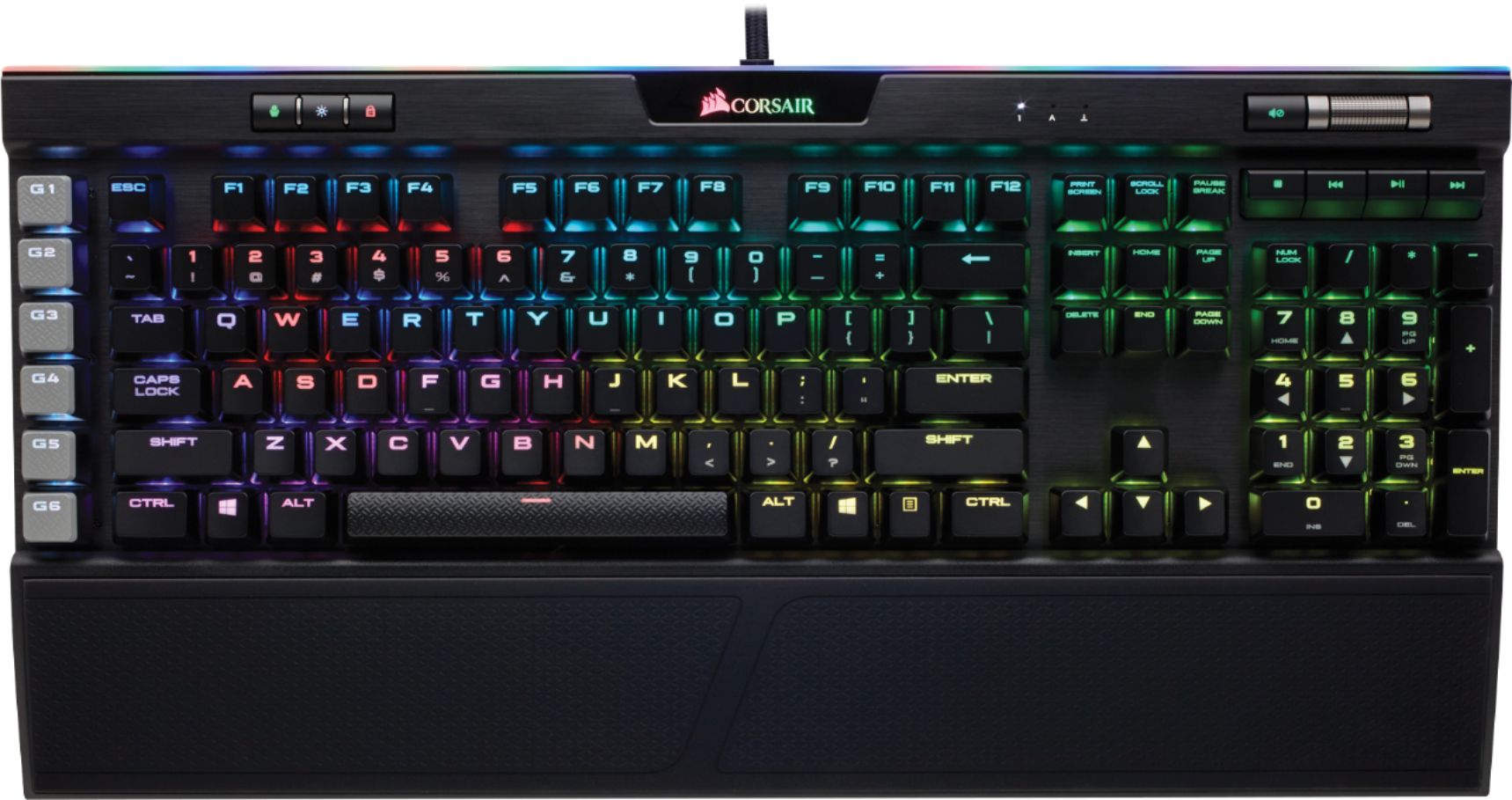
I would accept over priced or frivolous but not s
t.Back to the OP, mechanical keyboards are loud and unnecessary if you are upgrading your lap top experience. I work in IT and use a "comes free with the PC" Dell Keyboard as do 99% of the 5000 tech people in my building even though we do not have any Dell hardware. One of the main reasons is that when I am on a call and using the mechanical keyboard people can hear it but the Dell is silent.
Edited by h0b0 on Friday 20th September 21:19
Genuinely don’t bother looking at anything else
https://www.microsoft.com/accessories/en-us/produc...
I’ve tried them all and this thing is wonderful and still going strong 4 years on. Used daily for minimum 5 hours
https://www.microsoft.com/accessories/en-us/produc...
I’ve tried them all and this thing is wonderful and still going strong 4 years on. Used daily for minimum 5 hours
I have a Daskeyboard with clicky keys for home use and one with silent keys and extra o-rings for use on customer sites out of deference to colleagues who might be driven nuts by the clickerty-clack.
They are a joy to type with.
No silly gaming accoutrements like illumination, programmable keys, and the like, although there are media keys and a rotary volume knob.
I love them
They are a joy to type with.
No silly gaming accoutrements like illumination, programmable keys, and the like, although there are media keys and a rotary volume knob.
I love them
h0b0 said:
Back to the OP, mechanical keyboards are loud and unnecessary if you are upgrading your lap top experience. I work in IT and use a "comes free with the PC" Dell Keyboard as do 99% of the 5000 tech people in my building even though we do not have any Dell hardware. One of the main reasons is that when I am on a call and using the mechanical keyboard people can hear it but the Dell is silent.
I have a Filco Majestorm Ninja (or some similar wordsalad nonsense) with O-rings, and love it, but the Dell ones are surprisingly good. I have about ten 'cos I used to use them with my woodworking CNC machine. They didn't last long once you filled them with sawdust and wood chips.I do find I can type faster on something with Cherry MX keyswitches. I loved my Cherry Click but the noise genuinely nearly drove my wife to murdering me - she has mesophonia. She can tolerate the Filco as long as she's not in the room when I'm going full speed.
[edit] This looks like an ugly bargain: https://www.keyboardco.com/keyboard/german-superio...
Sporky said:
I do find I can type faster on something with Cherry MX keyswitches. I loved my Cherry Click but the noise genuinely nearly drove my wife to murdering me - she has mesophonia. She can tolerate the Filco as long as she's not in the room when I'm going full speed.
Cherry MX keys are lovely. That's what Daskeyboard use. They come in different colours corresponding to different levels of noise and clackertyness. The silent keys (I think that's Cherry MX Brown) + O-rings are as quiet as a membrane keyboard. Indeed, I had a colleague at one place who was very heavy on his keypresses and made more noise than I was doing with my silenced Daskeyboard.
The addition of O-rings does reduce the noise significantly, and the Browns are pretty quiet to start with.
Sporky said:
I think mine has Blues which feel clickier than browns, but aren't much louder. The O-rings damp that down a bit.

I think my home keyboard has Cherry MX Blue switches. Not 1980's IBM keyboard clickerty-clack but a nice action and sound. Probably a little excessive in an office environment, though, which is why I also bought the one with MX Browns and fitted O-rings to it.
Gassing Station | Computers, Gadgets & Stuff | Top of Page | What's New | My Stuff