
Help cloning HDD to SSD
Discussion


Today I tried to clone the HDD in my daughter's W10 laptop to a SSD but it does not seem to have worked so am after some advice.
The laptop has a 1TB HDD and the storage settings show it is only using 91.9GB with 824GB free.
I purchased a 500GB SSD.
Using Macrium Reflect it shows this:
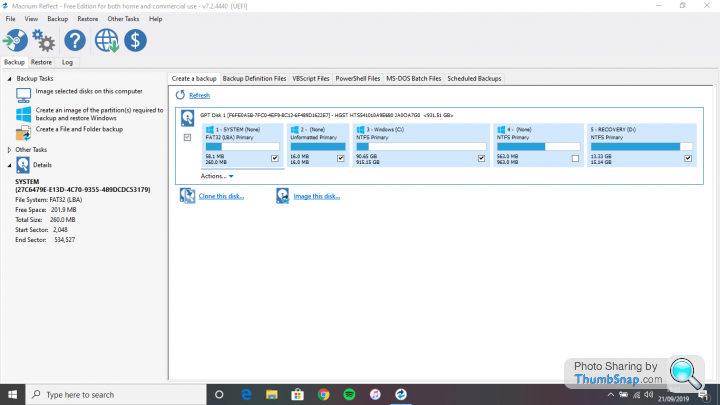
If you can't see the picture it shows 5 partitions:
System FATS32 Primary 58.1 GB of 250GB
Unformatted Primary 16GB of 16GB
Windows C: NTFS Primary 90.65GB of 915GB
(None) NTFS Primary 563MB of 963MB
Recovery D: 13.33GB of 15.14GB
I tried using the clone this disk function and it all seemed to go okay. WHen I put the SSD into the laptop I get an error message telling me there is no operating system on the boot disk.
Any ideas or pointers?
The laptop has a 1TB HDD and the storage settings show it is only using 91.9GB with 824GB free.
I purchased a 500GB SSD.
Using Macrium Reflect it shows this:
If you can't see the picture it shows 5 partitions:
System FATS32 Primary 58.1 GB of 250GB
Unformatted Primary 16GB of 16GB
Windows C: NTFS Primary 90.65GB of 915GB
(None) NTFS Primary 563MB of 963MB
Recovery D: 13.33GB of 15.14GB
I tried using the clone this disk function and it all seemed to go okay. WHen I put the SSD into the laptop I get an error message telling me there is no operating system on the boot disk.
Any ideas or pointers?

Penelope Stopit said:
Have you considered installing a clean Windows 10 OS to the SSD and then copying over any important files to it?
By far the simplest method. Just need a Windows PC and an 8Gb USB stick. Google Windows 10 download and follow the instructions on the MS page. Far less faffing and you’ll get the latest version, currently 1903.
Scrump said:
Today I tried to clone the HDD in my daughter's W10 laptop to a SSD but it does not seem to have worked so am after some advice.
The laptop has a 1TB HDD and the storage settings show it is only using 91.9GB with 824GB free.
I purchased a 500GB SSD.
Using Macrium Reflect it shows this:
If you can't see the picture it shows 5 partitions:
System FATS32 Primary 58.1 GB of 250GB
Unformatted Primary 16GB of 16GB
Windows C: NTFS Primary 90.65GB of 915GB
(None) NTFS Primary 563MB of 963MB
Recovery D: 13.33GB of 15.14GB
I tried using the clone this disk function and it all seemed to go okay. WHen I put the SSD into the laptop I get an error message telling me there is no operating system on the boot disk.
Any ideas or pointers?
First off: put the HDD back in & make a Recovery Disk using Macrium:The laptop has a 1TB HDD and the storage settings show it is only using 91.9GB with 824GB free.
I purchased a 500GB SSD.
Using Macrium Reflect it shows this:
If you can't see the picture it shows 5 partitions:
System FATS32 Primary 58.1 GB of 250GB
Unformatted Primary 16GB of 16GB
Windows C: NTFS Primary 90.65GB of 915GB
(None) NTFS Primary 563MB of 963MB
Recovery D: 13.33GB of 15.14GB
I tried using the clone this disk function and it all seemed to go okay. WHen I put the SSD into the laptop I get an error message telling me there is no operating system on the boot disk.
Any ideas or pointers?
https://knowledgebase.macrium.com/display/KNOW72/R...
https://knowledgebase.macrium.com/display/KNOW72/C...
Always do this first when using Macrium to clone a disk. You'll need to create a bootable USB drive:
https://knowledgebase.macrium.com/display/KNOW72/P...
https://knowledgebase.macrium.com/display/KNOW72/C...
Next attach the SSD & clone the HDD but I'd suggest only ticking the three following partitions:
YES - System FATS32 Primary 58.1 GB of 250GB
NO - Unformatted Primary 16GB of 16GB
YES - Windows C: NTFS Primary 90.65GB of 915GB
NO - (None) NTFS Primary 563MB of 963MB
YES - Recovery D: 13.33GB of 15.14GB
Adjust the C partion size to fill the free space if Macrium doesn't do this automatically.
Remove the HDD & put the SSD in. If it doesn't boot then follow this procedure (you'll need to boot from the USB Recovery key so make sure you have set the USB higher than the SSD in the BIOS boot order).
https://knowledgebase.macrium.com/display/KNOW72/F...
Hopefully this will result in an SSD that boots.
If you want to start again with a new copy of Windows 10 then that's been covered numerous times on this forum.
Gassing Station | Computers, Gadgets & Stuff | Top of Page | What's New | My Stuff