
QNAP NAS drive failure - what do i do now?
Discussion


After many years service one of the hard drives in my QNAP TS-412 has died - I have the red light on the front:
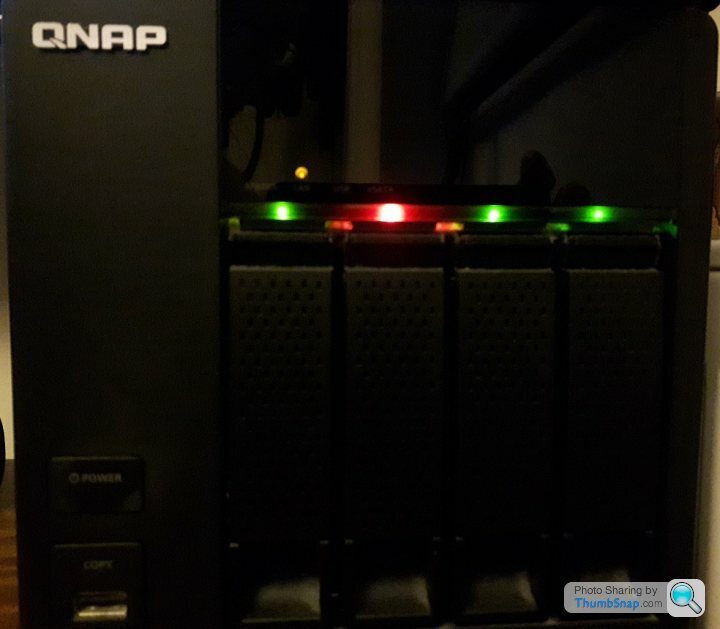
Im trying to connect to the NAS via "QNAP Finder" to access the configuration pages etc, but after I have entered my password it just stays on this loading screen:

Ive tried with several browsers.
Details:
QNAP TS-412
4 x 3TB Seagate Drives
Configured as RAID 5 (I think - where 1 drive can fail and data is still available from the other 3, which is how it is now)
Questions for you:
1) Any tips how I can access the configuration pages?
2) Or can I just pop in a new drive (cold swap) and it will automatically rebuild itself?
Any help gratefully received! I have years of movies and TV shows at risk....
Im trying to connect to the NAS via "QNAP Finder" to access the configuration pages etc, but after I have entered my password it just stays on this loading screen:
Ive tried with several browsers.
Details:
QNAP TS-412
4 x 3TB Seagate Drives
Configured as RAID 5 (I think - where 1 drive can fail and data is still available from the other 3, which is how it is now)
Questions for you:
1) Any tips how I can access the configuration pages?
2) Or can I just pop in a new drive (cold swap) and it will automatically rebuild itself?
Any help gratefully received! I have years of movies and TV shows at risk....
buggalugs said:
Normally you slide the red drive out and swap it with a good one then it auto rebuilds over a day or so.
I’d turn it off and on again to sort the unresponsive UI
I did try switching it off and on again, but still cant access the UI - the page loading icon just keeps spinning around for ever.I’d turn it off and on again to sort the unresponsive UI
However, if it can "auto-rebuild" without even needing to access the configuration pages, then im good, right?
Am I best swapping the drive when its off, then booting up the NAS, rather than a hot swap?
I have a QNAP TS-212 which also had one of the (2) drives fail. I removed the failing drive and it booted up. The failing drive was eating all the CPU resources so I couldn’t access the admin console.
Rather than replace the broken drive I sent all the data to Amazon Drive. Cost a few quid on top of Prime, and took a week or so to transfer 1TB of stuff. A much better solution than the old NAS which can grow as needed. I'm sure Google etc is just as good. The NAS still works with its one remaining drive, but I think as a solution it’s outdated now.
Rather than replace the broken drive I sent all the data to Amazon Drive. Cost a few quid on top of Prime, and took a week or so to transfer 1TB of stuff. A much better solution than the old NAS which can grow as needed. I'm sure Google etc is just as good. The NAS still works with its one remaining drive, but I think as a solution it’s outdated now.
If you replace the drive, I'd recommend using the same make/model as the others you have if you can. Not essential, but cuts out areas where issues can occur.
The NAS really should be able to cope with one drive down. Presumably you're powering it off at the switch rather than via the console if you can't access the console...I'd minimise the number of times you do this too.
Ref online storage...fine if you have relatively small amounts of data, the files aren't something you need to be secure and you have a good bi-directional internet connection. Otherwise a properly set up NAS has plenty of life in it as a solution
The NAS really should be able to cope with one drive down. Presumably you're powering it off at the switch rather than via the console if you can't access the console...I'd minimise the number of times you do this too.
Ref online storage...fine if you have relatively small amounts of data, the files aren't something you need to be secure and you have a good bi-directional internet connection. Otherwise a properly set up NAS has plenty of life in it as a solution
telford_mike said:
I have a QNAP TS-212 which also had one of the (2) drives fail. I removed the failing drive and it booted up. The failing drive was eating all the CPU resources so I couldn’t access the admin console.
Ah, i'll try that tonight then. I actually have a TS-212 as well, which rarely gets switched on - i'll boot that up and see whether that one can access the admin console. That ones a backup for pictures/files off my main PCThe TS-412 is 8TB of films and TV shows, and is my main media server streaming to a PS3, so not really practical (or possible?) to move to "the cloud" for what I use it for.
daddy cool said:
The TS-412 is 8TB of films and TV shows, and is my main media server streaming to a PS3, so not really practical (or possible?) to move to "the cloud" for what I use it for.
8TB, wow, yes, that's a bit of an issue for a cloud solution. Another thing I've done in the past to fix an unresponsive QNAP is to push a firmware update to it (I think using QFinder). You can do this even if you can’t log on to the NAS itself.daddy cool said:
telford_mike said:
I have a QNAP TS-212 which also had one of the (2) drives fail. I removed the failing drive and it booted up. The failing drive was eating all the CPU resources so I couldn’t access the admin console.
Ah, i'll try that tonight then. I actually have a TS-212 as well, which rarely gets switched on - i'll boot that up and see whether that one can access the admin console. That ones a backup for pictures/files off my main PCThe TS-412 is 8TB of films and TV shows, and is my main media server streaming to a PS3, so not really practical (or possible?) to move to "the cloud" for what I use it for.
). If you're powering it down, I'd personally do this once and then sort a spare drive before powering it back up.(I'm not familiar with QNAP units but my ReadyNAS automatically rebuild on detection of a clean disk being inserted. They also use a proprietary RAID - RAID X - which allows different size and brand disks etc to be used which is very handy).
It sounds like I do similar to you in terms of usage..I have 4x 4-bay NAS units full of films, including raw rips of the DVDs themselves including menus etc and one of them being used as a backup for photos and mp4 flavour versions of all films (if a main unit fails I really don't want to have re-rip the best part of 1,000 DVDs)
daddy cool said:
telford_mike said:
I have a QNAP TS-212 which also had one of the (2) drives fail. I removed the failing drive and it booted up. The failing drive was eating all the CPU resources so I couldn’t access the admin console.
Ah, i'll try that tonight then. I actually have a TS-212 as well, which rarely gets switched on - i'll boot that up and see whether that one can access the admin console. That ones a backup for pictures/files off my main PCI removed the duff drive from the TS-412 (SKYNET2) and booted up, and still cant access the control panel... just stays on the loading screen.
Only difference is that the TS-212 is on firmware 4.2.4, whereas the bigger TS-412 is on 4.2.3

I don't really want to update it to the very latest firmware (4.3.something) because I seem to think they have removed TwonkyMedia server from the more recent firmwares, and that's what ive always used to stream to the PS3 (and both the drives have it currently). Anyone know whether there is a database of all old historic QNAP firmwares where I could find a copy of 4.2.4?
As for the duff drive, deciding whether to just get another 3TB drive and rebuild the database, or go nuts and get 4x4TB drives and start afresh with a capacity increase (after ive transferred the majority of the films off the NAS and onto external harddrives). Figured it might make the database build quicker, and I could re-add the files back at my leisure later... or is that a stupid idea?
ash73 said:
Updating the firmware in the middle of a recovery procedure sounds very iffy to me.
Just follow the instructions on the link I posted.
Trouble is, the link is based around the messages and instruction in the control panel. I can't access the control panel for some reason... any ideas on that?Just follow the instructions on the link I posted.
I heard that for some reason 3TB disks are vulnerable to failure, don't know why though. I do know drives like to fail in batches though, and rebuilding the RAID is an intensive task for the other drives and they are already of similar age/wear. Might be worth looking at replacing them.
Gassing Station | Computers, Gadgets & Stuff | Top of Page | What's New | My Stuff