
A little tech support please, new Power supply
Discussion


I am upgrading the GPU which means i also need a new PSU and there is an issue.
The machine is an old Dell Studio XPS8100 and has a connector like this one on the motherboard:
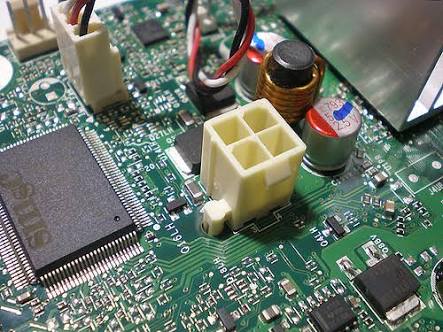
The new power supply doesn't have anything that will fit. Is there a workaround or do i need to find a different power supply? (or motherboard!)
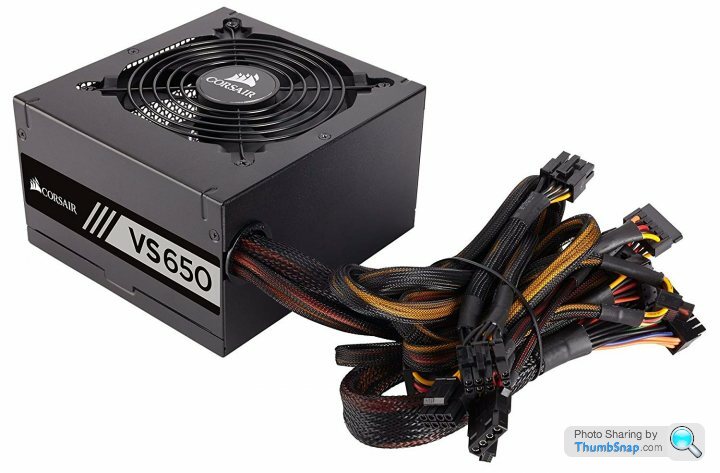
There are quite a few cables/connectors on the new power supply that are not being used: there are two six pin PCIe connectors for a start.
The machine is an old Dell Studio XPS8100 and has a connector like this one on the motherboard:
The new power supply doesn't have anything that will fit. Is there a workaround or do i need to find a different power supply? (or motherboard!)
There are quite a few cables/connectors on the new power supply that are not being used: there are two six pin PCIe connectors for a start.
Does this section from the manual help?
https://www.corsair.com/corsairmedia/sys_master/pr...
Step B: Installing the Corsair power supply
1. Make sure the power supply’s AC power cable is not connected.
2. Follow the directions in your chassis manual and install the power supply with the screws provided.
3. Connect the main 24-pin power cable. The main 24-pin power cable has a detachable 4-pin mechanism in order to support either a 24-pin or a 20-pin socket on the motherboard.
A. If your motherboard has a 24-pin socket, you may connect the 24-pin main power cable from the power supply directly to your motherboard.
B. If your motherboard has a 20-pin socket, you must detach the four-pin cable from the 24-pin connector, and then plug the 20-pin cable onto your motherboard without connecting the four-pin connector.
4. Connect the eight-pin +12V (EPS12V) cable to the motherboard.
A. If your motherboard has an eight-pin +12V socket, connect the eight-pin cable directly to your motherboard.
B. If your motherboard has a four-pin socket, detach the four-pin from the eight-pin cable, and then plug this four-pin cable directly to your motherboard.
WARNING: The detachable four-pin from the 24-pin main connector is not a “P4” or “+12V” connector. Serious damage can be caused if you use it in place of a “P4” or “+12V” connector.
https://www.corsair.com/corsairmedia/sys_master/pr...
Step B: Installing the Corsair power supply
1. Make sure the power supply’s AC power cable is not connected.
2. Follow the directions in your chassis manual and install the power supply with the screws provided.
3. Connect the main 24-pin power cable. The main 24-pin power cable has a detachable 4-pin mechanism in order to support either a 24-pin or a 20-pin socket on the motherboard.
A. If your motherboard has a 24-pin socket, you may connect the 24-pin main power cable from the power supply directly to your motherboard.
B. If your motherboard has a 20-pin socket, you must detach the four-pin cable from the 24-pin connector, and then plug the 20-pin cable onto your motherboard without connecting the four-pin connector.
4. Connect the eight-pin +12V (EPS12V) cable to the motherboard.
A. If your motherboard has an eight-pin +12V socket, connect the eight-pin cable directly to your motherboard.
B. If your motherboard has a four-pin socket, detach the four-pin from the eight-pin cable, and then plug this four-pin cable directly to your motherboard.
WARNING: The detachable four-pin from the 24-pin main connector is not a “P4” or “+12V” connector. Serious damage can be caused if you use it in place of a “P4” or “+12V” connector.
Gassing Station | Computers, Gadgets & Stuff | Top of Page | What's New | My Stuff