
A bit of help with 'new' GPU please :)
Discussion


I am chucking some 'New' bits at my old PC and having trouble with a GPU, I suspect it is a power issue.
The PC is a dell studio XPS 8100 so it is getting on a bit but i dont see why this card would not be compatible?
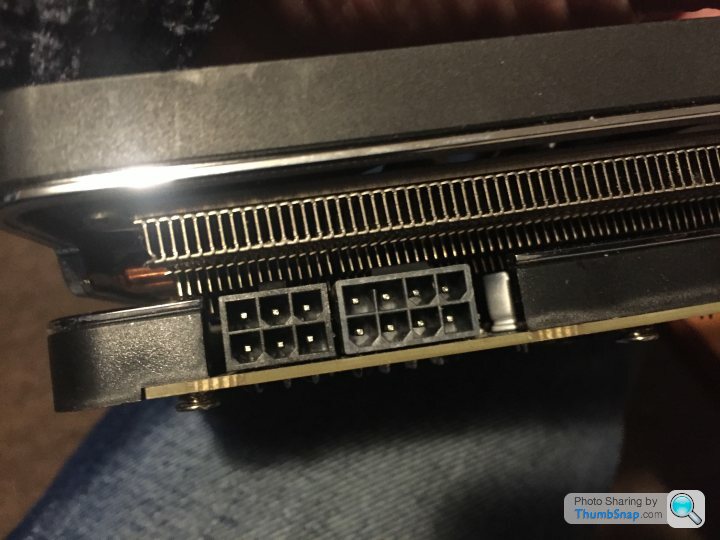
Here is what i am working with, it is a 4gb Radeon R9 290a and this is what i need to plugging power into:
I have a 'Multi pronged' PCI cable that looks like this:
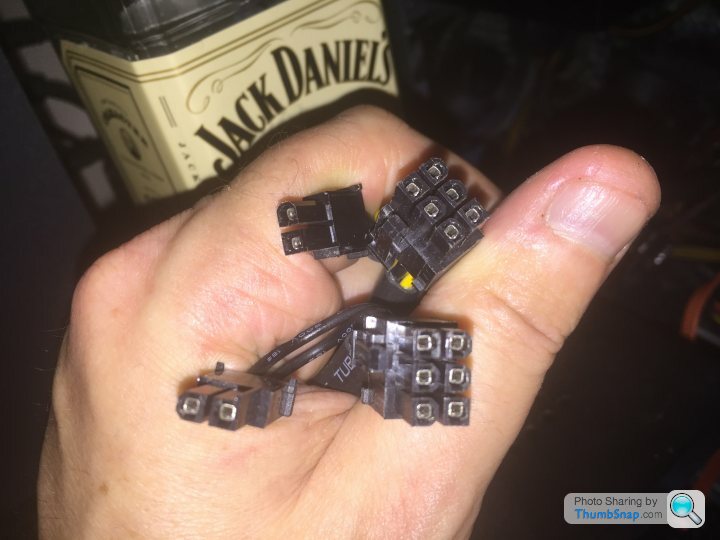
I have used just about all of those connectors to 'fill all the holes' in the GPU but all that happens is the PC just beeps five times and does not power up.
Then i read THIS:
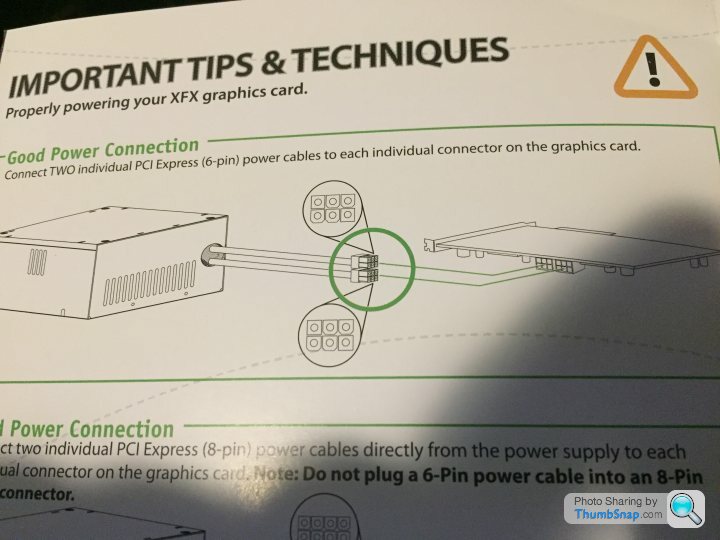
It made me wonder if i wasn't allowed to use that single cable to satisfy both the 8pin and 6pin receptacle on the GPU?
So i found some more cables that would allow me to use this adapter :

So, now i have two (three actually) seperate power sources going into the GPU and all the holes are filled but the result was exactly the same.
Any one got any Idea's for me to try?
The card is used but i met the seller in his house and have no reason to think the card is bad.
ETA: Also just realised that the 4x4gb of ram i just put in is only showing up as 8gb total..
The PC is a dell studio XPS 8100 so it is getting on a bit but i dont see why this card would not be compatible?
Here is what i am working with, it is a 4gb Radeon R9 290a and this is what i need to plugging power into:
I have a 'Multi pronged' PCI cable that looks like this:
I have used just about all of those connectors to 'fill all the holes' in the GPU but all that happens is the PC just beeps five times and does not power up.
Then i read THIS:
It made me wonder if i wasn't allowed to use that single cable to satisfy both the 8pin and 6pin receptacle on the GPU?
So i found some more cables that would allow me to use this adapter :
So, now i have two (three actually) seperate power sources going into the GPU and all the holes are filled but the result was exactly the same.
Any one got any Idea's for me to try?
The card is used but i met the seller in his house and have no reason to think the card is bad.
ETA: Also just realised that the 4x4gb of ram i just put in is only showing up as 8gb total..
Edited by Shuvi McTupya on Tuesday 26th November 18:33
essayer said:
5 beeps? Or 6?
Are you using an 8-pin cable in the 8-pin port?
E: what spec is the PSU, maybe it’s not powerful enough to run the card
The PSU is a corsair VS650Are you using an 8-pin cable in the 8-pin port?
E: what spec is the PSU, maybe it’s not powerful enough to run the card
Edited by essayer on Tuesday 26th November 18:45
I will have to plug it all back in again to count the beeps!
And yes i used an 8 pin cable in the 8 pin port AND a six in the other one.
I am confused by the instructions:
connection method 1:
Method 2:
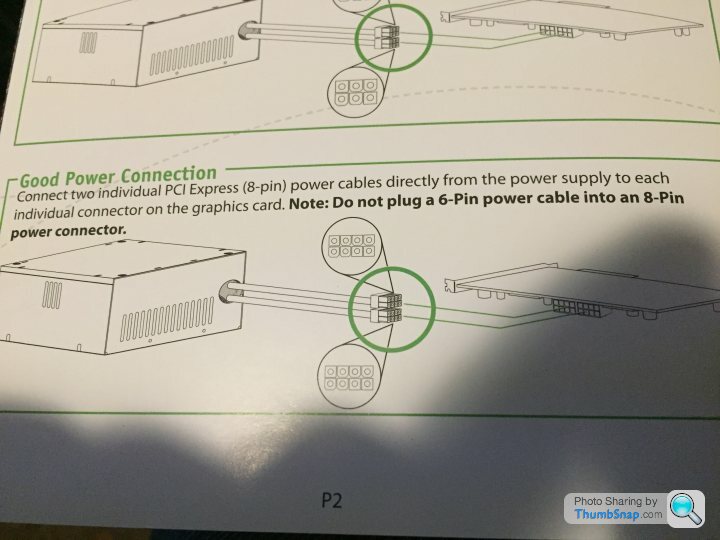
Connection method one says just to use two 6 pin connectors even though there is an 8 pin port and a six pin port. Maybe that is where i went wrong using the full 8 in one of them? Seems weird though?
But my card doesnt match either of those diagrams. one of the cards has two 8 pin ports and one has two 6 pin ports. Mine has one of each!
connection method 1:
Method 2:
Connection method one says just to use two 6 pin connectors even though there is an 8 pin port and a six pin port. Maybe that is where i went wrong using the full 8 in one of them? Seems weird though?
But my card doesnt match either of those diagrams. one of the cards has two 8 pin ports and one has two 6 pin ports. Mine has one of each!
Edited by Shuvi McTupya on Tuesday 26th November 18:55
The instructions do look a bit confusing, they assume you either have 2x8pin or 2x6pin obviously your card has one of each, i don't think it matters too much. I dont understand why they would put the 2 connectors on one lane if you are not supposed to use them both....
those 2 pin connectors clip onto the side of the 6 pin ones to make an 8 pin connector. So I would clip one of them on, use that as the 8 pin, and use the other for the 6 pin. However if you have a spare lane and an adaptor, it probably is worth using it for the 6 pin just in case there is not enough power on that single lane with the 2 6+2 connectors.
As someone else says, you need to check the RAM first, the card might be ok but the RAM POSTING first. I've found that often if there is not enough power to the card it will still boot but then crash either loading Windows or as soon as you try any 3d task, but that might depend on the card.
Cheers all,
I tried hooking it up again using all the connectors just like i did first time and it worked!
I have figured out the problem with the ram too. The ram is 'Dual layered' if that is the correct term and my old motherboard doesnt read both sides..hence half the ram!
I just ran 3d mark graphics test before and after the new card.
My old card (Nvidia GT630 2GB) scored..a whopping 808 points over all combined FPS about 3.85
The new one (Radeon R9 4BG)scored 8900 with a combined FPS of about 53!
That is quite a jump for £40
Shuvi McTupya said:
Cheers all,
I tried hooking it up again using all the connectors just like i did first time and it worked!
I have figured out the problem with the ram too. The ram is 'Dual layered' if that is the correct term and my old motherboard doesnt read both sides..hence half the ram!
I just ran 3d mark graphics test before and after the new card.
My old card (Nvidia GT630 2GB) scored..a whopping 808 points over all combined FPS about 3.85
The new one (Radeon R9 4BG)scored 8900 with a combined FPS of about 53!
That is quite a jump for £40
I think you're referring to Dual Channel with the RAM and your motherboard should support it. Even if it didn't, it should still detect all 16Gb of it so it sounds like you might have a dodgy RAM module or slots on the motherboard. Are all 4 sticks of RAM the same brand or are they different?I tried hooking it up again using all the connectors just like i did first time and it worked!
I have figured out the problem with the ram too. The ram is 'Dual layered' if that is the correct term and my old motherboard doesnt read both sides..hence half the ram!
I just ran 3d mark graphics test before and after the new card.
My old card (Nvidia GT630 2GB) scored..a whopping 808 points over all combined FPS about 3.85
The new one (Radeon R9 4BG)scored 8900 with a combined FPS of about 53!
That is quite a jump for £40
thecremeegg said:
I think you're referring to Dual Channel with the RAM and your motherboard should support it. Even if it didn't, it should still detect all 16Gb of it so it sounds like you might have a dodgy RAM module or slots on the motherboard. Are all 4 sticks of RAM the same brand or are they different?
All the same. And all four slots are working, but the system is just showing 4x2gb rather than 4 x 4gb! The New ram:
https://www.corsair.com/ca/en/Categories/Products/...
Edited by Shuvi McTupya on Tuesday 26th November 22:33
Shuvi McTupya said:
It turns out these are not 4GB sticks, they are 4GB 'Kits' or some such crap and you need two sticks to make 4GB.
I have never heard of such shonky marketing!
I know they do 'kits' of ram with identical sticks that should work together with no issues. Putting '4Gb Kit (2x2Gb)' on the box for these sets is normal and, on the outer packaging, it's clear what you're getting.I have never heard of such shonky marketing!
Them labeling each stick as 4Gb (2×2Gb) as in your photo is a bit of a stretch though.
Xerstead said:
I know they do 'kits' of ram with identical sticks that should work together with no issues. Putting '4Gb Kit (2x2Gb)' on the box for these sets is normal and, on the outer packaging, it's clear what you're getting.
Them labeling each stick as 4Gb (2×2Gb) as in your photo is a bit of a stretch though.
Well, I have never even seen the term before! Very dodgy IMO!Them labeling each stick as 4Gb (2×2Gb) as in your photo is a bit of a stretch though.
Even looking at the official site, it isn't clear at all that you need two of them to make 4GB's.
Edited by Shuvi McTupya on Wednesday 27th November 17:02
Gassing Station | Computers, Gadgets & Stuff | Top of Page | What's New | My Stuff