
Why is my iMac on a go slow? What would you change?
Discussion


Below are the specs on my iMac which I've not used for a while but when new was, as I understand it, a decent bit of kit.
It's on a bit of a go slow and the only thing I can see which could be causing the problem is the SATA drive as it doesn't have an SSD.
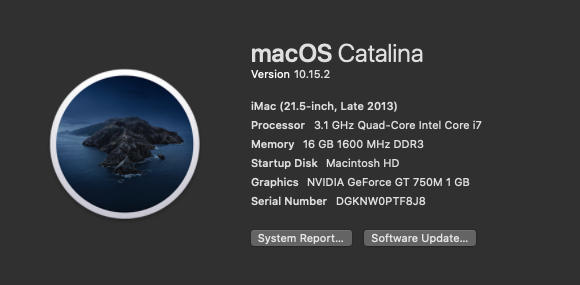


I've fully reset it to factory fresh.
I guess the first question is can this machine have it's HDD replaced with an SSD or it is a case of it being soldered in like some of the laptops?
I'm OK with software but the hardware side I'm clueless.
Thanks
It's on a bit of a go slow and the only thing I can see which could be causing the problem is the SATA drive as it doesn't have an SSD.
I've fully reset it to factory fresh.
I guess the first question is can this machine have it's HDD replaced with an SSD or it is a case of it being soldered in like some of the laptops?
I'm OK with software but the hardware side I'm clueless.
Thanks
A late 2013 model iMac can have its hardware replaced. Depending on how adventurous you're feeling it's not that difficult a job to tackle yourself.
Failing that grab yourself an external SSD on the fastest connection you have available and run the machine from that. A couple of our older machines have SSD's velcro attached to the back and run from there over USB C (your mileage may vary if using an older/slower connection - you should have thunderbolt which is essentially USB 3 so should be fine:

We're a 100% Mac office and find that replacing a standard HDD with an SSD makes the WORLD of difference, more so than processor/memory for general use.
Edit: From memory the 1TB Apple HDD drives like the one you are using are only 5400rpm drives so really put a bottleneck in system performance.
Failing that grab yourself an external SSD on the fastest connection you have available and run the machine from that. A couple of our older machines have SSD's velcro attached to the back and run from there over USB C (your mileage may vary if using an older/slower connection - you should have thunderbolt which is essentially USB 3 so should be fine:
We're a 100% Mac office and find that replacing a standard HDD with an SSD makes the WORLD of difference, more so than processor/memory for general use.
Edit: From memory the 1TB Apple HDD drives like the one you are using are only 5400rpm drives so really put a bottleneck in system performance.
Thank you, that might be the way forward. It does have Thunderbolt on the back and I'm not bothered by sticking something on the back of the machine as I don't see it.
https://www.amazon.co.uk/Samsung-MU-PA500B-Portabl...
Would this be OK?
I know I'm not there yet but how does one go about moving everything over etc if I went down that route.
We're a totally Mac office too and this has only come to light because my MBP has had to go into Apple for new screen and top case under warranty.
AB said:
Thank you, that might be the way forward. It does have Thunderbolt on the back and I'm not bothered by sticking something on the back of the machine as I don't see it.
https://www.amazon.co.uk/Samsung-MU-PA500B-Portabl...
Would this be OK?
I know I'm not there yet but how does one go about moving everything over etc if I went down that route.
We're a totally Mac office too and this has only come to light because my MBP has had to go into Apple for new screen and top case under warranty.
Pretty sure that's the exact same drive we use on two of our machines (see my picture above). Depending on what you use it for it's done us perfectly well. We are light users of both Logic and Final Cut / Adobe Premiere and it stands up to that just fine. I will add that "working files" are kept on a separate server if that makes a difference.https://www.amazon.co.uk/Samsung-MU-PA500B-Portabl...
Would this be OK?
I know I'm not there yet but how does one go about moving everything over etc if I went down that route.
We're a totally Mac office too and this has only come to light because my MBP has had to go into Apple for new screen and top case under warranty.
To move across the best thing to do is make a bootable installation usb thumb drive for, in your case Catalina, there's loads of instructions online how to do this, just google "make bootable Catalina usb" or similar. Then run the installation from boot, and rather than selecting your internal HD, chose your external SSD to install on. It's literally that easy. Once you're happy all is working well, use disk utility within Catalina running from your external SSD to erase your internal HD (if you want, we do this and then use the internal HD for temp/extra storage).
If this is the way you go forward and you get stuck at any point, do feel free to give me a shout - I've only done it approximately twelvety million times :-)
Bobajobbob said:
Probably a red herring but when I first upgraded to Catalina my iMac ran like a complete dog. It took a few point release updates before it got back to its usual rapid self. I don't recall the latest patch number for Catalina but worth double checking you the latest one installed.
The first release of Catalina made my MacBook Pro run like a dog. Upon investigation I found it was forever reindexing files on iCloud Drive (reading online there was a multitude of sync problems with iCloud and Catalina). This seemed never ending, system slow and becoming red hot. We work with hundreds of thousands of tiny files but I came to the conclusion it must have had time to finish "by now". A fresh clean installation did the trick. Yet again turning something off and back on again (albeit in a rather major way) did the trick! I have a late 2013 as well, same specs as yours but it is a fusion and that is the clincher. Though I have indicators that the spinning hard drive is on its way out.
My option is also a SSD using the thunderbolt port when the main HD gives up (not going to strip it down). I already keep my photos and iTunes on external hard drives along with a few copies of MacOS I can boot from should I need to.
Watch out for iTunes if it is needed, it has split into Music, Books, Podcast and TV. For some reason it pulled all the audio books to the main hard drive where the application is tying up space (no option to store outside the mac unlike TV etc.). My music and TV/Film libraries are still on the external hard drive.
Oh, and Photos application seems borked in Catalina when coupled with iCloud, at least for me it is. Absolutely make sure you have backed up what you need backed up and back it up again.
I have just revived my ailing 2012 Mac Mini by doing two things. I installed a cheapish Crucial SSD and did a clean install of the OS. Those two things, have transformed the machine into a perfectly useable computer again. I did each of those things separately and they each made a good improvement on its own.
Zirconia said:
I have a late 2013 as well, same specs as yours but it is a fusion and that is the clincher. Though I have indicators that the spinning hard drive is on its way out.
My option is also a SSD using the thunderbolt port when the main HD gives up (not going to strip it down). I already keep my photos and iTunes on external hard drives along with a few copies of MacOS I can boot from should I need to.
Watch out for iTunes if it is needed, it has split into Music, Books, Podcast and TV. For some reason it pulled all the audio books to the main hard drive where the application is tying up space (no option to store outside the mac unlike TV etc.). My music and TV/Film libraries are still on the external hard drive.
Oh, and Photos application seems borked in Catalina when coupled with iCloud, at least for me it is. Absolutely make sure you have backed up what you need backed up and back it up again.
Luckily, the iMac is on my desk in the office and I do tend to default to my MacBook Pro but I've had to start using it while MBP is with Apple. For this reason I don't use Photos/Music etc, just Office, Dropbox and a few other bits.My option is also a SSD using the thunderbolt port when the main HD gives up (not going to strip it down). I already keep my photos and iTunes on external hard drives along with a few copies of MacOS I can boot from should I need to.
Watch out for iTunes if it is needed, it has split into Music, Books, Podcast and TV. For some reason it pulled all the audio books to the main hard drive where the application is tying up space (no option to store outside the mac unlike TV etc.). My music and TV/Film libraries are still on the external hard drive.
Oh, and Photos application seems borked in Catalina when coupled with iCloud, at least for me it is. Absolutely make sure you have backed up what you need backed up and back it up again.
To be honest, if it speeds up and stops giving me the bloody beachball then I will probably start using it more as over the last day I've started enjoying the size of the screen. So much so that me and my business partner have been eyeing up 27" iMacs through Apple Business.
Waiting on my Amazon Prime delivery and I'll see how it goes.
AB said:
Luckily, the iMac is on my desk in the office and I do tend to default to my MacBook Pro but I've had to start using it while MBP is with Apple. For this reason I don't use Photos/Music etc, just Office, Dropbox and a few other bits.
To be honest, if it speeds up and stops giving me the bloody beachball then I will probably start using it more as over the last day I've started enjoying the size of the screen. So much so that me and my business partner have been eyeing up 27" iMacs through Apple Business.
Waiting on my Amazon Prime delivery and I'll see how it goes.
I keep eyeing up the 27" and willing the PSU in my 21 to fail. To be honest, if it speeds up and stops giving me the bloody beachball then I will probably start using it more as over the last day I've started enjoying the size of the screen. So much so that me and my business partner have been eyeing up 27" iMacs through Apple Business.
Waiting on my Amazon Prime delivery and I'll see how it goes.
 (only bought the 21 as I didn't have the space for a 27 at the time).
Don't forget, at the moment the 27" you can upgrade the memory yourself, 21" you cannot. Keeps the initial cost down. Bizarrely the 27 pro you cannot upgrade yourself.
I was in the Apple Store yesterday, I absolutely love the look of the iMac Pro but it's not half expensive!!!
Good point re upgrading yourself to keep initial cost down. I'd want minimum 512 SSD and 16 RAM which bring it in at around £2,200 inc VAT from memory.
I can't justify it if this simple fix sorts out my 21.5 - although looking at it as £180 ish a month over 2 years for 2 of them and then finding benefits in giving the older ones away or taking them home
stablemate said:
Pretty sure that's the exact same drive we use on two of our machines (see my picture above). Depending on what you use it for it's done us perfectly well. We are light users of both Logic and Final Cut / Adobe Premiere and it stands up to that just fine. I will add that "working files" are kept on a separate server if that makes a difference.
To move across the best thing to do is make a bootable installation usb thumb drive for, in your case Catalina, there's loads of instructions online how to do this, just google "make bootable Catalina usb" or similar. Then run the installation from boot, and rather than selecting your internal HD, chose your external SSD to install on. It's literally that easy. Once you're happy all is working well, use disk utility within Catalina running from your external SSD to erase your internal HD (if you want, we do this and then use the internal HD for temp/extra storage).
If this is the way you go forward and you get stuck at any point, do feel free to give me a shout - I've only done it approximately twelvety million times :-)
^^^ what he said. Thunderbolt SSD as the boot drive/apps/temp drive. Been running mine for 5 years.To move across the best thing to do is make a bootable installation usb thumb drive for, in your case Catalina, there's loads of instructions online how to do this, just google "make bootable Catalina usb" or similar. Then run the installation from boot, and rather than selecting your internal HD, chose your external SSD to install on. It's literally that easy. Once you're happy all is working well, use disk utility within Catalina running from your external SSD to erase your internal HD (if you want, we do this and then use the internal HD for temp/extra storage).
If this is the way you go forward and you get stuck at any point, do feel free to give me a shout - I've only done it approximately twelvety million times :-)
One thing to make sure of if you plan on running your iMac off an external SSD is to make sure that your iMac runs USB 3.0. If not you need something which is Thunderbolt like this:
https://www.ebay.co.uk/itm/LaCie-Rugged-500GB-SSD-... W4AAOSwW7ldT-qW
Or if you're feeling brave pull the screen off the iMac and replace the hard drive with a SSD
https://www.ebay.co.uk/itm/LaCie-Rugged-500GB-SSD-...
W4AAOSwW7ldT-qWOr if you're feeling brave pull the screen off the iMac and replace the hard drive with a SSD
Unfortunately you can't get CrystalDiskInfo for the Mac that allows you to check the health of the HDDs but there are alternatives - https://formac.informer.com/crystaldiskinfo
Can't say which one is best as I don't have a Mac. Checking the health of your HDD will help you decide if you can keep it for storage even if you install an SSD.
Can't say which one is best as I don't have a Mac. Checking the health of your HDD will help you decide if you can keep it for storage even if you install an SSD.
maccybee said:
I replaced the drive in my 2008 iMac with an SSHD (couldn't use an SSD because they were too small to go in the iMac), and that made a hell of a difference.
Relatively simple to do, had to buy a glass suction cup to pull the screen off but there's plenty of guides online.
I replaced the HDD in my 2007 24" iMac with an SSD and it now flies. You fit the smaller SSD into a caddy which then fits into the same space as the original drive. Takes a bit of nerve to strip the thing down though - took me 45mins from start to finish. I bought all the parts on Amazon.Relatively simple to do, had to buy a glass suction cup to pull the screen off but there's plenty of guides online.
Best off watching a few YouTube videos on how to change the drives because there are several variants of iMac over the years.
I see that it's now possible to change the drives in a more modern 27" iMac. Take a look at the tutorials on ifixit.com showing users how to make the changes.
Good luck with it.
Gassing Station | Computers, Gadgets & Stuff | Top of Page | What's New | My Stuff