
Can anyone help please? PDF to word
Discussion


ED209 said:
I have a pdf file (job application form) which I need to convert to a word document so that I can type in it properly whilst maintaining the proper format.
I have tried various online converters an get poor results. Can anyone assist please?
Are you sure it's not an editable/fillable pdf where you can type into the form? You may need to use Acrobat to do it.I have tried various online converters an get poor results. Can anyone assist please?
Mr Pointy said:
Are you sure it's not an editable/fillable pdf where you can type into the form? You may need to use Acrobat to do it.
I can edit it to some extent but I need to type a couple of 300 word pieces of text into it. All word counted and spell checked and in the correct font the employer specifies. I can’t for the life of me work out how to do it.
I have asked them for a word version. They don’t have one.
ED209 said:
Mr Pointy said:
Are you sure it's not an editable/fillable pdf where you can type into the form? You may need to use Acrobat to do it.
I can edit it to some extent but I need to type a couple of 300 word pieces of text into it. All word counted and spell checked and in the correct font the employer specifies. I can’t for the life of me work out how to do it.
I have asked them for a word version. They don’t have one.
TX.
ED209 said:
I have a pdf file (job application form) which I need to convert to a word document so that I can type in it properly whilst maintaining the proper format.
I have tried various online converters an get poor results. Can anyone assist please?
Ask the company to provide you with either an editable pdf file or a Word version. Then you get some brownie points as it looks like you want to fill in the form properly and you don't have to piss around converting it either.I have tried various online converters an get poor results. Can anyone assist please?
The employer hasn’t got a word document. I have already asked the question.
The kind member above attempt to assist me has had the same results as my efforts. The document corrupts.
Can anyone else please assist?
This is the document https://www.durham.police.uk/Join-us/Documents/Ins...
The kind member above attempt to assist me has had the same results as my efforts. The document corrupts.
Can anyone else please assist?
This is the document https://www.durham.police.uk/Join-us/Documents/Ins...
Terminator X said:
No, it works perfectly.You can get pdf editors for free that wil let you type over the top of it.
https://www.foxitsoftware.com/pdf-reader/
It has a "typewriter" function, just click where you want and you can type away.
Or, I've just opened it in Word and it converted it pretty much as per the original pdf file.
https://www.foxitsoftware.com/pdf-reader/
It has a "typewriter" function, just click where you want and you can type away.
Or, I've just opened it in Word and it converted it pretty much as per the original pdf file.
Think I can see your problem with the 300 word section. Try this:
Click 'View' along the top and tick the box that says 'ruler'
Along the top a ruler and a slide-rule will appear.
Move the left hand side slide-rule marker aligns with where you want your text to begin. You can do the same on the right hand side.
Click 'View' along the top and tick the box that says 'ruler'
Along the top a ruler and a slide-rule will appear.
Move the left hand side slide-rule marker aligns with where you want your text to begin. You can do the same on the right hand side.
Bear-n said:
Think I can see your problem with the 300 word section. Try this:
Click 'View' along the top and tick the box that says 'ruler'
Along the top a ruler and a slide-rule will appear.
Move the left hand side slide-rule marker aligns with where you want your text to begin. You can do the same on the right hand side.
Sorry are you talking about in word or something else?Click 'View' along the top and tick the box that says 'ruler'
Along the top a ruler and a slide-rule will appear.
Move the left hand side slide-rule marker aligns with where you want your text to begin. You can do the same on the right hand side.
All efforts so far have had the same results unfortunately, thanks all for trying though..
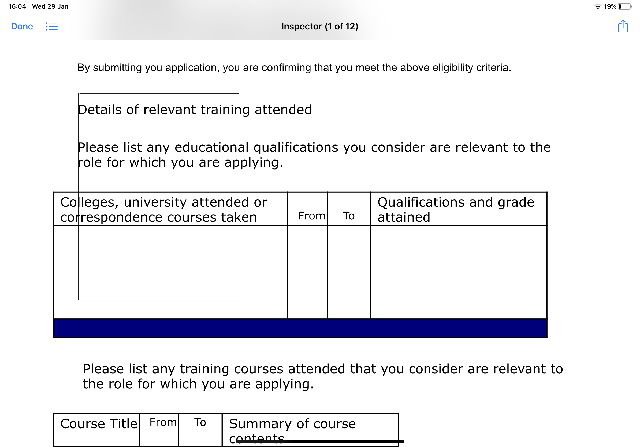
I’m really trying to avoid handwriting it as it will look a mess.

In Acrobat reader DC click on the Tools tab & open Fill & Sign. You then get a text box in the form field which you can type into. Note the text box can be resized & it doesn't seem to word wrap so you need to use return/enter at the right hand end.

Presumably one of the skills you will bring to the role is incarcerating whichever genius designed this form.
Presumably one of the skills you will bring to the role is incarcerating whichever genius designed this form.
Gassing Station | Computers, Gadgets & Stuff | Top of Page | What's New | My Stuff