
Help get Sky Q to my shed
Discussion


I thought I could sort this myself, but I’ve got into a bit of a confusing mess.
I have a shed (or cabin i guess) that is 50 metres from my property. I’ve run power and ethernet from my house to the shed.
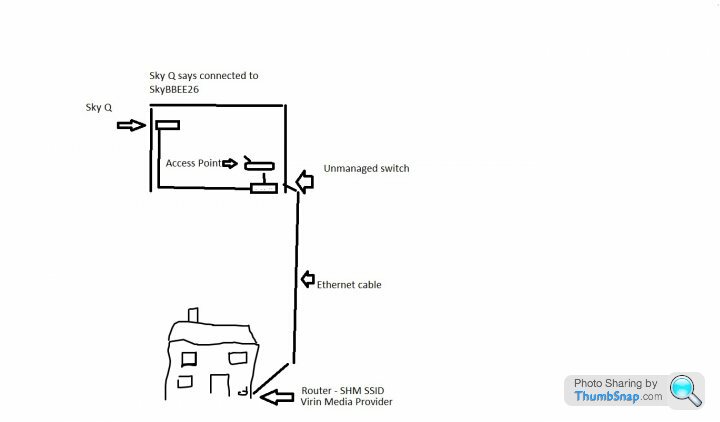
I’ve got a TV in there and a mini Sky Q box. The Ethernet cable runs directly from my Virgin router in my house, to a small unmanaged 6 port Tp link switch. One Ethernet cable goes to a Tp Access Point the other goes directly to the Sky Q box.
My virgin media WiFi Ssid is SH1. The WiFi ssid from my access point I also named SH1. (I have a SH2 running in my house)
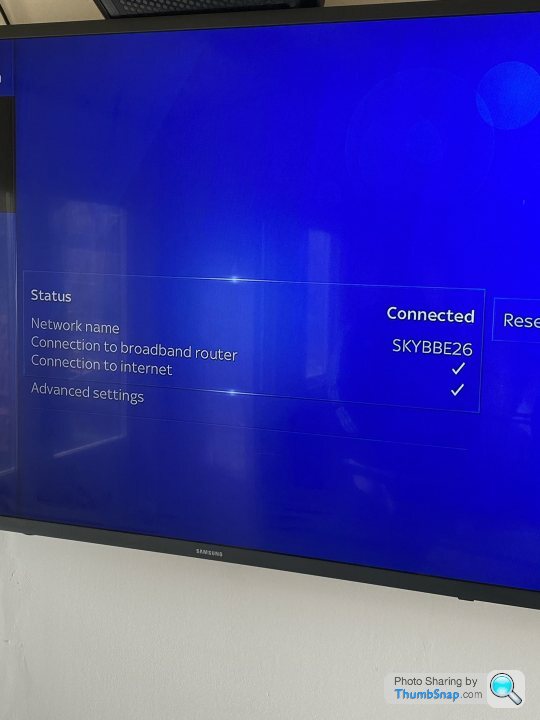
When I connect the Ethernet cable from my TP link switch to my Sky Q box, it connects and says it’s connected to a different ssid. When I setup the network connection on the Sky box and select Ethernet connection, it connects and my Sky will work for around 2 minutes then stop saying it can’t connect to the Sky box (I’m assuming this is because it’s a different network name)
When I test Netflix on my tv via the Ethernet cable is works fine and tests at 70MBs.
When I connect my Sky to the WiFi it works fine (and is connected to the same ssid as the sky q in the house)
Can anyone help as to why I can’t connect to sky on my Ethernet cable and why it connects to a different ssid name I have never seen before
I have a shed (or cabin i guess) that is 50 metres from my property. I’ve run power and ethernet from my house to the shed.
I’ve got a TV in there and a mini Sky Q box. The Ethernet cable runs directly from my Virgin router in my house, to a small unmanaged 6 port Tp link switch. One Ethernet cable goes to a Tp Access Point the other goes directly to the Sky Q box.
My virgin media WiFi Ssid is SH1. The WiFi ssid from my access point I also named SH1. (I have a SH2 running in my house)
When I connect the Ethernet cable from my TP link switch to my Sky Q box, it connects and says it’s connected to a different ssid. When I setup the network connection on the Sky box and select Ethernet connection, it connects and my Sky will work for around 2 minutes then stop saying it can’t connect to the Sky box (I’m assuming this is because it’s a different network name)
When I test Netflix on my tv via the Ethernet cable is works fine and tests at 70MBs.
When I connect my Sky to the WiFi it works fine (and is connected to the same ssid as the sky q in the house)
Can anyone help as to why I can’t connect to sky on my Ethernet cable and why it connects to a different ssid name I have never seen before
I'm guessing that it could be a latency issue. Sky Q boxes need a latency that is quite low to be certain that you are in the same property as the main box to avoid streaming over the internet. Maybe the switch is making the box think it is in a different location? If it is ok over wifi then I'd stick with that.
If I’m honest I can’t quite follow how you have attempted to connect everything but it sounds like if the main SkyQ box and the mini are both connected via Ethernet you should be able to get the mini working.
The following link outlines how to force a wired connection for a mini:
https://helpforum.sky.com/t5/Sky-Q/Sky-Q-Mini-Make...
The following link outlines how to force a wired connection for a mini:
https://helpforum.sky.com/t5/Sky-Q/Sky-Q-Mini-Make...
Sorry for my poor explanation.
My main Sky box connects to my internet via WiFi
My Sky q mini connects to my internet via an Ethernet cable that goes via a switch.
I think the network connection that is displayed on my Sky mini is something to do with the ‘wifi hotspot’ the box creates.
My main Sky box connects to my internet via WiFi
My Sky q mini connects to my internet via an Ethernet cable that goes via a switch.
I think the network connection that is displayed on my Sky mini is something to do with the ‘wifi hotspot’ the box creates.
I've made a diagram.
I can't connect the main box to the router, just due to the placement of the box.
I'm just confused where the sky q box is picking this network it thinks it's connected to 'SkyBBE26'. It must be something to do with is only hotspot.
If i connect the ethernet cable to a laptop it picks up my home network straight away
I can't connect the main box to the router, just due to the placement of the box.
I'm just confused where the sky q box is picking this network it thinks it's connected to 'SkyBBE26'. It must be something to do with is only hotspot.
If i connect the ethernet cable to a laptop it picks up my home network straight away
As far as I know, SKY uses a mesh network to connect Main SKY and SKYQ boxes. That Network name you are seeing is the mesh network between your SKYQ and main box. It is ignoring your wired connection. There may be some settings in the SKYQ box to allow you to force it to connect over the wire.
RLK500 said:
As far as I know, SKY uses a mesh network to connect Main SKY and SKYQ boxes. That Network name you are seeing is the mesh network between your SKYQ and main box. It is ignoring your wired connection. There may be some settings in the SKYQ box to allow you to force it to connect over the wire.
I'm not sure how it can connect to the main sky box without the ethernet connection though. I have turned wifi off on the box and the main sky box is 50 metres+ away (It's a big garden) Seventyseven7 said:
I've made a diagram.
I can't connect the main box to the router, just due to the placement of the box.
I'm just confused where the sky q box is picking this network it thinks it's connected to 'SkyBBE26'. It must be something to do with is only hotspot.
If i connect the ethernet cable to a laptop it picks up my home network straight away
How about using a powerline adapter to connect the main box to your router?I can't connect the main box to the router, just due to the placement of the box.
I'm just confused where the sky q box is picking this network it thinks it's connected to 'SkyBBE26'. It must be something to do with is only hotspot.
If i connect the ethernet cable to a laptop it picks up my home network straight away
As has been said the mini box won’t be able to pick up the mesh network from 50m and the main sky box won’t distribute anything to the WiFi network it is connected to.
Edited by ChrisNic on Tuesday 7th April 18:29
ChrisNic said:
How about using a powerline adapter to connect the main box to your router?
As has been said the mini box won’t be able to pick up the mesh network from 50m and the main sky box won’t distribute anything to the WiFi network it is connected to.
Good idea about the power line adapters! I actually have some that are not used, I'll try that today. Thanks As has been said the mini box won’t be able to pick up the mesh network from 50m and the main sky box won’t distribute anything to the WiFi network it is connected to.
Edited by ChrisNic on Tuesday 7th April 18:29
The sky Q mini box requires one of three things:
Wireless connection to Sky Q hub/Sky Q main box/Sky Q booster
Ethernet link to Sky Q main box/another Q mini box/Sky Q booster
Ethernet link to Sky Q hub
Sky Q mini boxes won't work via ethernet connection to a third party hub regardless whether that third party hub is connected to a main box. They only work in the above scenarios, it's to prevent you streaming content over a network either online or into another property or other nefarious reasons.
Your mini box shows that it's connected to SKY****** SSID because it recognises that it's connected to a network that the Q main is connected to, but will not transfer streaming data needed for images. If your mini is connected wirelessly to your main box it would show that its connected to VM****** (if it's virgin you're using as your third party internet)
TLDR - Mini needs to be ethernet link DIRECTLY to your main Q box in your scenario.
Wireless connection to Sky Q hub/Sky Q main box/Sky Q booster
Ethernet link to Sky Q main box/another Q mini box/Sky Q booster
Ethernet link to Sky Q hub
Sky Q mini boxes won't work via ethernet connection to a third party hub regardless whether that third party hub is connected to a main box. They only work in the above scenarios, it's to prevent you streaming content over a network either online or into another property or other nefarious reasons.
Your mini box shows that it's connected to SKY****** SSID because it recognises that it's connected to a network that the Q main is connected to, but will not transfer streaming data needed for images. If your mini is connected wirelessly to your main box it would show that its connected to VM****** (if it's virgin you're using as your third party internet)
TLDR - Mini needs to be ethernet link DIRECTLY to your main Q box in your scenario.
Scuba_steve said:
The sky Q mini box requires one of three things:
Wireless connection to Sky Q hub/Sky Q main box/Sky Q booster
Ethernet link to Sky Q main box/another Q mini box/Sky Q booster
Ethernet link to Sky Q hub
Sky Q mini boxes won't work via ethernet connection to a third party hub regardless whether that third party hub is connected to a main box. They only work in the above scenarios, it's to prevent you streaming content over a network either online or into another property or other nefarious reasons.
Your mini box shows that it's connected to SKY****** SSID because it recognises that it's connected to a network that the Q main is connected to, but will not transfer streaming data needed for images. If your mini is connected wirelessly to your main box it would show that its connected to VM****** (if it's virgin you're using as your third party internet)
TLDR - Mini needs to be ethernet link DIRECTLY to your main Q box in your scenario.
Interesting.Wireless connection to Sky Q hub/Sky Q main box/Sky Q booster
Ethernet link to Sky Q main box/another Q mini box/Sky Q booster
Ethernet link to Sky Q hub
Sky Q mini boxes won't work via ethernet connection to a third party hub regardless whether that third party hub is connected to a main box. They only work in the above scenarios, it's to prevent you streaming content over a network either online or into another property or other nefarious reasons.
Your mini box shows that it's connected to SKY****** SSID because it recognises that it's connected to a network that the Q main is connected to, but will not transfer streaming data needed for images. If your mini is connected wirelessly to your main box it would show that its connected to VM****** (if it's virgin you're using as your third party internet)
TLDR - Mini needs to be ethernet link DIRECTLY to your main Q box in your scenario.
I have a main and mini both connected via Ethernet going through a hub and router.
The network name that comes up on the sky boxes is that of my router (not the wireless ssid).

Scuba_steve said:
In your case I suspect the main box and the mini will both be connected via ethernet to a third party router, which upon checking will work 
In the case of the OP, his main box is connected to the router wirelessly and the mini is Ethernet to the router via a switch. :thumbs:
Hence my suggestion of connecting his main box via powerlines to his router In the case of the OP, his main box is connected to the router wirelessly and the mini is Ethernet to the router via a switch. :thumbs:
Sweet mate Powerline is worth a try!
Power line works one of two ways with Sky Q, perfect or absolutely terrible, there’s no in between unfortunately.
There doesn’t seem to be a link between ISP either, just a case of try it and see :thumbs:
Sorry if I’m coming across as a bit doom and gloom, I’m normally a solutions man
Powerline is worth a try! Power line works one of two ways with Sky Q, perfect or absolutely terrible, there’s no in between unfortunately.
There doesn’t seem to be a link between ISP either, just a case of try it and see :thumbs:
Sorry if I’m coming across as a bit doom and gloom, I’m normally a solutions man
Gassing Station | Computers, Gadgets & Stuff | Top of Page | What's New | My Stuff