
Discussion


Let me try to keep it simple, in order to rule out the "have you switched it off and on again" suggestions.
My older music is ripped from CDs to mp3/m4a and scans fine. I can play it on my Plex clients. My newer music, over the past 5 years or so, is mp3 downloads bought and paid for from Amazon. Up until the end of last year they scanned fine into Plex.
My most recent purchases from Amazon this year (5 albums, almost £100) will not scan into Plex under any circumstances. Yes, I have deleted the Library and reinstalled it from scratch (several times). Yes I have renamed the files and folders as recommended by Plex.
I'm pretty sure it's a metadata issue, but I have run out of ideas how to solve it. It isn't a network or hardware issue because it is selective. It scans some music files but not others, even if I put one of the new mp3s into a folder with older mp3s, delete the library then re-install it, the older files will be in that folder again but the new one not. I can scan the new ones into KODI without a problem, but I don't want to use KODI, I paid for Plex.
It's a pity because Plex has been a great media player for me for years with my video collection. But I'm going to have to dump it. I haven't got time for all this farting about every time I buy new music because the geekheads have "made my user experience even better", i.e broke something that used to work perfectly well. Again.
My older music is ripped from CDs to mp3/m4a and scans fine. I can play it on my Plex clients. My newer music, over the past 5 years or so, is mp3 downloads bought and paid for from Amazon. Up until the end of last year they scanned fine into Plex.
My most recent purchases from Amazon this year (5 albums, almost £100) will not scan into Plex under any circumstances. Yes, I have deleted the Library and reinstalled it from scratch (several times). Yes I have renamed the files and folders as recommended by Plex.
I'm pretty sure it's a metadata issue, but I have run out of ideas how to solve it. It isn't a network or hardware issue because it is selective. It scans some music files but not others, even if I put one of the new mp3s into a folder with older mp3s, delete the library then re-install it, the older files will be in that folder again but the new one not. I can scan the new ones into KODI without a problem, but I don't want to use KODI, I paid for Plex.
It's a pity because Plex has been a great media player for me for years with my video collection. But I'm going to have to dump it. I haven't got time for all this farting about every time I buy new music because the geekheads have "made my user experience even better", i.e broke something that used to work perfectly well. Again.
hutchst said:
Let me try to keep it simple, in order to rule out the "have you switched it off and on again" suggestions.
My older music is ripped from CDs to mp3/m4a and scans fine. I can play it on my Plex clients. My newer music, over the past 5 years or so, is mp3 downloads bought and paid for from Amazon. Up until the end of last year they scanned fine into Plex.
My most recent purchases from Amazon this year (5 albums, almost £100) will not scan into Plex under any circumstances. Yes, I have deleted the Library and reinstalled it from scratch (several times). Yes I have renamed the files and folders as recommended by Plex.
I'm pretty sure it's a metadata issue, but I have run out of ideas how to solve it. It isn't a network or hardware issue because it is selective. It scans some music files but not others, even if I put one of the new mp3s into a folder with older mp3s, delete the library then re-install it, the older files will be in that folder again but the new one not. I can scan the new ones into KODI without a problem, but I don't want to use KODI, I paid for Plex.
It's a pity because Plex has been a great media player for me for years with my video collection. But I'm going to have to dump it. I haven't got time for all this farting about every time I buy new music because the geekheads have "made my user experience even better", i.e broke something that used to work perfectly well. Again.
It's quite possibly unintentional, but when asking for help it's usually more productive not to come across quite so....snotty and "I know what I'm doing" My older music is ripped from CDs to mp3/m4a and scans fine. I can play it on my Plex clients. My newer music, over the past 5 years or so, is mp3 downloads bought and paid for from Amazon. Up until the end of last year they scanned fine into Plex.
My most recent purchases from Amazon this year (5 albums, almost £100) will not scan into Plex under any circumstances. Yes, I have deleted the Library and reinstalled it from scratch (several times). Yes I have renamed the files and folders as recommended by Plex.
I'm pretty sure it's a metadata issue, but I have run out of ideas how to solve it. It isn't a network or hardware issue because it is selective. It scans some music files but not others, even if I put one of the new mp3s into a folder with older mp3s, delete the library then re-install it, the older files will be in that folder again but the new one not. I can scan the new ones into KODI without a problem, but I don't want to use KODI, I paid for Plex.
It's a pity because Plex has been a great media player for me for years with my video collection. But I'm going to have to dump it. I haven't got time for all this farting about every time I buy new music because the geekheads have "made my user experience even better", i.e broke something that used to work perfectly well. Again.

90% of the time I've had issues with this sort of thing (Plex or Kodi) it's been oddities on naming. Sometimes not obvious. Also, are you using the same scraper ("metadata agents") in both Plex and Kodi?
If you have an album that works, and one that doesn't and some space you can chuck it up on the web I can look at scanning it in on mine. Will also get a fresh pair of eyes on the structure.
8% of the rest of the time for me it was DRM related. There's not some new setting that's been set when you purchase music?
The other 2% is split between stuff simply not getting found and has to be entered manually, or issues with the software itself (though tbh that was in the early days...it's all been stable for me for a while now. Though I do find Plex more clunky than Kodi. If only the latter could use a shared library...).
Murph7355 said:
It's quite possibly unintentional, but when asking for help it's usually more productive not to come across quite so....snotty and "I know what I'm doing"
90% of the time I've had issues with this sort of thing (Plex or Kodi) it's been oddities on naming. Sometimes not obvious. Also, are you using the same scraper ("metadata agents") in both Plex and Kodi?
If you have an album that works, and one that doesn't and some space you can chuck it up on the web I can look at scanning it in on mine. Will also get a fresh pair of eyes on the structure.
8% of the rest of the time for me it was DRM related. There's not some new setting that's been set when you purchase music?
The other 2% is split between stuff simply not getting found and has to be entered manually, or issues with the software itself (though tbh that was in the early days...it's all been stable for me for a while now. Though I do find Plex more clunky than Kodi. If only the latter could use a shared library...).
Thanks for the offer, and I agree it was a bit of a rant. But not aimed at anybody on here and I do apologise if anybody took it that way.90% of the time I've had issues with this sort of thing (Plex or Kodi) it's been oddities on naming. Sometimes not obvious. Also, are you using the same scraper ("metadata agents") in both Plex and Kodi?
If you have an album that works, and one that doesn't and some space you can chuck it up on the web I can look at scanning it in on mine. Will also get a fresh pair of eyes on the structure.
8% of the rest of the time for me it was DRM related. There's not some new setting that's been set when you purchase music?
The other 2% is split between stuff simply not getting found and has to be entered manually, or issues with the software itself (though tbh that was in the early days...it's all been stable for me for a while now. Though I do find Plex more clunky than Kodi. If only the latter could use a shared library...).
It can't be right that the same Plex scraper, whichever one it is, picks up the mp3 albums that I bought last year from Amazon, but not the ones I've bought this year.
I appreciate your offer, but I'm going to walk away from Plex. It really shouldn't be this difficult for an end user.
Plex is a nightmare with MP3 tags, even with a Lifetime Plex Pass, I've a library of podcasts downloaded via gpodder that also populates the mp3 tags.
When these file are initially imported the tags are read and recognised, only for them to disappear the next day in Plex, yet the mp3 tags are populated correctly.
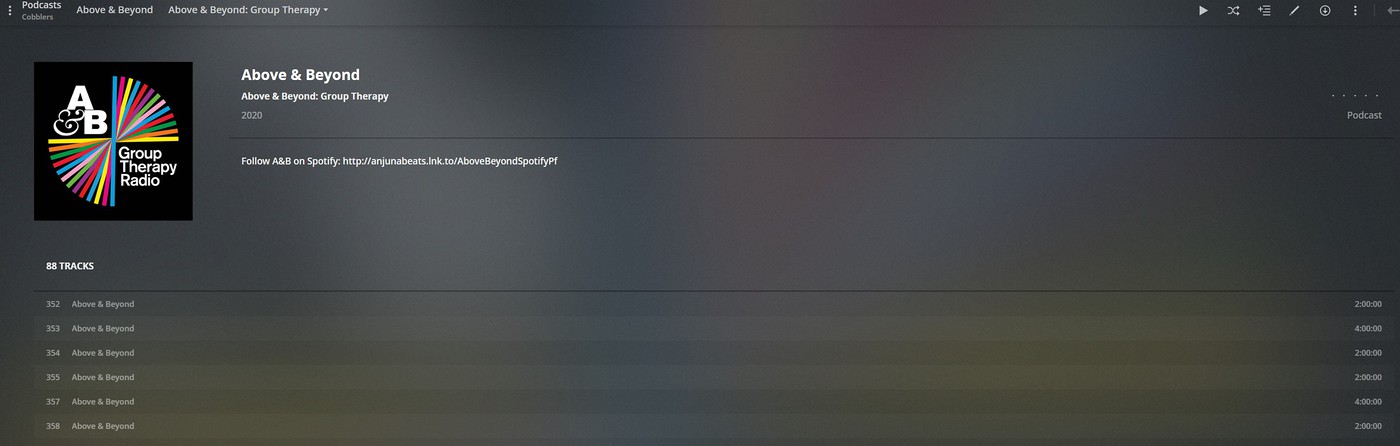

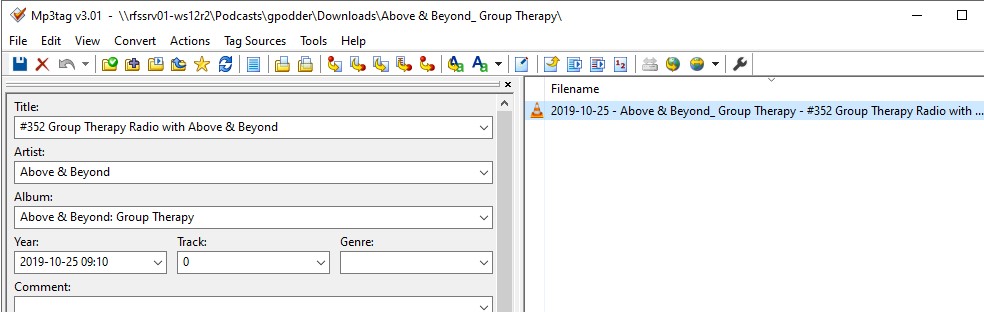
I have to manually refresh the metadata to cause Plex to re-read the mp3 tags;
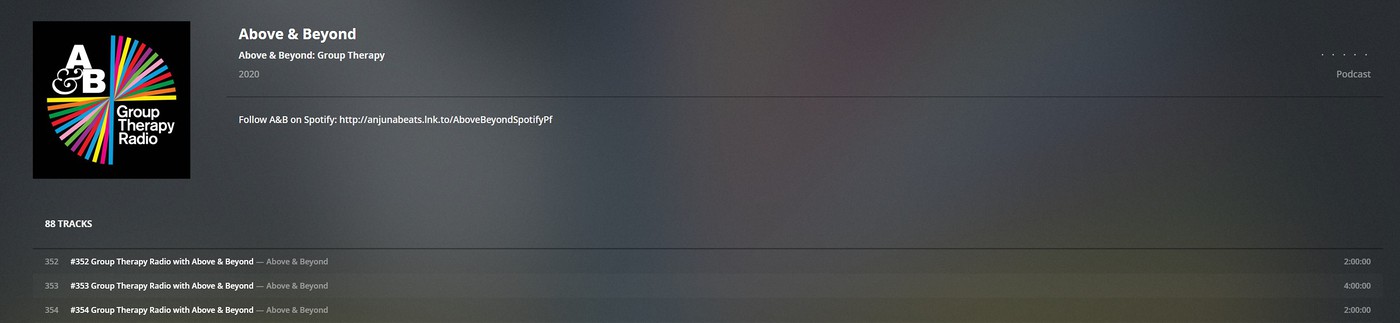
The other annoying issue with the Plex mp3 tag scraper, is that the Album Arist tags needs to be populated, not just the Artist, otherwise the Album is assigned to Various Artists.
When these file are initially imported the tags are read and recognised, only for them to disappear the next day in Plex, yet the mp3 tags are populated correctly.
I have to manually refresh the metadata to cause Plex to re-read the mp3 tags;
The other annoying issue with the Plex mp3 tag scraper, is that the Album Arist tags needs to be populated, not just the Artist, otherwise the Album is assigned to Various Artists.
hutchst said:
Thanks for the offer, and I agree it was a bit of a rant. But not aimed at anybody on here and I do apologise if anybody took it that way.
It can't be right that the same Plex scraper, whichever one it is, picks up the mp3 albums that I bought last year from Amazon, but not the ones I've bought this year.
I appreciate your offer, but I'm going to walk away from Plex. It really shouldn't be this difficult for an end user.
I think a lot of the stuff Plex does is unnecessarily clunky. And I suspect designed to get people to subscribe...not that this helps.It can't be right that the same Plex scraper, whichever one it is, picks up the mp3 albums that I bought last year from Amazon, but not the ones I've bought this year.
I appreciate your offer, but I'm going to walk away from Plex. It really shouldn't be this difficult for an end user.
It's big benefits over Kodi are the central library possibility, and also it's integration with Alex...though that latter bit is flaky IME too.
I definitely think your issues will be either DRM related, or something odd with naming or missing items it "needs" in metadata (as someone noted above).
couple of questions
what do you store your moves on? i.e NAS, Windows server e.t.c?
Is it a windows machine you are downloading to and then copying to the place you store them?
I ask as I had a similar issue with films copied from a windows machine to a NAS some time ago and Plex. Trying to recall how i fixed it
what do you store your moves on? i.e NAS, Windows server e.t.c?
Is it a windows machine you are downloading to and then copying to the place you store them?
I ask as I had a similar issue with films copied from a windows machine to a NAS some time ago and Plex. Trying to recall how i fixed it
Thanks for all your comments. Just to be clear I've always been really pleased with Plex's abilities as a video streamer set up for my movie and tv show collection. For that it's a fantastic piece of kit.
But for music it's dog poo. Its failure to scan files in the library really is completely random. I've spent many many many hours over the past few days, deleting and rescanning the library. Moving and renaming files and folders. Checking and comparing metadata. It isn't a DRM issue. Its just a crap music streaming software package.
I'll find a better one.
But for music it's dog poo. Its failure to scan files in the library really is completely random. I've spent many many many hours over the past few days, deleting and rescanning the library. Moving and renaming files and folders. Checking and comparing metadata. It isn't a DRM issue. Its just a crap music streaming software package.
I'll find a better one.
Have you looked in the logs?
Turn on verbose logging and debug logging. Try and scan some stuff. Then have a look at Plex Media Scanner.log; Plex Media Scanner Analysis.log; and Plex Media Scanner Deep Analysis.log.
Logs are stored in your Plex database folder.
Turn on verbose logging and debug logging. Try and scan some stuff. Then have a look at Plex Media Scanner.log; Plex Media Scanner Analysis.log; and Plex Media Scanner Deep Analysis.log.
Logs are stored in your Plex database folder.
Gassing Station | Computers, Gadgets & Stuff | Top of Page | What's New | My Stuff