
“Bricked” T5610 After Enabling Secure Boot - Ideas
Discussion


Firstly - I am a muppet! Let’s just get that out of the way.
One of my lockdown projects was making a new PC with a bit of punch behind it, (for not much money). I bought a Dell T5610 with an E5-2637, 32GB RAM and a 3 port graphics card. The idea was to add a second processor and to boot from a NVMe drive with a second one in the box to swap data to/from.
So I receive the machine and my new NVMe drive and PCIe card. Install the drive and am hoping to clone the original SATA disk. I do this, change the drive to GPT from MBR, restart, set BIOS to UEFI and nothing. The machine can’t find it. I keep tweaking things in the BIOS and decide it would be a good idea to set it to Secure Boot! Doh!
Clearly my graphics card is not UEFI compatible and the machine just turns on and nothing comes to screen. It then sits with POST lights 1,2&3 lit. I cannot get into the BIOS to turn Secure Boot off, I have reset the BIOS with the 2 main options on the internet i.e.:
1. Move password jumper to the Reset jumper, plug in power, wait 10 seconds, unplug, swap jumper back and restart
2. Remove power, hold power button for 15 secs, remove CMOS battery, hold power for 30 seconds, reseat battery, plug back in and restart
Neither helps me and many seem to have similar issues. If there was onboard graphics it seems like it may be possible to use that and get video to change BIOS settings but not on this machine.
Any ideas to help me?
One of my lockdown projects was making a new PC with a bit of punch behind it, (for not much money). I bought a Dell T5610 with an E5-2637, 32GB RAM and a 3 port graphics card. The idea was to add a second processor and to boot from a NVMe drive with a second one in the box to swap data to/from.
So I receive the machine and my new NVMe drive and PCIe card. Install the drive and am hoping to clone the original SATA disk. I do this, change the drive to GPT from MBR, restart, set BIOS to UEFI and nothing. The machine can’t find it. I keep tweaking things in the BIOS and decide it would be a good idea to set it to Secure Boot! Doh!
Clearly my graphics card is not UEFI compatible and the machine just turns on and nothing comes to screen. It then sits with POST lights 1,2&3 lit. I cannot get into the BIOS to turn Secure Boot off, I have reset the BIOS with the 2 main options on the internet i.e.:
1. Move password jumper to the Reset jumper, plug in power, wait 10 seconds, unplug, swap jumper back and restart
2. Remove power, hold power button for 15 secs, remove CMOS battery, hold power for 30 seconds, reseat battery, plug back in and restart
Neither helps me and many seem to have similar issues. If there was onboard graphics it seems like it may be possible to use that and get video to change BIOS settings but not on this machine.
Any ideas to help me?
It should have a bios reset jumper in addition the the password clear:
https://www.dell.com/support/article/en-uk/sln2849...
Does it have another pcie slot you can try the graphics card in?
https://www.dell.com/support/article/en-uk/sln2849...
Does it have another pcie slot you can try the graphics card in?
Thanks for taking time to reply. The rtcrst jumper is the one I am using. I take the jumper from the password reset and use it to short the bios reset one. No dice though.
The machine does have another PCIe x16 slot and I have moved the card to that but no help. Wondering if I can find a newer graphics card that can support secure boot and see if it will display and let me into the bios to change.?!?
The machine does have another PCIe x16 slot and I have moved the card to that but no help. Wondering if I can find a newer graphics card that can support secure boot and see if it will display and let me into the bios to change.?!?
Although I can't help with the answer I think the whole purpose of secure boot is to stop people being able to take a computer and use it outside of its set environment. Otherwise, someone could steal a work laptop, open it up and reset everything, then sell it on with a non authorised version of Windows etc.
I would have thought Dell would be able to help though - there must be some kind of process if things are set by mistake or passwords are forgotten.
I would have thought Dell would be able to help though - there must be some kind of process if things are set by mistake or passwords are forgotten.
Edited by Camelot1971 on Monday 1st June 13:18
Camelot1971 said:
Although I can't help with the answer I think the whole purpose of secure boot is to stop people being able to take a computer and use it outside of its set environment. Otherwise, someone could steal a work laptop, open it up and reset everything, then sell it on with a non authorised version of Windows etc. 8[/footnote]
no - more a case of preventing interference with the boot process by malware or other "unsigned" code - code that runs has to have the appropriate digital signature, hence it can be a pain with some Linux distros, but you can trivially reinstall Windows for example with it enabled.CMOS resets can be temperamental. Try doing 1 and 2 at the same time and leave it unplugged and without the battery for a couple of hours. Press the power button again before you plug it all in again to make sure it is fully discharged. It might even help to disconnect the power supply from the motherboard.
Thanks all will give some of the thoughts a go today i.e. do a few resets before turning on and leave it all again.
I have ordered a new box today which comes with the 2 processors I wanted to that's a £100 saving over the new CPU and fan I was going to buy. Also shelving the NVMe boot for the moment and this new box comes with a 256GB SSD so overall £150 of kit I would have needed and perhaps I can flog the 8GB of RAM the new one has, the old graphics, card, (new one is better), and a "bricked" bare bones box!
If I get things going I'll let you all know what worked but either way should be running again by the end of the week. New graphics card has 4 ports so I might also need to persuade my wife that the 3 x 24" monitors I bought to go with all of this need a new friend
I have ordered a new box today which comes with the 2 processors I wanted to that's a £100 saving over the new CPU and fan I was going to buy. Also shelving the NVMe boot for the moment and this new box comes with a 256GB SSD so overall £150 of kit I would have needed and perhaps I can flog the 8GB of RAM the new one has, the old graphics, card, (new one is better), and a "bricked" bare bones box!
If I get things going I'll let you all know what worked but either way should be running again by the end of the week. New graphics card has 4 ports so I might also need to persuade my wife that the 3 x 24" monitors I bought to go with all of this need a new friend
xeny said:
Camelot1971 said:
Although I can't help with the answer I think the whole purpose of secure boot is to stop people being able to take a computer and use it outside of its set environment. Otherwise, someone could steal a work laptop, open it up and reset everything, then sell it on with a non authorised version of Windows etc. 8[/footnote]
no - more a case of preventing interference with the boot process by malware or other "unsigned" code - code that runs has to have the appropriate digital signature, hence it can be a pain with some Linux distros, but you can trivially reinstall Windows for example with it enabled.My work laptop has bitlocker on it, but is there anything to stop a scrote who nicks it just wiping the hard drive and selling it on? I assumed there was some combination of hardware and software that "bricked" the laptop if anyone tampered with it, but I could (most likely!) be wrong.
Update!
New T5610 with 2 x E5-2637 V2, 8GB, 256GB SSD, 1TB SATA, NVS510 turned up yesterday. Yay!
Setup, put in the 32GB from the old machine, NVMe drive and got going. All great. Never noticed before on other machines but RAM shows at 16GB I.e. per processor. Have 16GB of the same DDR3 1866 so decide to install this morning. Do so and shows 24GB, (seems reasonable per processor).
Restart for something, can’t remember what, and BAM!!!! Orange flashing power light with 1 and 3 solid orange. Indicates PSU issue or “pinched cable” shorting out. Lots of trying, pull motherboard out - no cables pinched. Lots of reasearch...
...decide to try some things suggested and eventually pull power on CPU2. Fans start and initially OK but again failure. Pull heat sink, processor AND power to CPU - things get better I.e. completes POST. Won’t boot but after fiddling in BIOS, (which I reset during earlier fiddling but can at least get into now on this machine), I get no boot errors. Re-install Windows and the boot drive original Windows is stuffed. Get going and we’re running again but with one CPU.
I may be being totally ham fisted and I get that these are 5 year old machines but they seem pretty fragile. Still I have one running machine at a decent pace for less than an equivalent new machine but with 2 processors it would have been really good. Need to find a cheap motherboard but at present they are not that cheap.
WIll update if I get the original going or find more about my fried second CPU socket.
New T5610 with 2 x E5-2637 V2, 8GB, 256GB SSD, 1TB SATA, NVS510 turned up yesterday. Yay!
Setup, put in the 32GB from the old machine, NVMe drive and got going. All great. Never noticed before on other machines but RAM shows at 16GB I.e. per processor. Have 16GB of the same DDR3 1866 so decide to install this morning. Do so and shows 24GB, (seems reasonable per processor).
Restart for something, can’t remember what, and BAM!!!! Orange flashing power light with 1 and 3 solid orange. Indicates PSU issue or “pinched cable” shorting out. Lots of trying, pull motherboard out - no cables pinched. Lots of reasearch...
...decide to try some things suggested and eventually pull power on CPU2. Fans start and initially OK but again failure. Pull heat sink, processor AND power to CPU - things get better I.e. completes POST. Won’t boot but after fiddling in BIOS, (which I reset during earlier fiddling but can at least get into now on this machine), I get no boot errors. Re-install Windows and the boot drive original Windows is stuffed. Get going and we’re running again but with one CPU.
I may be being totally ham fisted and I get that these are 5 year old machines but they seem pretty fragile. Still I have one running machine at a decent pace for less than an equivalent new machine but with 2 processors it would have been really good. Need to find a cheap motherboard but at present they are not that cheap.
WIll update if I get the original going or find more about my fried second CPU socket.
Sounds like a nightmare! So frustrating when things go wrong. I don't believe you've managed to break two T5610's.
I did similar to you a few years ago. I've got a couple of its predecessors, a T5500 and a T7500 and they have been pretty solid, even with me fiddling and upgrading with AliExpress sourced used processors etc. I'm usually pretty careful to earth myself out regularly so maybe that helped.
Try resetting the CMOS on the first one again. Reset it tonight then leave it all disconnected overnight and try it in the morning.
I did similar to you a few years ago. I've got a couple of its predecessors, a T5500 and a T7500 and they have been pretty solid, even with me fiddling and upgrading with AliExpress sourced used processors etc. I'm usually pretty careful to earth myself out regularly so maybe that helped.
Try resetting the CMOS on the first one again. Reset it tonight then leave it all disconnected overnight and try it in the morning.
Soft Top said:
Update!
Setup, put in the 32GB from the old machine, NVMe drive and got going. All great. Never noticed before on other machines but RAM shows at 16GB I.e. per processor. Have 16GB of the same DDR3 1866 so decide to install this morning. Do so and shows 24GB, (seems reasonable per processor).
.
This makes me think there was something wrong at this point - If you've got 48GB split at 24 GB perprocessor, Windows or Linux will see all 48. I suspect the CPU in socket 2 was U/S at this point so you couldn't see its memory.Setup, put in the 32GB from the old machine, NVMe drive and got going. All great. Never noticed before on other machines but RAM shows at 16GB I.e. per processor. Have 16GB of the same DDR3 1866 so decide to install this morning. Do so and shows 24GB, (seems reasonable per processor).
.
Thanks for all the help. I haven’t reset BIOS again on the other machine but will try one last time. I am starting to think it must be something different but am far from the only one to have this issue.
I was slightly confused on the half memory Issue but have never put 2 processors into Windows 10, only ever server machines so wondered if it was an issue with that. It did confuse me so sounds like there was something wrong in the second CPU area originally. It did noT run much cpu %age processing and was only 45 degrees as opposed to 70 on CPU 1 but I’ve never delved that deep into the second cpu before. Does sound like it was largely idle.
I’ve got enough bits now that I must have the capabilities of getting my 2 x CPU machine with 48GB and booting from NVMe. I just need a solid motherboard, (I think). If I can resurrect machine 1 I may be good.
I did get Windows 10 install to the NVMe yesterday but if failed to load with a c:\windows\system32\winload.efi error so I was close. Didn’t fancy persevering when I had a machine that worked! Leave that for another day when things are stable.
Will keep updates going when I get any further. Thanks again everyone.
I was slightly confused on the half memory Issue but have never put 2 processors into Windows 10, only ever server machines so wondered if it was an issue with that. It did confuse me so sounds like there was something wrong in the second CPU area originally. It did noT run much cpu %age processing and was only 45 degrees as opposed to 70 on CPU 1 but I’ve never delved that deep into the second cpu before. Does sound like it was largely idle.
I’ve got enough bits now that I must have the capabilities of getting my 2 x CPU machine with 48GB and booting from NVMe. I just need a solid motherboard, (I think). If I can resurrect machine 1 I may be good.
I did get Windows 10 install to the NVMe yesterday but if failed to load with a c:\windows\system32\winload.efi error so I was close. Didn’t fancy persevering when I had a machine that worked! Leave that for another day when things are stable.
Will keep updates going when I get any further. Thanks again everyone.
So final update!
I guess overall I am just a complete cack handed tool! Bought a replacement motherboard for everything and managed to bend a pin on it within an hour during the clean up of the thermal paste I managed to get everywhere!
One more try and I now have a working machine and a lot of broken bits. Still in the process I have managed to sell a heap of the components that I didn't break and when the rest shift I'll barely be down on the overall project from where it should be! I do have 2 borked motherboards and one that works but as we have identified is probably knackered due to the 1 working CPU, (I should have sent it back but as per the last sentence I am getting my cash back by selling the bits on eBay).
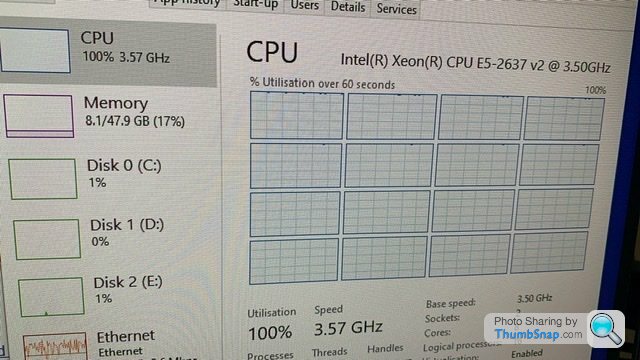
As of this morning I am a VERY happy boy. A lot of research and testing didn't quite indicate that I could make the whole thing work as I wanted but there was a strong likelihood. Thus another NVME was bought - Samsung 950Pro. This has a legacy ROM in it which MAY allow machines that don't have the relevant BIOS to use it. Guess what it works! Once I got it going it was obvious the machine was much snappier and benchmarks proved it.
So I have a 2 x Xeon E5-2637 V2, 48GB RAM, 512GB NVME and currently a Firepro W5000 GPU, (planning on GTX 1080). It's certainly not slow and if I had done it right overall the cost would have been £450. Thats got to be fair by anyone's calculations.
Thanks all for help and suggestions. If anyone wants 1, 2 or 3 likely completely knackered T5610 motherboards then let me know!
I guess overall I am just a complete cack handed tool! Bought a replacement motherboard for everything and managed to bend a pin on it within an hour during the clean up of the thermal paste I managed to get everywhere!
One more try and I now have a working machine and a lot of broken bits. Still in the process I have managed to sell a heap of the components that I didn't break and when the rest shift I'll barely be down on the overall project from where it should be! I do have 2 borked motherboards and one that works but as we have identified is probably knackered due to the 1 working CPU, (I should have sent it back but as per the last sentence I am getting my cash back by selling the bits on eBay).
As of this morning I am a VERY happy boy. A lot of research and testing didn't quite indicate that I could make the whole thing work as I wanted but there was a strong likelihood. Thus another NVME was bought - Samsung 950Pro. This has a legacy ROM in it which MAY allow machines that don't have the relevant BIOS to use it. Guess what it works! Once I got it going it was obvious the machine was much snappier and benchmarks proved it.
So I have a 2 x Xeon E5-2637 V2, 48GB RAM, 512GB NVME and currently a Firepro W5000 GPU, (planning on GTX 1080). It's certainly not slow and if I had done it right overall the cost would have been £450. Thats got to be fair by anyone's calculations.
Thanks all for help and suggestions. If anyone wants 1, 2 or 3 likely completely knackered T5610 motherboards then let me know!
Gassing Station | Computers, Gadgets & Stuff | Top of Page | What's New | My Stuff