
Which Mac? used Pro or iMac?
Discussion


Have an ageing iMac (2009, 24 inch) that, whilst works well (SSD and 8GB RAM) does not support latest O/S and that's becoming an annoyance as doesn't run latest office 365, GarageBand etc.
Given it's done sterling service for 11 years, time soon(ish) to replace.
Other than usual surfing, mail, office etc., videos (watching, i.e. Netflix, YouTub etc.) the main use is probably writing/recoding music - Garageband etc.
Want something that will do service for a good many years so something that will still get O/S updates for another 5 years or more ideally.
I am aware of new iMac coming later this year so may wait to see what that brings (and affects used prices).
But essentially, looking at 27inch iMac but also thinking of Mac Mini, or more ideally MacPro (trash can one) but not sure how the Xeon processors compare to the i5/i7s etc. of the iMac/Mini? Are they way better etc?
I would then need to budget for decent monitor or maybe twin ones given not built in like iMac.
Was going to budget approx £1300/1500 (I have keyboard/mouse so no need for those) but need to consider monitors too - separate budget though.
I have a retina 12inch MacBook which is fine for when out and about the house etc. and the iMac replacement would sit in my office all the time so does not need to be portable.
Any thoughts, recommendations etc.? Is MacPro way better than iMac for example?
Given it's done sterling service for 11 years, time soon(ish) to replace.
Other than usual surfing, mail, office etc., videos (watching, i.e. Netflix, YouTub etc.) the main use is probably writing/recoding music - Garageband etc.
Want something that will do service for a good many years so something that will still get O/S updates for another 5 years or more ideally.
I am aware of new iMac coming later this year so may wait to see what that brings (and affects used prices).
But essentially, looking at 27inch iMac but also thinking of Mac Mini, or more ideally MacPro (trash can one) but not sure how the Xeon processors compare to the i5/i7s etc. of the iMac/Mini? Are they way better etc?
I would then need to budget for decent monitor or maybe twin ones given not built in like iMac.
Was going to budget approx £1300/1500 (I have keyboard/mouse so no need for those) but need to consider monitors too - separate budget though.
I have a retina 12inch MacBook which is fine for when out and about the house etc. and the iMac replacement would sit in my office all the time so does not need to be portable.
Any thoughts, recommendations etc.? Is MacPro way better than iMac for example?
So, the Xeon is more about multiple processors rather than outright individual performance?
So, for my purposes, a newer iMac would be faster etc.?
Is the same said for the Mini? Or will that be worse than iMac? Can I get a nearly new Mini and upgrade (RAM if not already 16/32 GB)? Does it support multiple monitors?
So, for my purposes, a newer iMac would be faster etc.?
Is the same said for the Mini? Or will that be worse than iMac? Can I get a nearly new Mini and upgrade (RAM if not already 16/32 GB)? Does it support multiple monitors?
The latest (2018-2020) MacMinis have soldered-in RAM, so it's not really possible to upgrade it after purchase, and Apple prices for RAM are £200 per 8GB stick. You're also limited to the Intel integrated GPU...unless you run an eGPU for extra GPU oomph. You can run multiple monitors though...and if you want you can buy one with a faster processor but smaller internal SSD and then extend the internal storage by using an SSD for fast access to larger files.
Whichever way you go, I'd recommend looking for something from the Apple Refurb store as you'll save 10-15% on the new price, and it's basically a new machine with a full Apple warranty.
There's currently a 16GB/512GB MacMini on there for £989...but it's only the quad-core i3 model.
Whichever way you go, I'd recommend looking for something from the Apple Refurb store as you'll save 10-15% on the new price, and it's basically a new machine with a full Apple warranty.
There's currently a 16GB/512GB MacMini on there for £989...but it's only the quad-core i3 model.
Best wait for faster chip, but otherwise that MacMini seems good...
I've often bought Apple stuff from refurb store so aware of that I will see if any other online retailers selling higher spec refurb units. Which retailers to trust though??......
Sounds like I get more for my money with a MacMini than an iMac though?
Now to look into best monitor solutions, like the idea of 2....
I've often bought Apple stuff from refurb store so aware of that
I will see if any other online retailers selling higher spec refurb units. Which retailers to trust though??......Sounds like I get more for my money with a MacMini than an iMac though?
Now to look into best monitor solutions, like the idea of 2....
Dracoro said:
Best wait for faster chip, but otherwise that MacMini seems good...
I've often bought Apple stuff from refurb store so aware of that I will see if any other online retailers selling higher spec refurb units. Which retailers to trust though??......
Sounds like I get more for my money with a MacMini than an iMac though?
Now to look into best monitor solutions, like the idea of 2....
The entry level of the iMacs all come with Fusion drives...so you can easily add another £200 onto their base prices if that's not your preference. Don't know what the supposed refresh will do to them though.I've often bought Apple stuff from refurb store so aware of that
I will see if any other online retailers selling higher spec refurb units. Which retailers to trust though??......Sounds like I get more for my money with a MacMini than an iMac though?
Now to look into best monitor solutions, like the idea of 2....
The difference in cost between that MacMini and the entry-level 27" iMac (£2249 if you spec the memory and SSD to the same as the Mini) is primarily the extra costs of the 5k monitor, discrete/faster GPU (Radon Pro 570x) and 6-core i5 processor.
If you're going to a multiple monitor set-up, then a Mini may be a better option as you can then make sure both monitors are identical - which is not easy to do with an iMac.
I think the Mini is the best way to go, it also has some portability in case I ever need it (it's tiny so just unplug and go!)
New, about £1300 from Apple - although I can get for £1220, so a bit off..
3.0GHz 6-core 8th-generation Intel Core i5 processor with Turbo Boost up to 4.1GHz
Turbo Boost up to 4.1GHz
16GB 2666MHz DDR4 memory
Intel UHD Graphics 630
512GB PCIe-based SSD storage¹
Which should be all I ever need, but I will see if I can get cheaper or see if appears on refurb store..... (nothing there currently)
The main thing I need to sort is a monitor (or two).
Any recommendations?
New, about £1300 from Apple - although I can get for £1220, so a bit off..
3.0GHz 6-core 8th-generation Intel Core i5 processor with Turbo Boost up to 4.1GHz
Turbo Boost up to 4.1GHz
16GB 2666MHz DDR4 memory
Intel UHD Graphics 630
512GB PCIe-based SSD storage¹
Which should be all I ever need, but I will see if I can get cheaper or see if appears on refurb store..... (nothing there currently)
The main thing I need to sort is a monitor (or two).
Any recommendations?
Edited by Dracoro on Tuesday 2nd June 11:22
Hi, I have had many iMac and Mac minis in the past. I have given up on the Mac mini as they don't seem to have the power to multitask. I purchased an iMac last year and was disappointed how slow it was when using the internal hard drive. As the iMac are harder to pimp these days I opted for an external SSD Thunderbolt drive. Which is where I installed the operating system. So much faster!! Just irritating that apple charge over the odds for SSD's
mmm-five said:
The latest (2018-2020) MacMinis have soldered-in RAM, so it's not really possible to upgrade it after purchase, and Apple prices for RAM are £200 per 8GB stick.
The 2018 MacMinis use standard SO-DIMMS. The slots are buried deep within the MacMini so you have to disassemble it, but you can add 64GB of RAM for £270 from Crucial rather than £1000 from Apple, but it might be a warranty invalidated job. RAM; https://uk.crucial.com/compatible-upgrade-for/appl...
How to; https://www.ifixit.com/Guide/Mac+mini+Late+2018+Me...
Hi
The specs I have put above are SSD and at 512GB, am happy with capacity for my needs. I can always plug in external SSD in future if need be.
I can get a discount from Apple (only £80 but prob what a refurb would be).
May invest in speakers for my music (most I do with headphones or my guitar amp currently)
My main research is now monitor(s). I think one 27inch (4k or not???) would do the job and I can add a 2nd at a later point if need be.
There's so many monitors but USB-C and 4k prob what I want but need to see what would work well.
The specs I have put above are SSD and at 512GB, am happy with capacity for my needs. I can always plug in external SSD in future if need be.
I can get a discount from Apple (only £80 but prob what a refurb would be).
May invest in speakers for my music (most I do with headphones or my guitar amp currently)
My main research is now monitor(s). I think one 27inch (4k or not???) would do the job and I can add a 2nd at a later point if need be.
There's so many monitors but USB-C and 4k prob what I want but need to see what would work well.
weldingwizard said:
Hi, I have had many iMac and Mac minis in the past. I have given up on the Mac mini as they don't seem to have the power to multitask. I purchased an iMac last year and was disappointed how slow it was when using the internal hard drive. As the iMac are harder to pimp these days I opted for an external SSD Thunderbolt drive. Which is where I installed the operating system. So much faster!! Just irritating that apple charge over the odds for SSD's
The newer Mac Minis come with an PCIe SSD as standard (admittedly a 250GB one - and originally came with 128GB ones), but it is quite fast...over 2500MB/s...which is much faster than an internal HDD, and considerably faster than the earlier models with SATA SSD or Fusion drives.e.g. my 2017 iMac with 1TB SSD returns 630/600MB/s, whereas my 2019 iMac returns about 2200/2000MB/s read/write.
GoodDoc said:
The 2018 MacMinis use standard SO-DIMMS. The slots are buried deep within the MacMini so you have to disassemble it, but you can add 64GB of RAM for £270 from Crucial rather than £1000 from Apple, but it might be a warranty invalidated job.
RAM; https://uk.crucial.com/compatible-upgrade-for/appl...
How to; https://www.ifixit.com/Guide/Mac+mini+Late+2018+Me...
Sorry, got confused which was soldered...it's the SSD that's soldered to the logic board, not the RAM RAM; https://uk.crucial.com/compatible-upgrade-for/appl...
How to; https://www.ifixit.com/Guide/Mac+mini+Late+2018+Me...

But it's so easy (and cheaper) to add an external SSD that I don't know why you'd pay Apple prices for that either.
Dracoro said:
The specs I have put above are SSD and at 512GB, am happy with capacity for my needs. I can always plug in external SSD in future if need be.
I can get a discount from Apple (only £80 but prob what a refurb would be).
Refurb discount (if you can find the exact spec you're after) is usually 10-15% - but there's also the possibility of a further 3% cashback from the likes of Quidco.I can get a discount from Apple (only £80 but prob what a refurb would be).
Dracoro said:
May invest in speakers for my music (most I do with headphones or my guitar amp currently)
I've had a set of Edirol MA-10D active micro-monitors (about 9" high) attached to my desktop Mac (was a Mac Pro, but now an iMac) for about 10 years. Used to be connected via optical/toslink, but now just by a normal stereo 3.5mm lead.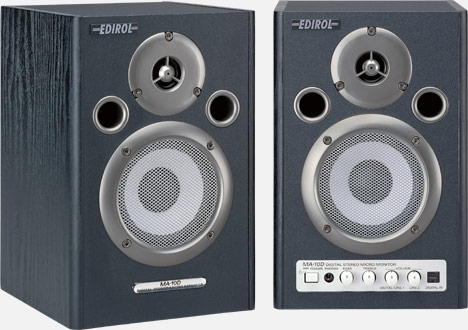
Dracoro said:
My main research is now monitor(s). I think one 27inch (4k or not???) would do the job and I can add a 2nd at a later point if need be
27" would be a comfortable size for a 4k monitor - and match a 5k iMac size-wise - plus should be a common enough size/res to add a 2nd one down the line.Depending what your requirements for the screen are, you can get perfectly usable, big brand ones for £225+, or £260+ for 'gaming' ones with higher refresh rates.
mmm-five said:
GoodDoc said:
The 2018 MacMinis use standard SO-DIMMS. The slots are buried deep within the MacMini so you have to disassemble it, but you can add 64GB of RAM for £270 from Crucial rather than £1000 from Apple, but it might be a warranty invalidated job.
RAM; https://uk.crucial.com/compatible-upgrade-for/appl...
How to; https://www.ifixit.com/Guide/Mac+mini+Late+2018+Me...
Sorry, got confused which was soldered...it's the SSD that's soldered to the logic board, not the RAM RAM; https://uk.crucial.com/compatible-upgrade-for/appl...
How to; https://www.ifixit.com/Guide/Mac+mini+Late+2018+Me...
But it's so easy (and cheaper) to add an external SSD that I don't know why you'd pay Apple prices for that either.
I fear my 2011 iMac may be a high water mark in terms of upgradability/repairability. The front glass is held on by magnets, the screen is secured using actual screws. The SSD and HDD use SATA connectors and standard 2.5"/3.5" bays (although when the HDD failed I had to buy a special SATA cable with a temperature sensor to stop the fans spinning at full speed as the OEM HDD used custom firmware to pass temp data to the motherboard), and I was even able to remove and reflow the GPU (in my oven) when it failed.
That's why I kept my 2008 octo-core Mac Pro for so long (and it's still in the family).
With hindsight I should have bought one of the last-of-the-line 5,1 MacPros before they disappeared, as I would still be using that now with my 30" Cinema Display (again with another family member).
Bur it was 2012 and I was all excited about the announcement for a New MacPro in 2013, then really disappointed when it arrived, so went down the path of 27" iMac for home, and a 21.5" one for travelling. They're both used for multiple clients, and run both MacOS and Windows depending on what the client needs.
The only thing the 2008 MacPro lacked was a way to increase memory/BUS speeds to take advantage of faster PCIe cards/peripherals, and I could only have one 'semi-fast' one in there and one decent GPU, otherwise the PSU would trip (solved with an external PSU powering the GPU directly)...but still never got the full throughput the card could deliver due to the architecture of the Mac.
With hindsight I should have bought one of the last-of-the-line 5,1 MacPros before they disappeared, as I would still be using that now with my 30" Cinema Display (again with another family member).
Bur it was 2012 and I was all excited about the announcement for a New MacPro in 2013, then really disappointed when it arrived, so went down the path of 27" iMac for home, and a 21.5" one for travelling. They're both used for multiple clients, and run both MacOS and Windows depending on what the client needs.
The only thing the 2008 MacPro lacked was a way to increase memory/BUS speeds to take advantage of faster PCIe cards/peripherals, and I could only have one 'semi-fast' one in there and one decent GPU, otherwise the PSU would trip (solved with an external PSU powering the GPU directly)...but still never got the full throughput the card could deliver due to the architecture of the Mac.
Dracoro said:
Thanks all. I may put a new thread re monitors as really a separate discussion...
Will prob go for the Mini with the spec I posted earlier...
I've used this monitor with my MacBook and it's excellent - Will prob go for the Mini with the spec I posted earlier...
https://www.amazon.co.uk/LG-27UL850-DisplayHDR-Dis...

mmm-five said:
There's currently a 16GB/512GB MacMini on there for £989...but it's only the quad-core i3 model.
I see this is back. Like the idea of a saving more (£1225 for i5).When (or will) I notice the need for the 6-core i5 over the i3? Is it worth the extra £235?
Main use is GarageBand (maybe Logic in future), other than that just Photos app and office/Netflix etc.
Gassing Station | Computers, Gadgets & Stuff | Top of Page | What's New | My Stuff