
Network me up! (Please.)
Discussion


We currently use power line to get WiFi around the house and it's a bit crap. We're now getting fttp so I'm finally getting off my arse to sort it out.
I've ordered a pair of AVM mesh repeaters as our router is AVM and it seems simplest. We have a long house and thick stone walls so I think I need to wire them together.
They'll be sited in three adjacent rooms. Room 1 at one end will have the router and I have already got 2 lengths of cat5 (or possibly 6) under the floor from that end of room 2 into room 3 with slack at both ends.
What do I need to link them all together?
I've ordered a pair of AVM mesh repeaters as our router is AVM and it seems simplest. We have a long house and thick stone walls so I think I need to wire them together.
They'll be sited in three adjacent rooms. Room 1 at one end will have the router and I have already got 2 lengths of cat5 (or possibly 6) under the floor from that end of room 2 into room 3 with slack at both ends.
What do I need to link them all together?
Troubleatmill said:
Erm... maybe it is just me...but.
Plug the cat 5 cables into the router?
or
Plug the cat 5 cables into a switch - Plug the switch into the router?
The other end of the cat 5 cables - whatever switch/ wireless thingamebob you have.
Sorry, I didn't mention I'm a numpty. I'm vaguely aware of switches but no idea how to connect them or what I need to get one to work.Plug the cat 5 cables into the router?
or
Plug the cat 5 cables into a switch - Plug the switch into the router?
The other end of the cat 5 cables - whatever switch/ wireless thingamebob you have.
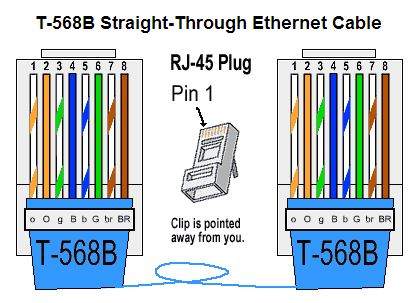
Similarly, what is the best way to terminate the cables I have? I guess a socket?
eltawater said:
If they're Mesh wireless then you don't plug any cables into them at all, they communicate wirelessly with each other.
Only if you choose to do it that way. Wireless backhaul is still the bestway.Terminating cables it depends if they exit out of.a backbox stick a faceplate and rj45 socket there if not just stick a plug on the ends


Trustmeimadoctor said:
Depending on the ap's and how many ethernet ports they have daisychain router to ap1 to ap 2 or.run both from the router
Don't know if it depends on whose kit it is but TP-Link says to daisy-chain the Mesh units, do not connect more than one unit directly to the router.Trustmeimadoctor said:
Brilliant, thanks.I'll have a read of the instructions for linking them...
Our house has 2ft thick stone walls is fitted and FTTP into the BT router in the middle. CAT5 ducted to the office at one end into an 8 port switch so all the office requirements 'can be' hardwired. Cisco access point also mounted on the wall in the office and hardwired which gives WiFi access around the whole garden out to 100m.
The only WiFi 'dead spot' is the 'man loo' at one end of the house in an extension the wrong side of the 2ft external wall. Limits social media surfing while 'busy'.
Power line briadband connections are the bain of the Devil and should be crushed IMHO
The only WiFi 'dead spot' is the 'man loo' at one end of the house in an extension the wrong side of the 2ft external wall. Limits social media surfing while 'busy'.
Power line briadband connections are the bain of the Devil and should be crushed IMHO
Trustmeimadoctor said:
I have the kit above above and it works spot on for occassional DIY network tasks. Bought mine on eebaay for around £6.Edited by Marlin45 on Thursday 4th June 10:28
Bill said:
It's a Fritzbox 7530, and I've ordered 2 Fritz Repeater 3000s.
Rather than the repeaters you can buy cheaper FritzBox’s on eBay and mesh network them. I have a 7590 as the main router and then three 7530’s to cover the rest of the house (which sounds a lot, but the house is big and with very very thick walls). I’m impressed with the mesh, and each device (iPhones etc) will swap access points with no drop in the connection.Gassing Station | Computers, Gadgets & Stuff | Top of Page | What's New | My Stuff