
IMAC will not boot - Help
Discussion


PLEASE HELP :-)
My daughters Apple Imac stopped booting up since she did the last OS upgrade, its a nightmare with homeschooling.
I have tried booting from the internet (select WIFI etc) but it gets to about 90% of the progress bar (below the apple logo) and then stops. We have left it at this stage for over 3 days, but still no joy.
If I boot in verbose mode, it stops at the below, any ideas ??
(There are no devices plugged in other than a USB keyboard and wireless mouse)
Thanks.

My daughters Apple Imac stopped booting up since she did the last OS upgrade, its a nightmare with homeschooling.
I have tried booting from the internet (select WIFI etc) but it gets to about 90% of the progress bar (below the apple logo) and then stops. We have left it at this stage for over 3 days, but still no joy.
If I boot in verbose mode, it stops at the below, any ideas ??
(There are no devices plugged in other than a USB keyboard and wireless mouse)
Thanks.
Have you got any old install discs that you can use to boot from? Or failing that, can you make your self a bootable USB stick using a previous version? Or perhaps a Time Machine backup you can revert to from the initial boot-up options?
You may need access to a second Mac to make a bootable installer:
https://www.macworld.co.uk/how-to/mac-software/boo...
Good luck!
You may need access to a second Mac to make a bootable installer:
https://www.macworld.co.uk/how-to/mac-software/boo...
Good luck!
Wilmslowboy said:
If I boot in verbose mode, it stops at the below, any ideas ??
(There are no devices plugged in other than a USB keyboard and wireless mouse)
the not quit last set of lines reference SDXC - you've presumably checked there isn't anything in any SD card slot?(There are no devices plugged in other than a USB keyboard and wireless mouse)
The last lines are talking about USB human interface devices - keyboard and mice - do you have another set you can try?
There's the clutching at straws option of an SMC reset: https://support.apple.com/en-gb/HT201295
"Error getting cib 27 bitmap" tells me your boot volume is corrupted. It's very likely recoverable, but you probably need to boot using an installer and use disk utility to repair the file system. If you have an OS DVD or bootable USB key you should be able to do that. If you don't I'm sure an Apple store will help you out with one. I'd offer to post you one but that would take much longer than getting hold of one yourself. You can burn the bootable OS image onto a DVD or a USB key using any computer - it doesn't have to be a Mac. Then use that to boot and use disk utility to repair the hard disk volume.
You might also find an answer here:
https://iboysoft.com/mac-data-recovery/mac-compute...
You might also find an answer here:
https://iboysoft.com/mac-data-recovery/mac-compute...
Edited by LunarOne on Sunday 28th June 16:22
LunarOne said:
"Error getting cib 27 bitmap" tells me your boot volume is corrupted. It's very likely recoverable, but you probably need to boot using an installer and use disk utility to repair the file system. If you have an OS DVD or bootable USB key you should be able to do that. If you don't I'm sure an Apple store will help you out with one. I'd offer to post you one but that would take much longer than getting hold of one yourself. You can burn the bootable OS image onto a DVD or a USB key using any computer - it doesn't have to be a Mac. Then use that to boot and use disk utility to repair the hard disk volume.
You might also find an answer here:
https://iboysoft.com/mac-data-recovery/mac-compute...
Thanks , I have an external drive that I can create a boot drive from, and a few other MacBooks to use in the process.You might also find an answer here:
https://iboysoft.com/mac-data-recovery/mac-compute...
Edited by LunarOne on Sunday 28th June 16:22
For some reason I can't get the Imac into the disk utility (Cmd + R), it will go into internet recovery and verbose mode but not disk unity.
Wilmslowboy said:
Thanks , I have an external drive that I can create a boot drive from, and a few other MacBooks to use in the process.
For some reason I can't get the Imac into the disk utility (Cmd + R), it will go into internet recovery and verbose mode but not disk unity.
How old is the machine? Is it an SSD, HDD or Hybrid drive?For some reason I can't get the Imac into the disk utility (Cmd + R), it will go into internet recovery and verbose mode but not disk unity.
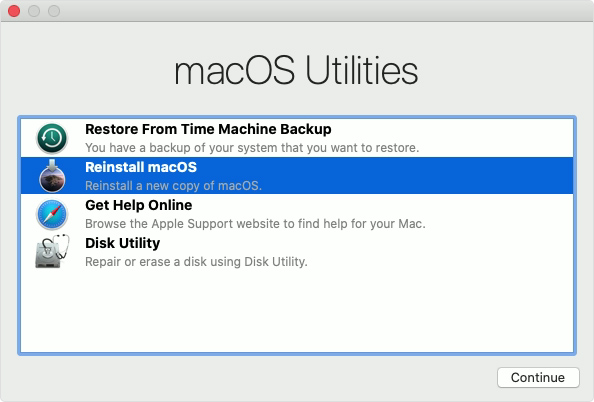
It could be that the drive has failed, and so the recovery partition can't mount either. Usually, if you can get it into Internet Recovery mode then you should be able to run Disk Utility from there.
If the HD really is goosed, then your only option is to try to start it up ion Target Disk Mode (hold 'T' during startup) and connect it to another Mac and you should be able to mount/fix the disk on your other machine (I'd get as much stuff off it before you start trying to fix it though - as you may do more harm than good).
Gassing Station | Computers, Gadgets & Stuff | Top of Page | What's New | My Stuff